repligen.com XC-LAB-UG-V4
7.8.9 Bioreactor configuration
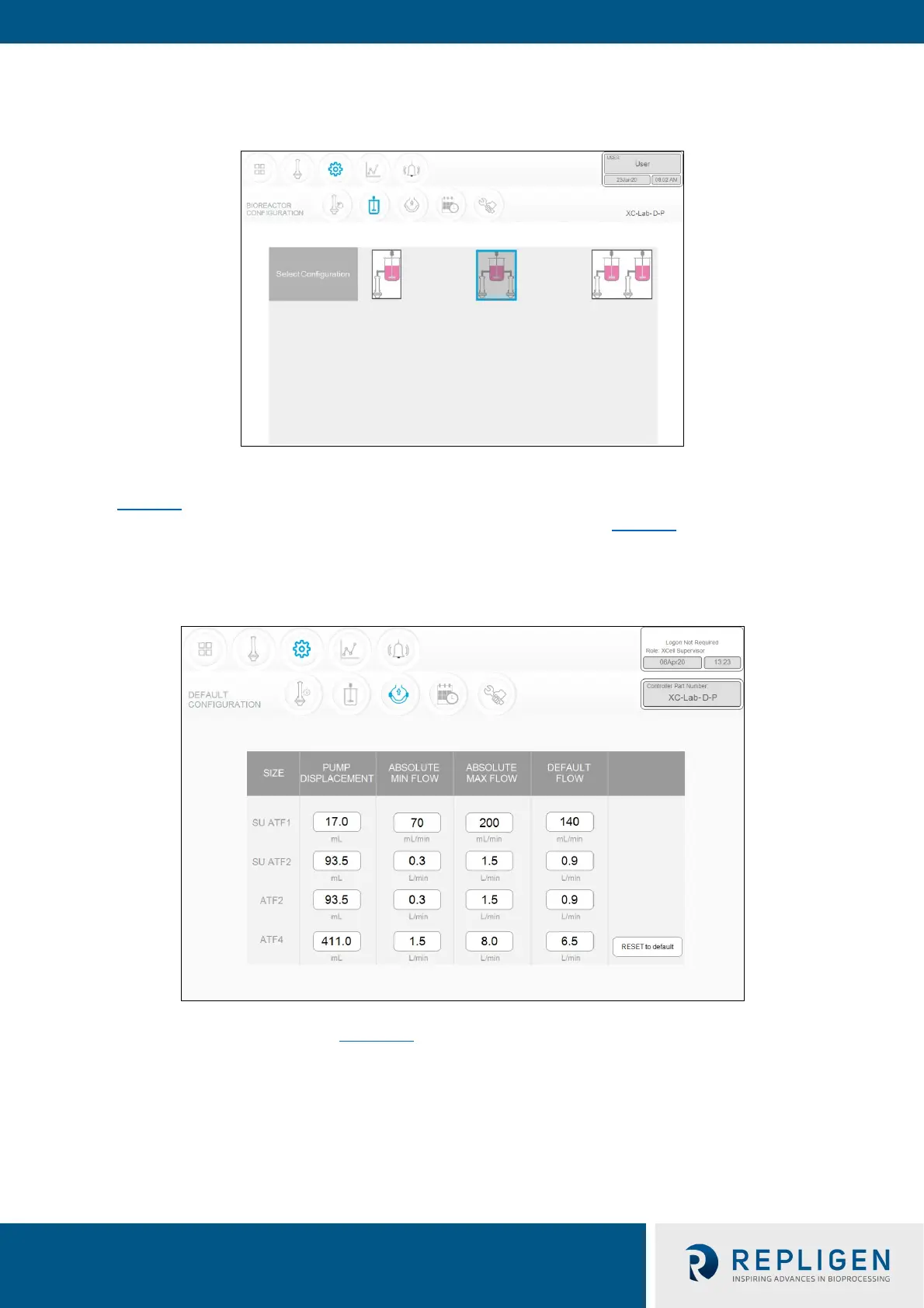
Figure 24. Bioreactor configuration example
For the S controller configuration, you will only be able to choose the first option with one device
(Figure 24
). With a D or D-P model model controller, enabled controller, you may choose the, all
three options are available; select the one that matches your lab setup (Figure 24).
7.8.10 Default configuration/ATF pump settings
Figure 25. ATF pump settings example
The Default Configuration menu (Figure 25)
displays the ATF pump settings, which includes:
expected pump displacement, minimum flow, maximum flow and default flow.
These settings can be changed by clicking the relevant box and entering in a new value. Default flow
represents the most frequently edited parameter and is typically set to the flow rate used in most of
your processes.
A Supervisor or Engineer may choose to restrict user input to a specific range of allowable flow set
points by providing minimum and maximum flow values. For example, any flow rate between 70
ml/min to 200 ml/min can be used when running an ATF1 device. However, depending on your



 To Next Page