repligen.com XC-LAB-UG-V4
14. Appendix D Editing and adding access and passwords
14.1 Windows accounts and passwords
Two Windows accounts are already set up on the Surface Pro. One of them is a Windows
Administrator who can create and edit users and passwords, for both Windows and XCell™ Lab
Software, and the other is a normal Windows User who can run the XCell™ Lab Software.
These two predefined windows account logons are User and 0Admin ([zero]Admin). By default,
Windows User will be logged in automatically, which then loads the XCell™ Lab Software (called the
Wonderware View software application within Windows System) with a default username of
Supervisor. A Supervisor has access to all areas of the XCell™ Lab Software. For many users, no
changes.
By having a single Windows User account, all files and folder structures will be the same for all users.
The Windows User account is a top-level group that contains all the XCell™ Lab Software users.
XCell™ Lab users of any kind are by default Windows Users.
Note: If you do not wish to modify any account usernames and passwords, nor change any Windows
administrator settings, you would never need to manually log in to Windows.
Login 0Admin (Operating System Admin) is required to modify existing XCell™ Lab Software
usernames or passwords or add new ones. It is recommended that a qualified IT or Repligen
engineer carries out these tasks. 0Admin does not have the same functionality within the XCell™ Lab
Software as Users.
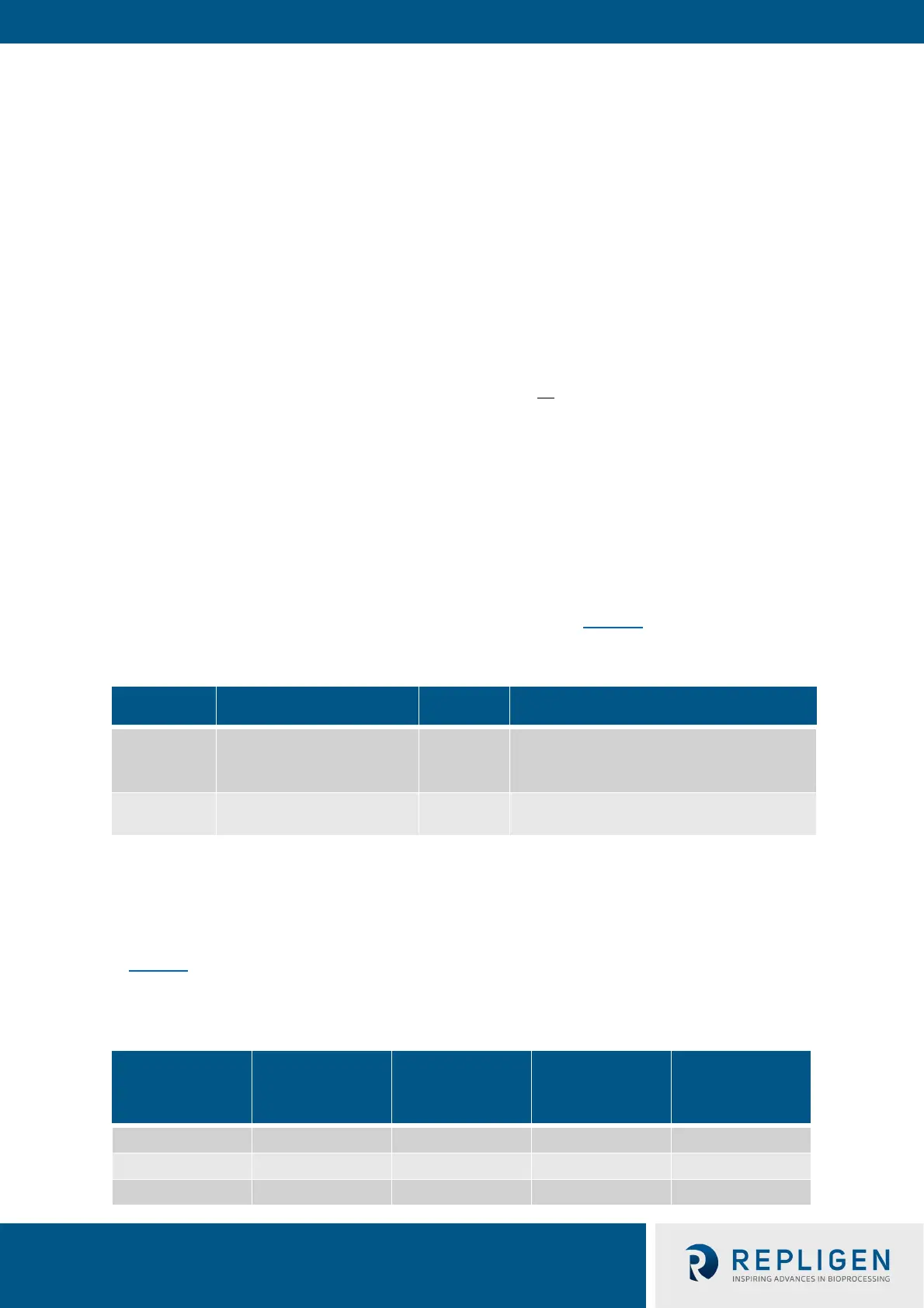
The two Windows accounts’ usernames and passwords are listed in Table 17
.
Table 17. Windows usernames and passwords
User type Username Password Used For
Windows 0Admin Admin123
Windows admin tasks and changing
XCell™ Lab Software usernames and
Windows
User
(logged in automatically)
User123
Using the XCell™ Lab Software
Note: It is not recommended to create new Windows Users – they would not be able to access the
XCell™ Lab software and the file structures would also be different.
14.2 XCell™ Lab Software usernames and passwords
In Table 18
the default usernames and passwords are shown along with their permission rights. The
default usernames are essentially a short version of the role they play.
Table 18. XCell™ Lab users and roles
User Group
Name
XCell™ Lab
Username
Change Network
Alarm and
System
Configuration
Start/Stop Flow
SP Ack Alarms
XCell_Engineers Eng
XCell_Supervisors Super
XCell_Users Opr



 To Next Page