Chapter 6
6-8 BiPAP® Focus™ Ventilator Service Manual © Respironics, Inc. REF 1029568 Rev A
Ventilator Communications
Downloading UI
Software to the
Ventilator
During this portion of the software installation the alarm enunciator will sound.
Hearing protection may be desired.
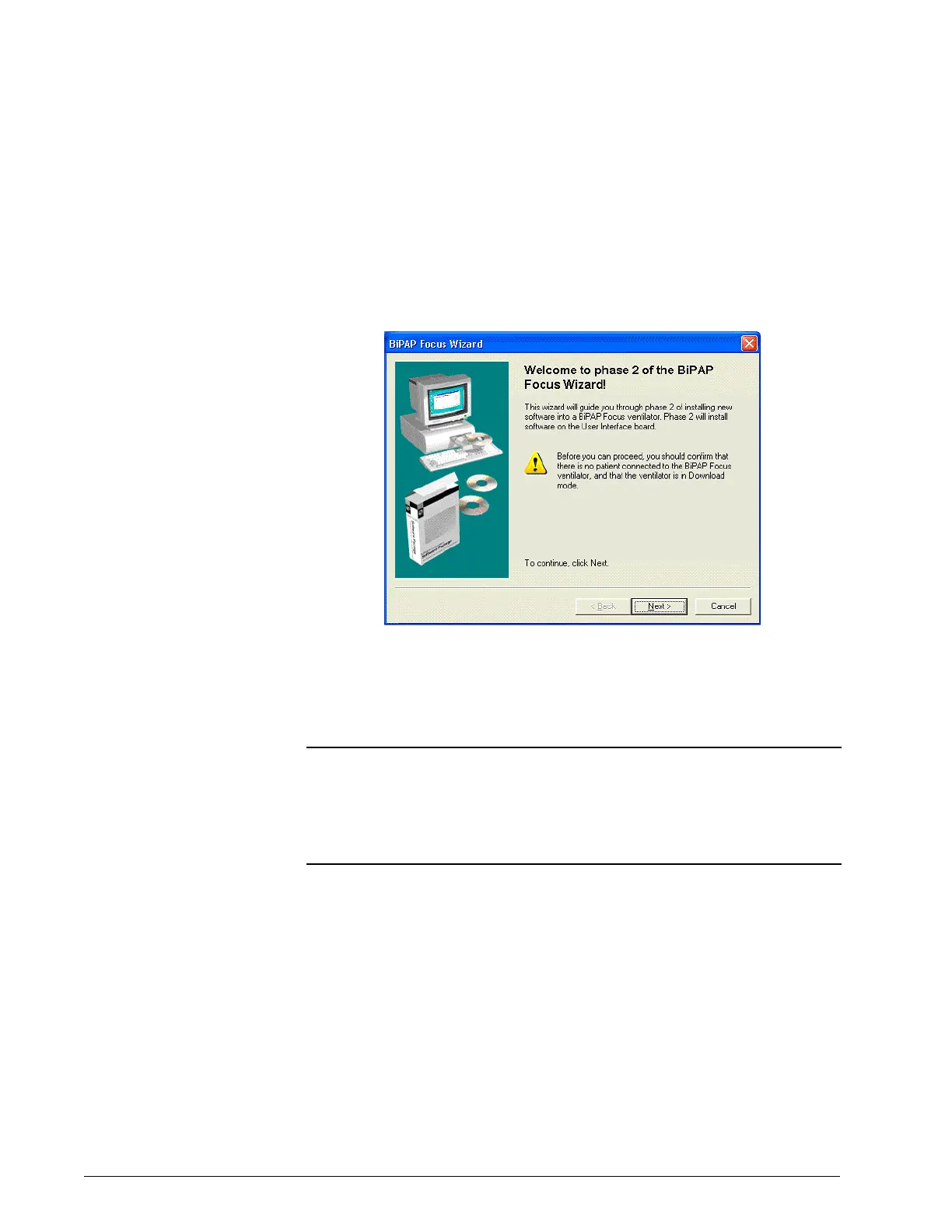
1. Follow the onscreen instructions to install the software: confirm that
no patient is connected to the ventilator and that the ventilator is in
download mode (Figure 6-10). Click Next.
Figure 6-10: Phase 2 welcome
2. Connect a universal serial bus (USB) cable between the service PC
and ventilator. If necessary choose the option to display more detailed
connection instructions (Figure 6-11). Click Next.
NOTE: Do not connect the USB cable through a hub or docking station. Using
an intermediate connection causes communication errors.
NOTE: The female end of the serial communications cable should be connected
to the service PC. The male end, labeled Software/Rasp, should be
connected to the ventilator.






 To Next Page