219
9
Downloading Images to Your Computer
When you shoot one still image with M-Cont Plus, Speed Cont, or
Multi-trgt AF, the image is recorded as one MP file.
By using the VM-1 MP file viewer, you can play back MP files on
your Macintosh computer and export still images.
This section explains how to install and uninstall the VM-1 software
included on the supplied CD-ROM. For details on how to play back
MP files on your computer or export still images from MP files using
the MP file viewer, see the “Software User Guide” available from the
supplied CD-ROM.
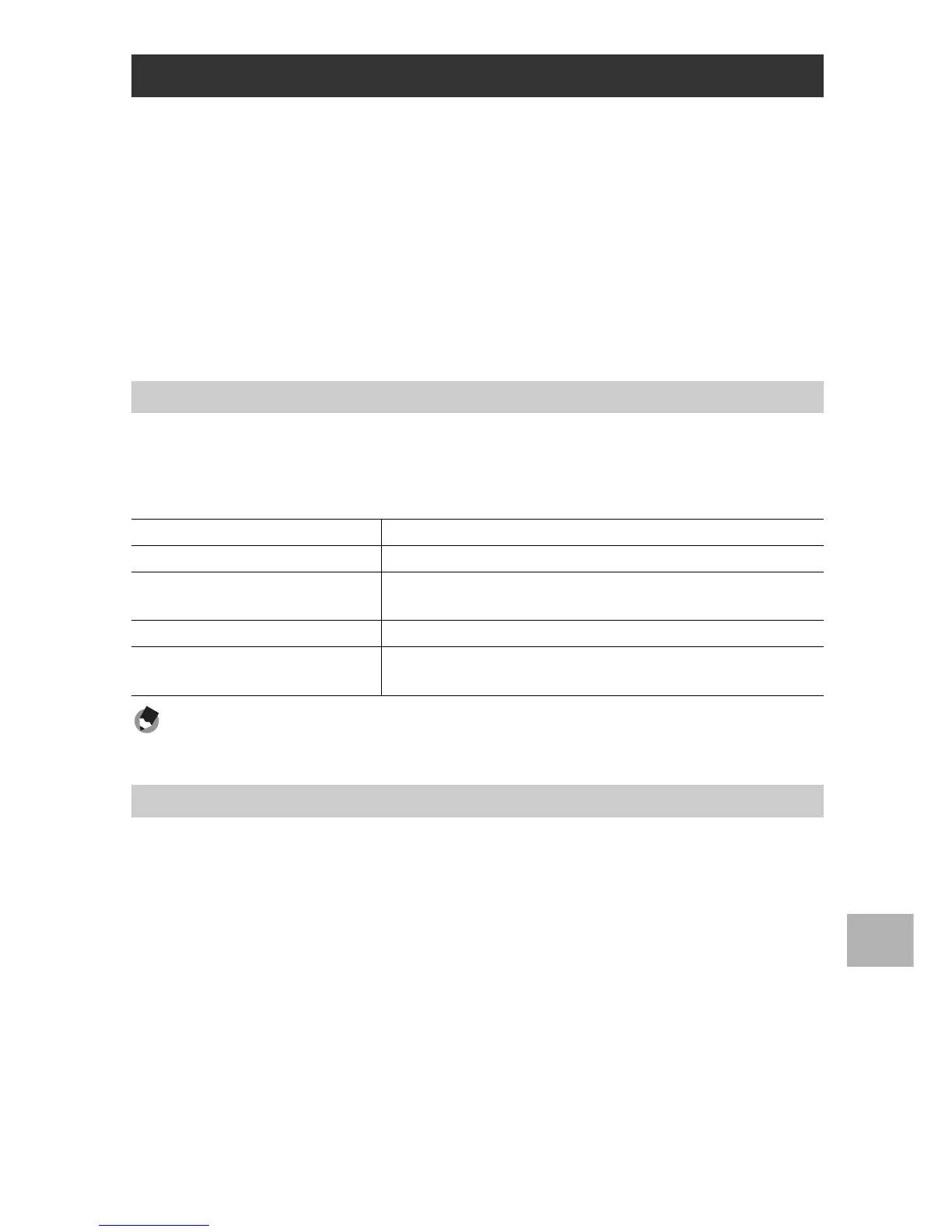
The following environments are necessary for using the supplied
CD-ROM.
Please check your computer, or the computer’s user manual.
Note ----------------------------------------------------------------------------------------------
VM-1 supports Japanese, English, French and Chinese (Simplified).
1
Start your Macintosh computer and insert the supplied
CD-ROM in the CD-ROM drive.
2
Double-click the [RICOH] icon.
3
Double-click the [VM-1] folder.
4
Double-click the [VM-1 Installer.pkg] icon.
• The [Install VM-1] window is displayed.
5
Click [Continue].
• The window for selecting the installation location appears.
Using the MP File Viewer
System Requirements for Using the Supplied CD-ROM
Operating Systems Supported Mac OS X 10.4 to 10.5.7
Macintosh computer Apple Inc. Macintosh Series
Internal Memory Mac OS X 10.4 256 MB or more
Mac OS X 10.5 512 MB or more
Hard Disk Available Memory 5 MB or more
CD-ROM Drive A CD-ROM drive compatible with the above-mentioned
Macintosh computer
Installing VM-1



 To Next Page