5.3 Software settings
After scanning is complete, the system is updated with all the functions necessary to
control the climate and irrigation equipment in your greenhouse. (These functions are
collectively referred to as the controls.) A number of software settings and control
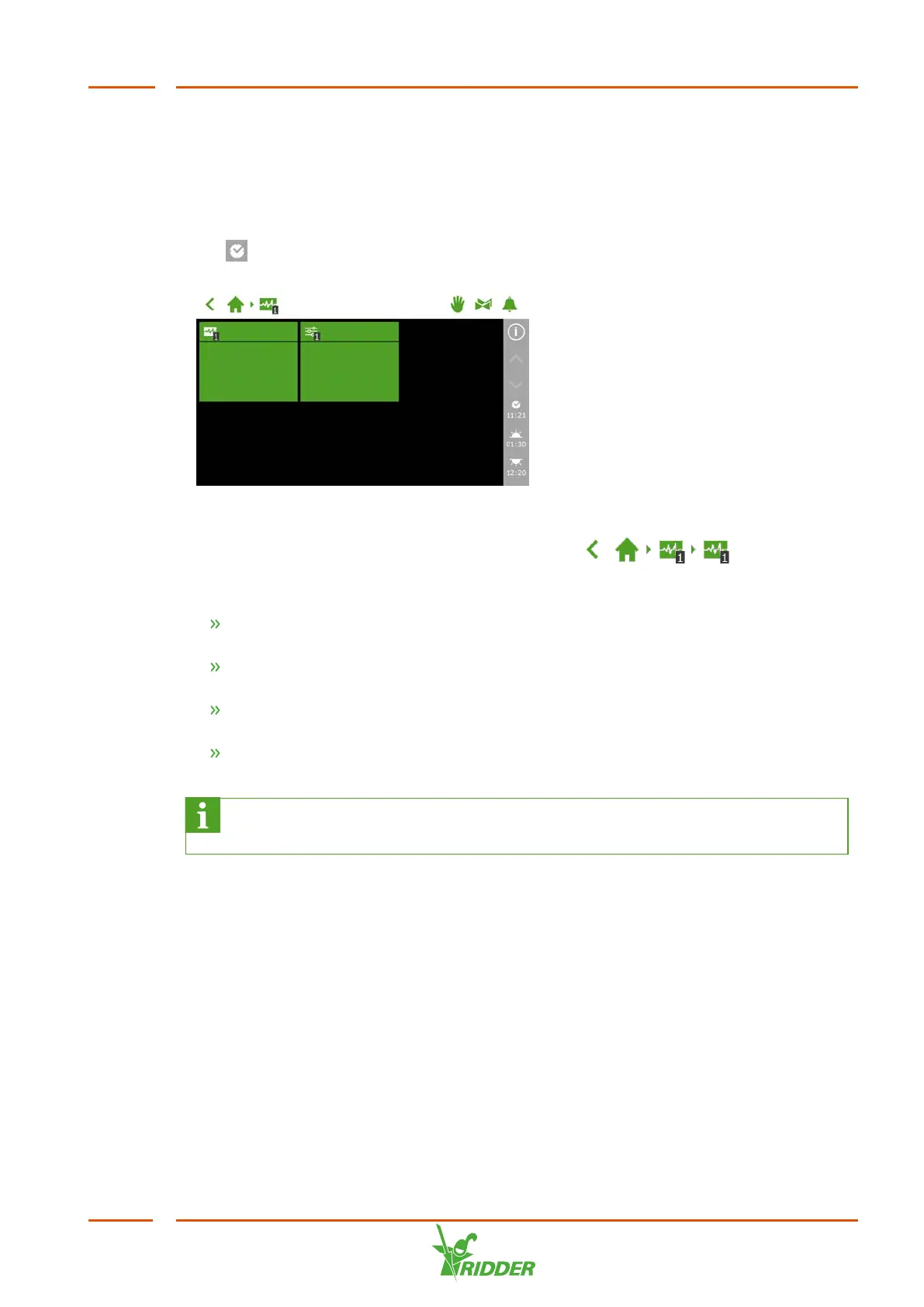
requirements have been preset. To access the software settings, tap the system time
icon ‘ '.
Figure 5-4: Tap the System Time icon to open the configuration menu.
To access the software settings, navigate this path: .
The following settings are required:
Time Required for time-related settings, such as: system date/time , time
format and time zone.
Location The system's location is necessary in order to determine the sunrise
and sunset times.
Network address If a network is required, you need to check your network
settings.
Physical components Various controls have purple tiles representing the
physical components.
For more information about the HortiMaX-Go!, please refer to the
documentation included or the online help (help.hortimax-go.com).
FertiMiX
39


 To Next Page