When automated irrigation starts are executed, the irrigation program always
uses the recipe settings of the valve group that were set for the period that is
currently active. If no period is active, then irrigation will not start
automatically.
6.3.9 Alarms
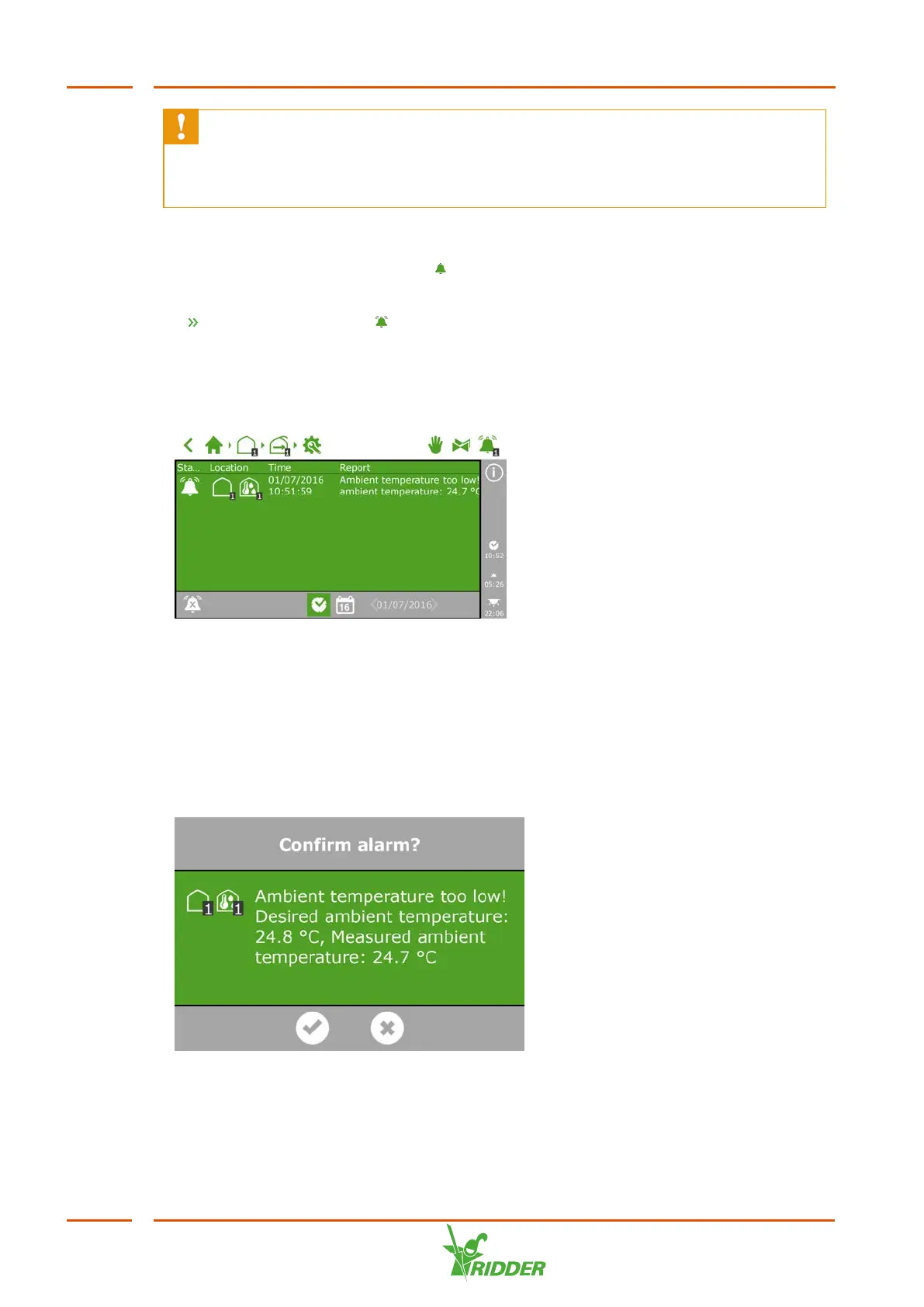
On the top bar, there is a bell icon ‘ ' that enables you to access the alarm screen.
When this bell is active, it means that an alarm is currently present.
Tap the (active) bell ' '. The alarm screen opens.
The alarm screen displays information about your current alarms and your alarm
history. If you open the alarm screen and no alarms are currently active, then the
following text is shown: No alarms present!
Figure 6-17: The alarm screen
The alarm screen lists the following information for each alarm: status, location, time
and corresponding message.
If you tap an alarm, a pop-up appears with detailed information about the alarm. This
is also where you can acknowledge the alarm. Acknowledging an alarm resets it.
However, if the cause of the alarm has not yet been resolved, the alarm will probably
return almost immediately.
Figure 6-18: Alarm
FertiMiX
56


 To Next Page