6.3.7 Pre-flushing and post-flushing
An irrigation cycle may consist of the phases: pre-flushing, dosing and post-flushing.
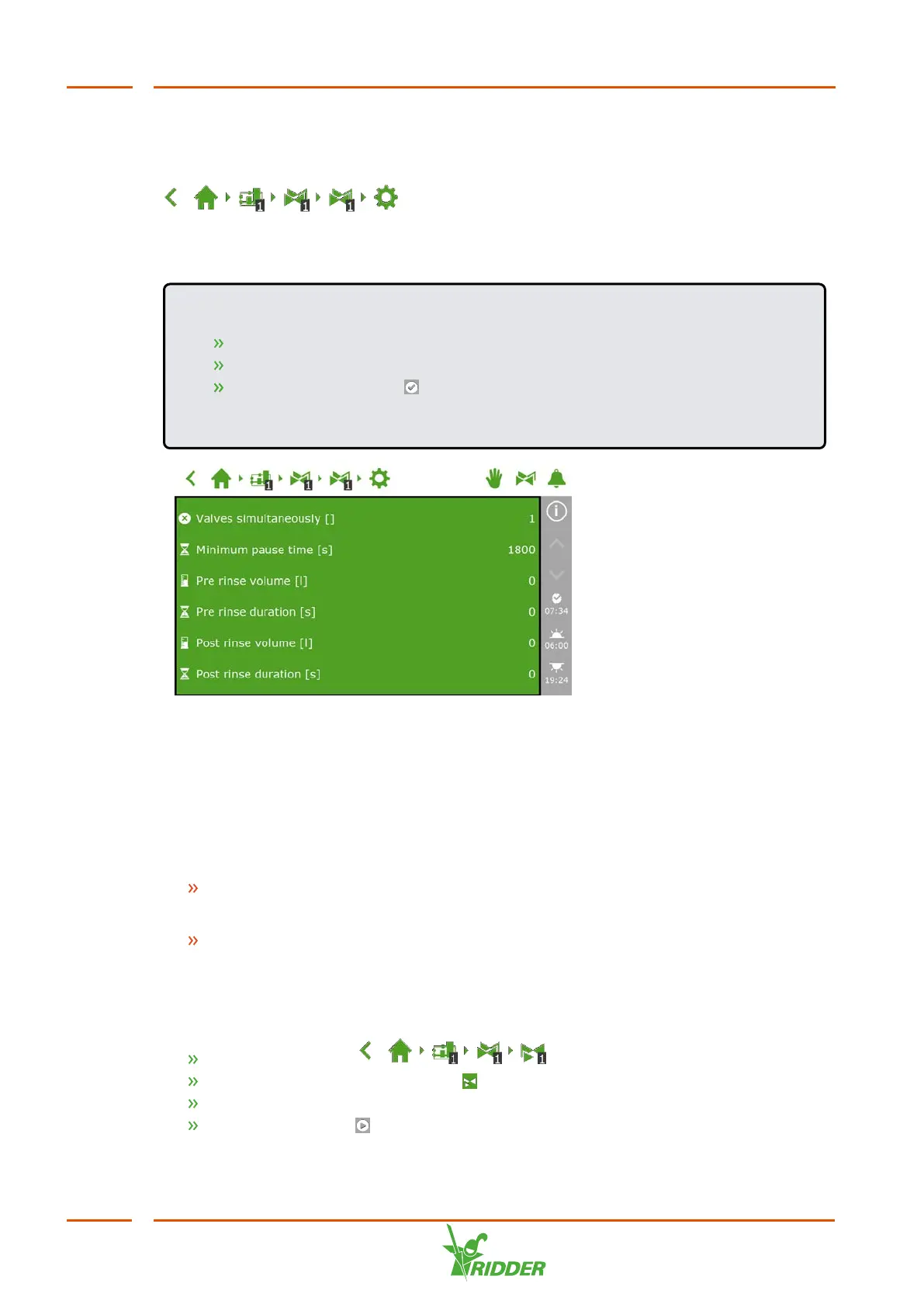
To get to the settings for pre-flushing and post-flushing, navigate this path:
.
You can set the volume in litres or the duration in seconds for both pre-flushing and
post-flushing.
EXAMPLE
Tap the Pre-flush volume setting. A pop-up window appears.
Enter the volume in litres.
Tap the Confirm icon ‘ '.
You have entered the pre-flush volume.
Figure 6-11: The settings associated with pre-flushing and post-flushing
6.3.8 Start conditions
You can activate a valve or valve group manually or preprogram the start conditions.
Manual starts
The irrigation program includes two types of manual starts:
Manual valve start
Use the manual valve start to select valves that you want to activate.
Manual valve group start
Use the manual valve group start to activate a valve group (with predefined
valves/recipes).
Manual valve start
Navigate the path: .
Tap the Manual Valve Start icon ' '. A pop-up window appears.
Select the valves. A white border appears around the selected valves.
Tap the Start icon ‘ '.
FertiMiX
52


 To Next Page