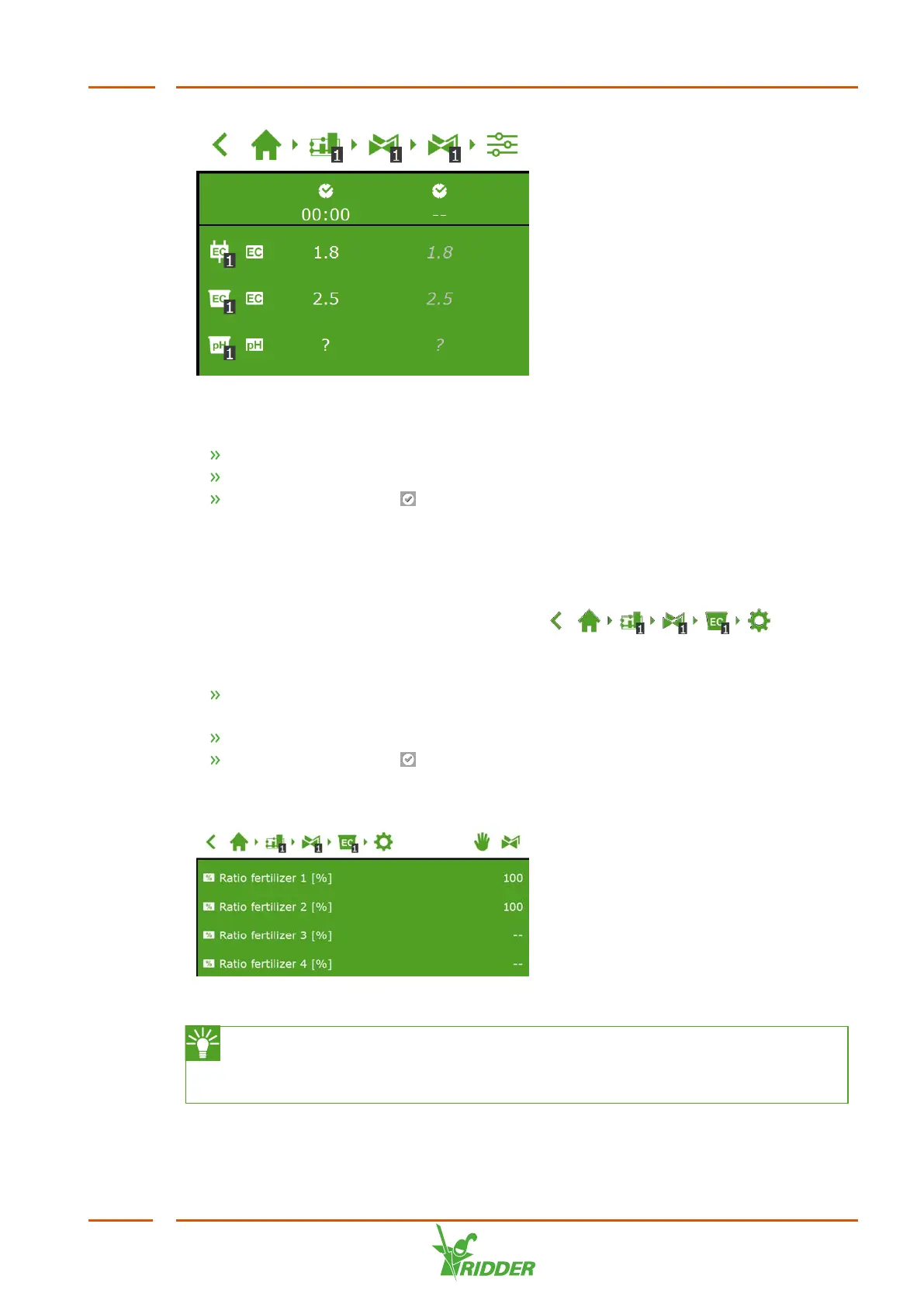
Figure 6-9: You can set the EC and/or the pH target values for each predefined
period.
Tap EC or pH in a period. A pop-up window appears.
Set the EC target value in mS/cm, or the pH target value.
Tap the Confirm icon ‘ '.
You have set the EC and/or pH target values.
Dosing ratio
If more than one fertilizer is used, you can set the dosing ratio of each fertilizer. To
get to this screen, navigate the following path: .
By default, the irrigation program uses the same ratio for all available fertilizers.
Tap one of the Fertilizer ratio settings (for example, 'Ratio fertilizer 1') A pop-
up window appears.
Enter a percentage.
Tap the Confirm icon ‘ '.
You have entered a fertilizer ratio.
Figure 6-10: Dosing ratios of fertilizers
If you want to set a different dosing ratio for a valve group in different
periods, then create a new valve group and link the same valves to it. This
enables you to set a different dosing ratio for this new valve group.
FertiMiX
51


 To Next Page