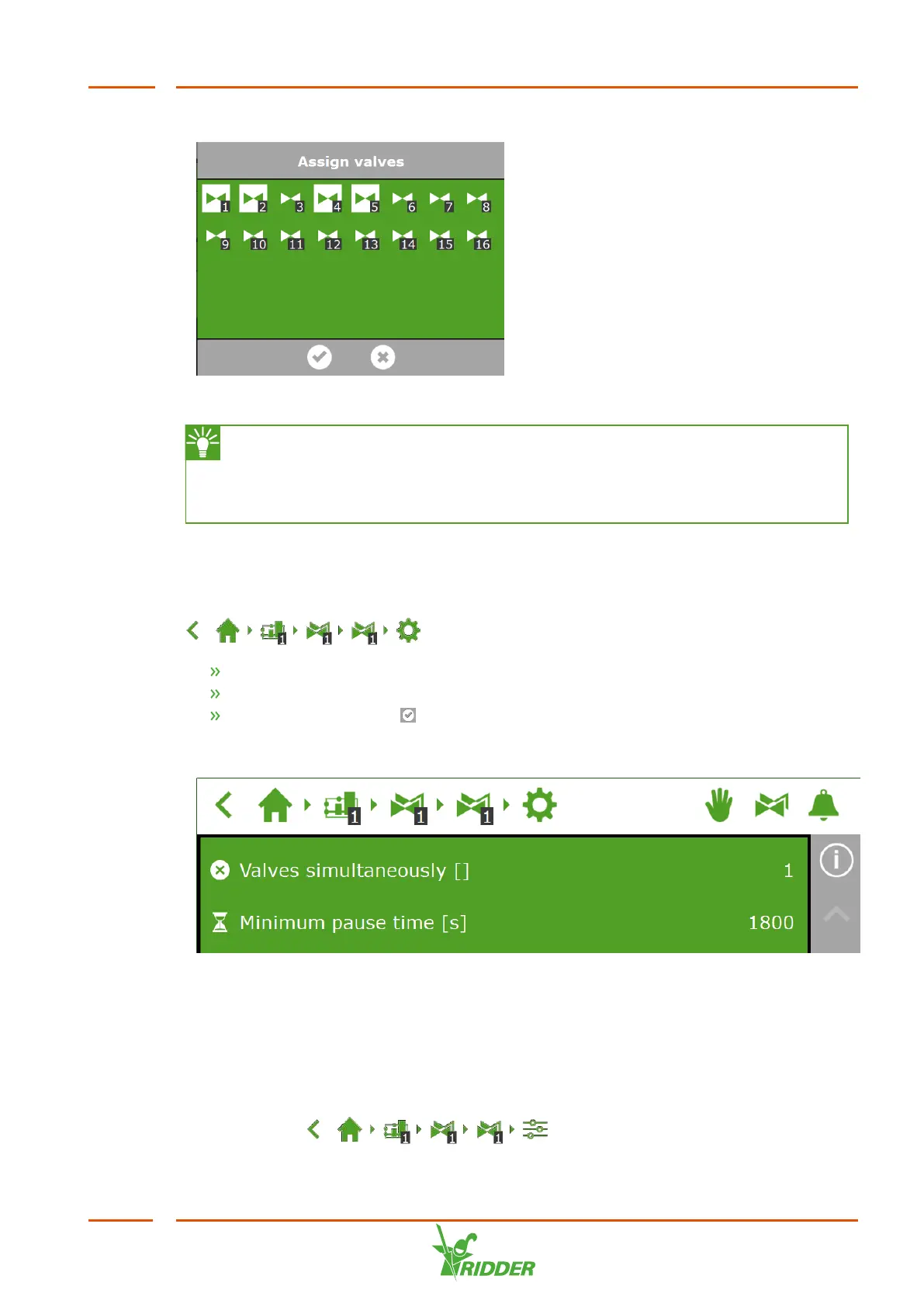
You have assigned valves to a valve group.
Figure 6-3: Assigning valves
The irrigation program enables you to use a separate valve group for each
valve. This means that you can program fertigation recipes for each valve
individually. It is also possible to assign a particular valve to multiple valve
groups.
6.3.3 Valves simultaneously
Use the Valves simultaneously setting to specify how many valves may open
simultaneously. To get to this setting, navigate this path:
.
Tap the Valves simultaneously setting. A pop-up window appears.
Enter the number of valves.
Tap the Confirm icon ‘ '.
You have set how many valves may open simultaneously.
Figure 6-4: The Valves simultaneously setting
6.3.4 Periods
Use periods to vary target values throughout the day. You can set up to four periods
per day.
You can set periods on the settings screen. To set the dosing ratios, navigate the
following path: .
FertiMiX
47


 To Next Page