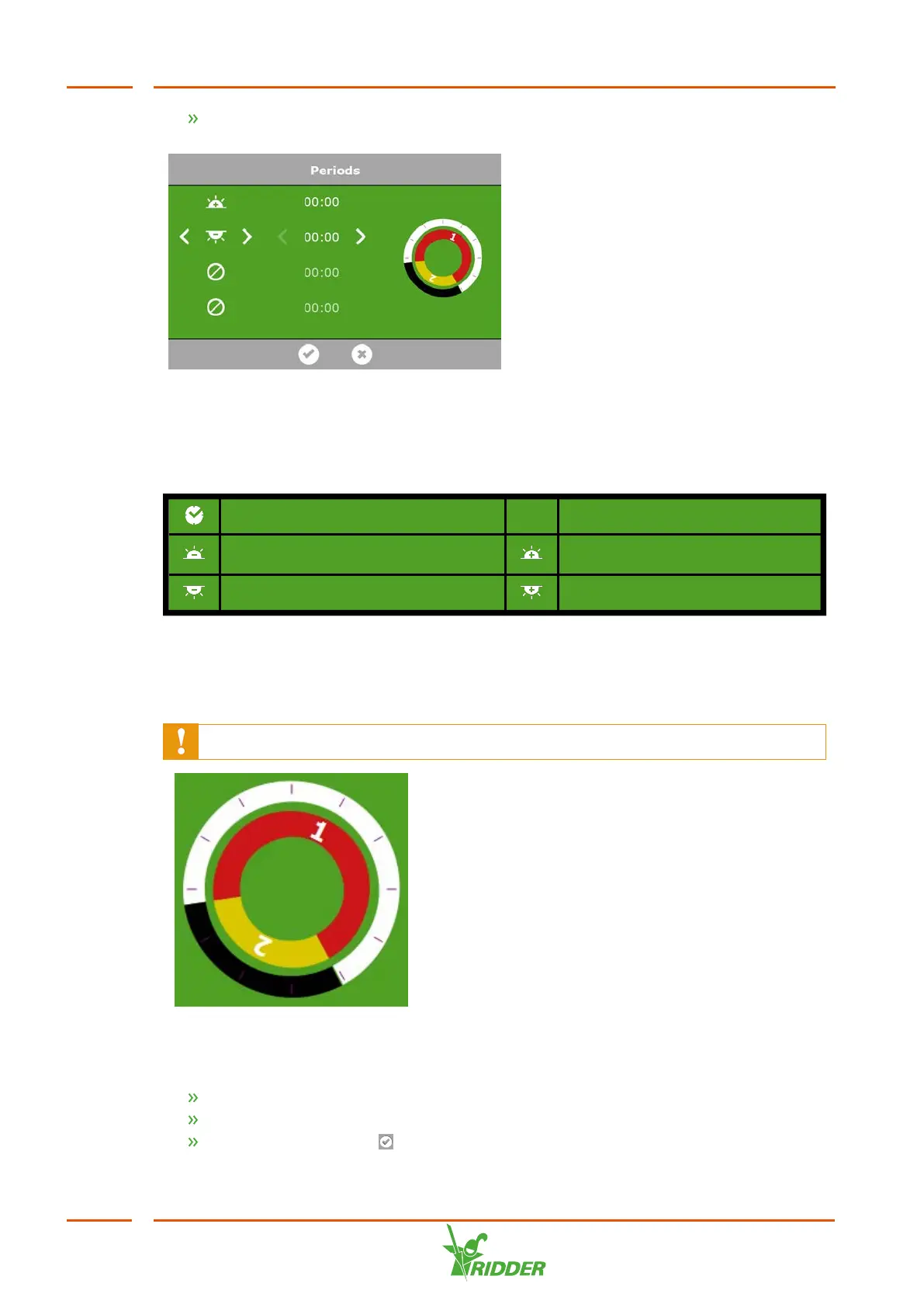
Tap a period at the top of the settings screen. The Set periods screen appears.
Figure 6-5: Setting periods
On the left-hand side of the Set periods screen, you can select the type of start time
for a period. You can select a start time based on clock time, sunrise or sunset. The
icons displayed have the following meaning:
Start time based on clock time
Start time before sunrise (e.g. 1
hour before sunrise)
Start time after sunrise (e.g. 1
hour after sunrise)
Start time before sunset Start time after sunset
The circles on the right-hand side represent the 24-hour clock. The outer circle
displays the day period in white and the night period in black. The inner circle displays
the set time periods. Each period is represented by a coloured section containing a
number.
If periods overlap, then the highest period number applies.
Figure 6-6: Periods in 24-hour clock
To set a period, proceed as follows:
Select a time indication (clock time, sunrise or sunset).
If applicable, enter a time.
Tap the Confirm icon ‘ '.
FertiMiX
48


 To Next Page