Robertson AP21 and AP22 Autopilots
106 20220596E
• Too little Rudder and the autopilot fails to keep a steady
course.
• Too much Rudder gives unstable steering and reduces speed.
• Low speed requires more rudder than high speed.
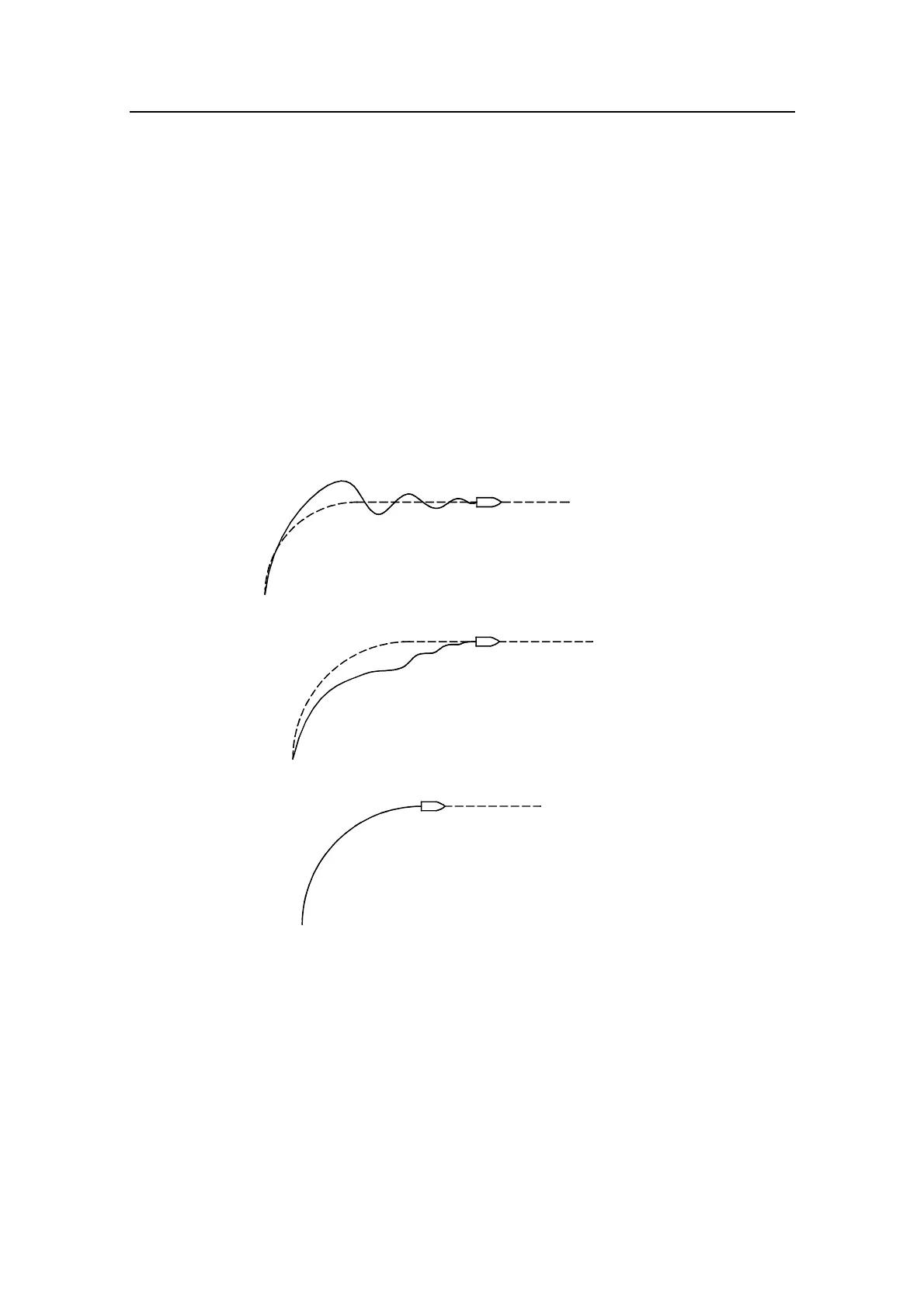
Counter Rudder is the parameter that counteracts the effect of
the boats turn rate and inertia. For a short time period it is
superimposed on the normal rudder response as provided by
the Rudder parameter. It may sometimes appear as if it tends to
make the rudder move to the wrong side (counter rudder).
The best way of checking the value of the Counter Rudder
setting is when making turns. The figures illustrates the effects
off various Counter Rudder settings.
Autotrim standard value is 40 which should work well on most
boats.
Rudder Limit should be kept at 20 degrees unless there is a
need for more rudder when performing dockside manoeuvres.
Note ! In no event should the Rudder Limit be set to a value higher than the
actual maximum rudder angle.
Exit the Parameter menu by pressing STBD [>] button to
proceed to the Display Units menu, or press STBY to return to
normal autopilot operation.
New course
New course
Counter rudder setting too
low, overshoot response
Correct setting of counter
rudder, ideal response
New course
Counter rudder setting too high,
sluggish and creeping response



 To Next Page