CAUTION
l
The name of the first box type must absolutelybe between quotation marks.
l
The questioned equal to symbol (≟)must be entered using the keyboard in the panel.
4. In the program tree, select the <empty> node in the If node.
5. Go to Program > Basicand insert a Set node.
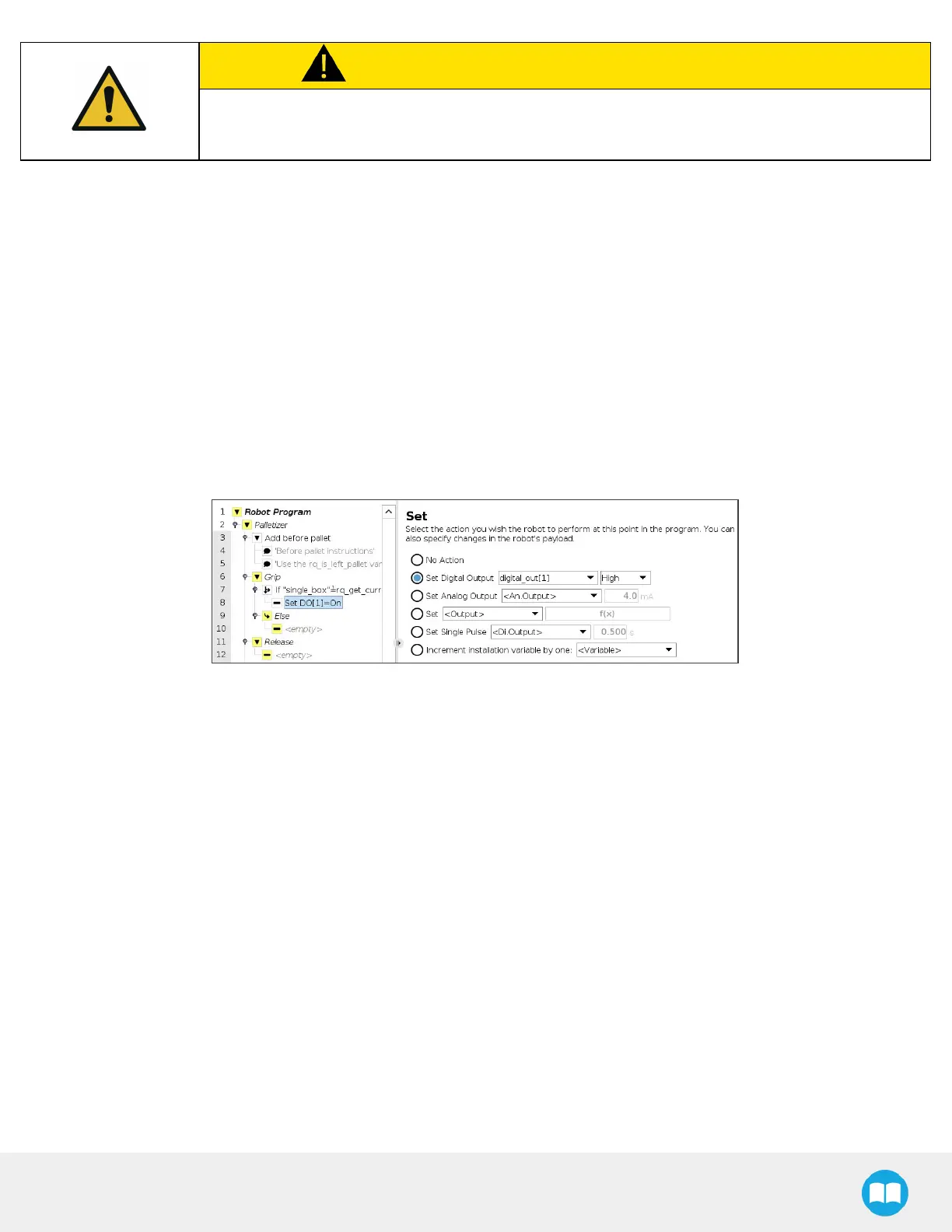
6. Select the Set node and tick the Set Digital Output radio button in the Command window.
7. Expand the dropdown menu.
8. Select the digital output to which the gripper in the If node isassigned.
9. Expand the adjacent dropdown menu.
10. Select High.
The result in the program tree and Command window should resemble this:
Fig. 5-32: Set Node in the If node
11. Select the parent If node and tap the Add Else button at the bottom of the screen.
12. In the program tree, tap the <empty> node in the Else node.
13. Go to Program > Basicand insert two Set nodes.
14. In the first Set node, tick the Set Digital Output radio button.
15. Expand the dropdown menu.
16. Select a digital output to which one of the grippersisassigned.
17. Expand the adjacent dropdown menu.
18. Select High.
19. Repeat steps 15 to 18 with the other Set node, but select the digital output to which the other gripper isassigned.
In doing so, both grippers will activate when the robot will be instructed to pick up grouped boxes.
The result in the program tree should resemble this:



 To Next Page