330
MIDI Implementation
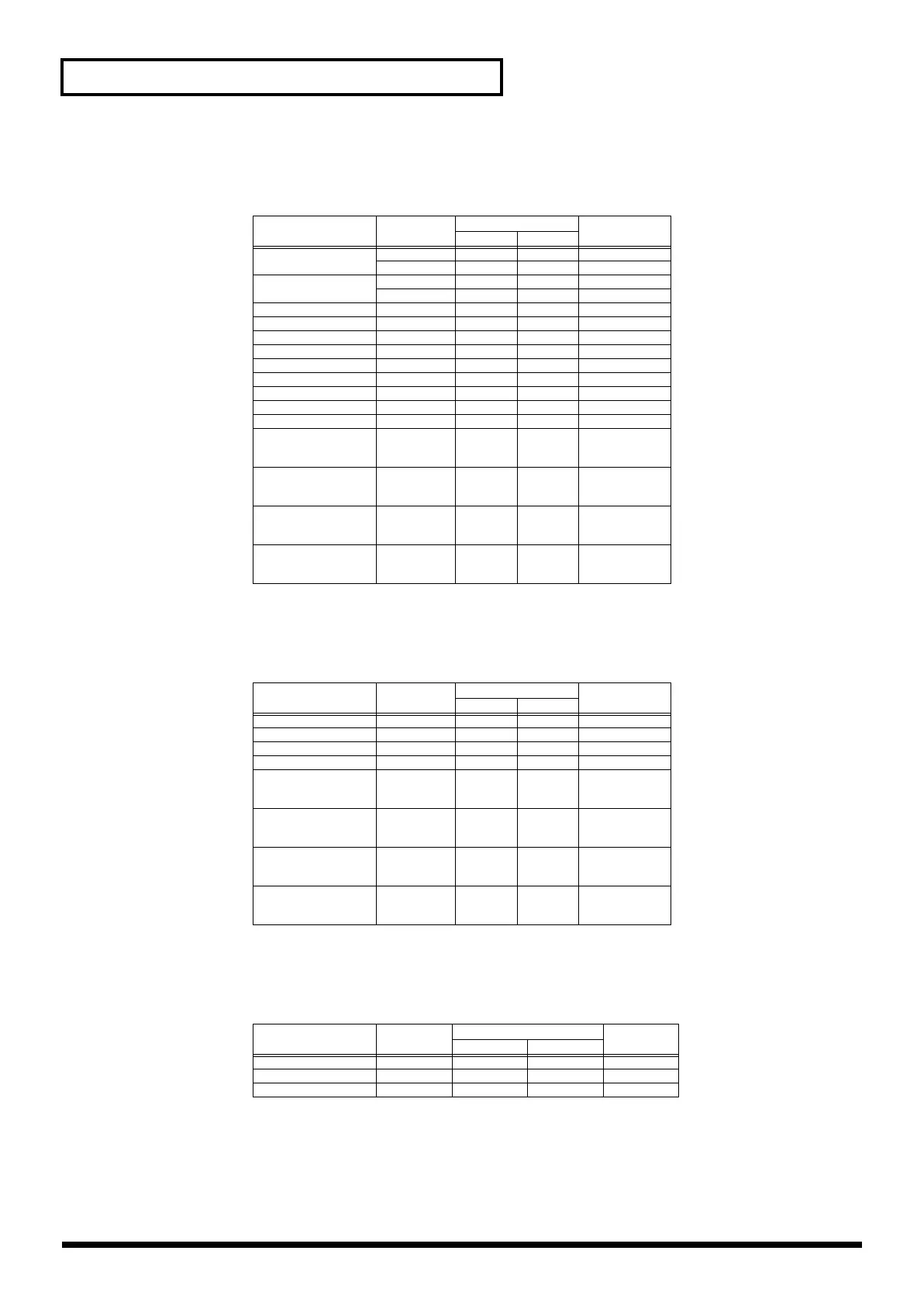
<Bank Select and Program Change Correspondence Chart>
Patch
* The XP groups vary depending on the Wave Expansion Board(s) you’ve
installed. For information about an SRX series board, refer to the Owner’s
Manual that came with it.
Rhythm Set
* The XP groups vary depending on the Wave Expansion Board(s) you’ve
installed. For information about an SRX series board, refer to the Owner’s
Manual that came with it.
Performance
* To switch multitimbres, the external MIDI device’s transmit channel needs to
be matched up with the Control Channel of the Fantom-X. (P.230)
Group
Number Bank Select Program
NumberMSB LSB
USER
001–128 87 0 1–128
129–256 87 1 1–128
CARD 001–128 87 32 1–128
129–256 87 33 1–128
PR-A 001–128 87 64 1–128
PR-B 001–128 87 65 1–128
PR-C 001–128 87 66 1–128
PR-D 001–128 87 67 1–128
PR-E 001–128 87 68 1–128
PR-F 001–128 87 69 1–128
PR-G 001–128 87 70 1–128
PR-H 001–128 87 71 1–128
GM(2) 001–256 121 0– 1–128
XP-A (SRX-01)
(SRX-02)
:
001–
001–
:
93
93
:
0
1
:
1–
1–
:
XP-B (SRX-01)
(SRX-02)
:
001–
001–
:
93
93
:
0
1
:
1–
1–
:
XP-C (SRX-01)
(SRX-02)
:
001–
001–
:
93
93
:
0
1
:
1–
1–
:
XP-D (SRX-01)
(SRX-02)
:
001–
001–
:
93
93
:
0
1
:
1–
1–
:
Group Number Bank Select Program
NumberMSB LSB
USER
001–032 86 0 1–32
CARD 001–032 86 32 1–32
PRST 001–040 86 64 1–40
GM(2) 001–009 120 --- 1–57
XP-A (SRX-01)
(SRX-02)
:
001–
001–
:
92
92
:
0
1
:
1–
1–
:
XP-B (SRX-01)
(SRX-02)
:
001–
001–
:
92
92
:
0
1
:
1–
1–
:
XP-C (SRX-01)
(SRX-02)
:
001–
001–
:
92
92
:
0
1
:
1–
1–
:
XP-D (SRX-01)
(SRX-02)
:
001–
001–
:
92
92
:
0
1
:
1–
1–
:
Group
Number Bank Select Program
Number
MSB LSB
USER
01–64 85 0 1–64
CARD 01–64 85 32 1–64
PRST 01–64 85 64 1–64
Fantom-X678_r_e.book 330 ページ 2005年5月12日 木曜日 午後4時40分


 To Next Page