8-20
Instruction Manual
IM-106-350C, Rev 2.2
July 2008
Hazardous Area Oxymitter 5000
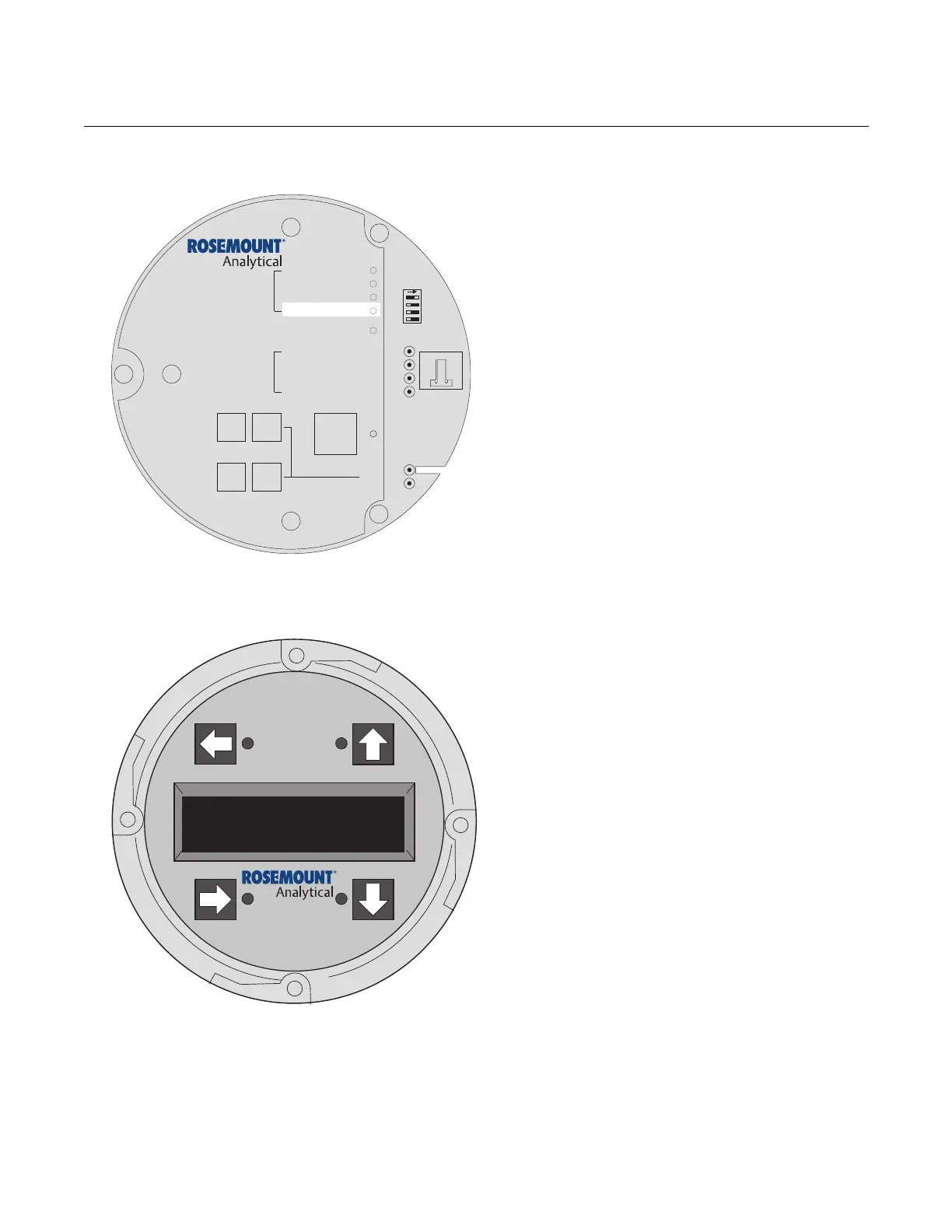
Figure 8-16. Fault 14, Invalid Constant
Fault 14, Invalid Constant
Figure 8-16 shows the electronic assembly for a
Hazardous Area Oxymitter 5000 with a
membrane keypad (upper view) and a
Hazardous Area Oxymitter 5000 with an LOI
(lower view).
Membrane Keypad
When Fault 14 is detected, the CALIBRATION
LED flashes twice, pauses for three seconds,
and repeats.
1. After a calibration has been performed, the
electronics calculates a cell constant value.
2. If the cell constant value is outside of the
range, -4 mV to 10 mV, the alarm will
activate. See "Calibration with Keypad" in
Section 9: Maintenance and Service, and
verify the last calibration was performed
correctly.
3. Power down the Hazardous Area Oxymitter
5000 and remove it from the stack.
4. Replace the cell per "Cell Replacement" in
Section 9: Maintenance and Service.
LOI
When Fault 14 is detected, the LOI displays the
"O2 Cell Bad" message. Refer to the comments
and procedures in paragraphs 1 through 4
above.
DIAGNOSTIC
ALARMS
TEST
POINTS
HEATER T/C
HEATER
O2 CELL
CALIBRATION
CALIBRATION RECOMMENDED
O2 CELL mV +
O2 CELL mv -
HEATER T/C +
HEATER T/C -
INC INC
DEC DEC
HIGH
GAS
LOW
GAS
CAL
TEST GAS +
PROCESS -
% O2
SW2
TP1
J1
TP2
TP3
RED
YEL
GRN
ORG
TP4
TP5
TP6
ON
38740057
LOI
KEYPAD
Alarms
O2CellBad



 To Next Page