Route Planning Method types:
Button
Description
/'
_._-~--
y
~
.~
..
-~----~--'---~--
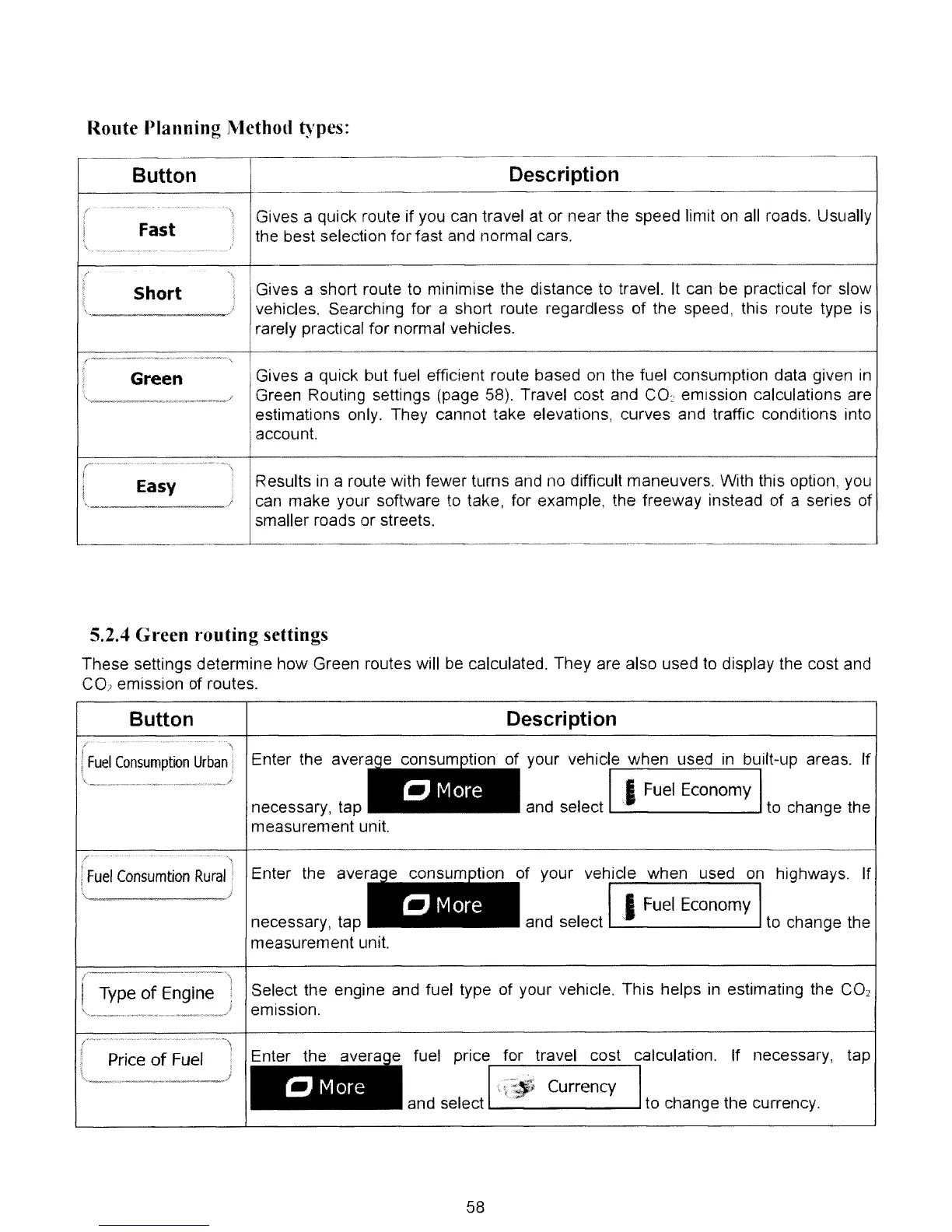
Gives a quick route if you can travel
at
or near the speed limit
on
all
roads. Usually
I
Fast
I
the best selection for fast and normal cars.
,
\
"w
__
~
____
•
t"
.
...
\
1
1
Short
!
Gives a short route to minimise the distance to travel.
It
can be practical for slow
;
J
vehicles. Searching for a short route regardless of the speed, this route type
is
,
--
-
rarely practical for normal vehicles.
t
Green
Gives a quick but fuel efficient route based
on
the fuel consumption data given
in
Green Routing settings (page 58). Travel cost and
CO
2
emission calculations are
estimations only. They cannot take elevations, curves and traffic conditions into
account.
(
"~'
...
"N.
__
._~_
...
.-
.•
_~~
____
~·_~·
__
~ ~.~
__
-,
Easy
,
Results
in
a route with fewer turns and
no
difficult maneuvers. With this option, you
I
;
can
make your software
to
take, for example, the freeway instead of a series of
\
/
smaller roads or streets.
5.2.4 Green
routing
settings
These settings determine how Green routes will
be
calculated. They are also used
to
display the cost and
CO?
emission of routes.
necessary, tap
measurement unit.
r
necessary, tap
measurement unit.
Button
Fuel
Consumption
Urban
r--
---
-------
'\
j ,
j
Fuel
Consumtion
Rural
!
\ /
Enter the avera
Enter the aver
• •
CMore
• •
"
More
Description
f your vehicle when used
in
bUilt-up areas. If
II
Fuel
Economy I
and select ' to change the
of your vehide when used
on
highways, If
IJFuel Economy I
and select to change the
I
f
",I
Type
of
Engine .
'----~_._
..
__
.
-----.,)
Select the engine and fuel type of your vehicle. This helps
in
estimating the
CO
2
emission,
th
Price
of
Fuel
Et
•
CMore
fuel price for travel cost calculation. If necessary,
and select
II-'~_\_~_';'I_;
_c_u_r_re_n_c_y_1
to change the currency,
58
tap



 To Next Page