Installation
Guide
GM
Series
System
Troubleshooting
No Operation:
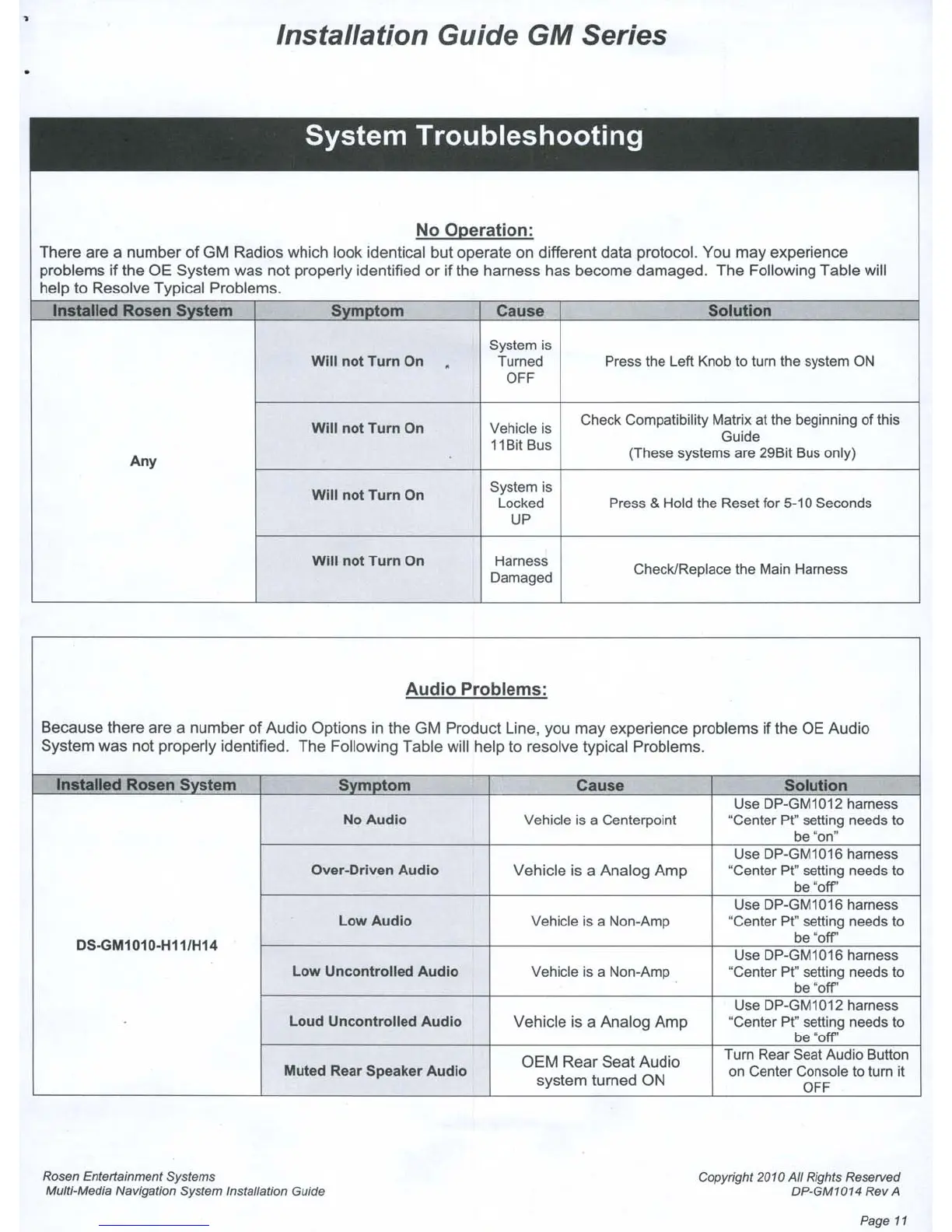
There are a number
of
GM Radios which look identical but operate on different data protocol. You may experience
problems
if
the OE System was
not
properly identified
or
if
the harness has
become
damaged.
The
Following
Table
will
help to Resolve Typical Problems.
Installed
Rosen
SYStem
Svmotom
Cause Solution
System is
Will
not
Turn
On
.
Turned Press the Left Knob
10
tum the system ON
OFF
Will
not
Tum
On Vehicle is
Check Compatibility Matrix
at
the beginning
of
this
11Bit Bus
Guide
Any
(These systems are
29Bil
Bus only)
Will
not
Turn
On
System is
locked
Press & Hold the Reset for 5-10 Seconds
UP
Will
not
Turn
On
Harness
Check/Replace the Main Harness
Damaged
Audio
Problems:
Because
there are a
number
of
Audio Options in the
GM
Product Line, you
may
experience problems
if
the
OE
Audio
System was
not
properly identified.
The
Following Table will help
to
resolve typical Problems.
Installed
Rosen
System
SvmDtom
Cause
Solution
Use
DP-GM1
012
harness
No Audio Vehicle
is
a Centerpoint ·Center
pt-
selting needs
to
be
'on-
Use
DP-GM1016 harness
Over-Orlven Audio
Vehicle is a Analog
Amp
·Center
pt"
selting needs
to
be
'oW
Use
DP-GM1016 harness
Low Audio Vehicle
is
a Non-Amp "Center
pt"
selting needs
to
OS-GM1010-H11/H14
be
'oW
Use
OP-GM1016
harness
Low Uncontrolled Audio
Vehicle
is
a Non-Amp
'Center
pt"
setting needs
10
be
·oW
Use DP-GM1012 harness
Loud Uncontrolled Audio
Vehicle is a Analog
Amp
·Center
pt.
setting needs
10
be
"off"
OEM
Rear
Seat
Audio
Tum Rear Seat Audio Bulton
Muted Rear Speaker Audio
system turned ON
on
Center Console
10
lum
it
OFF
Rosen Entertainment Systems
Multi-Media Navigation System Installation Guide
Copyright 2010 All Rights Resef\led
DP-GM1014 Rev
A
Page
11



 To Next Page