Making/Ending
A Call
Clear last number
Press to transfer call between cell phone
and car speakers.
You
can
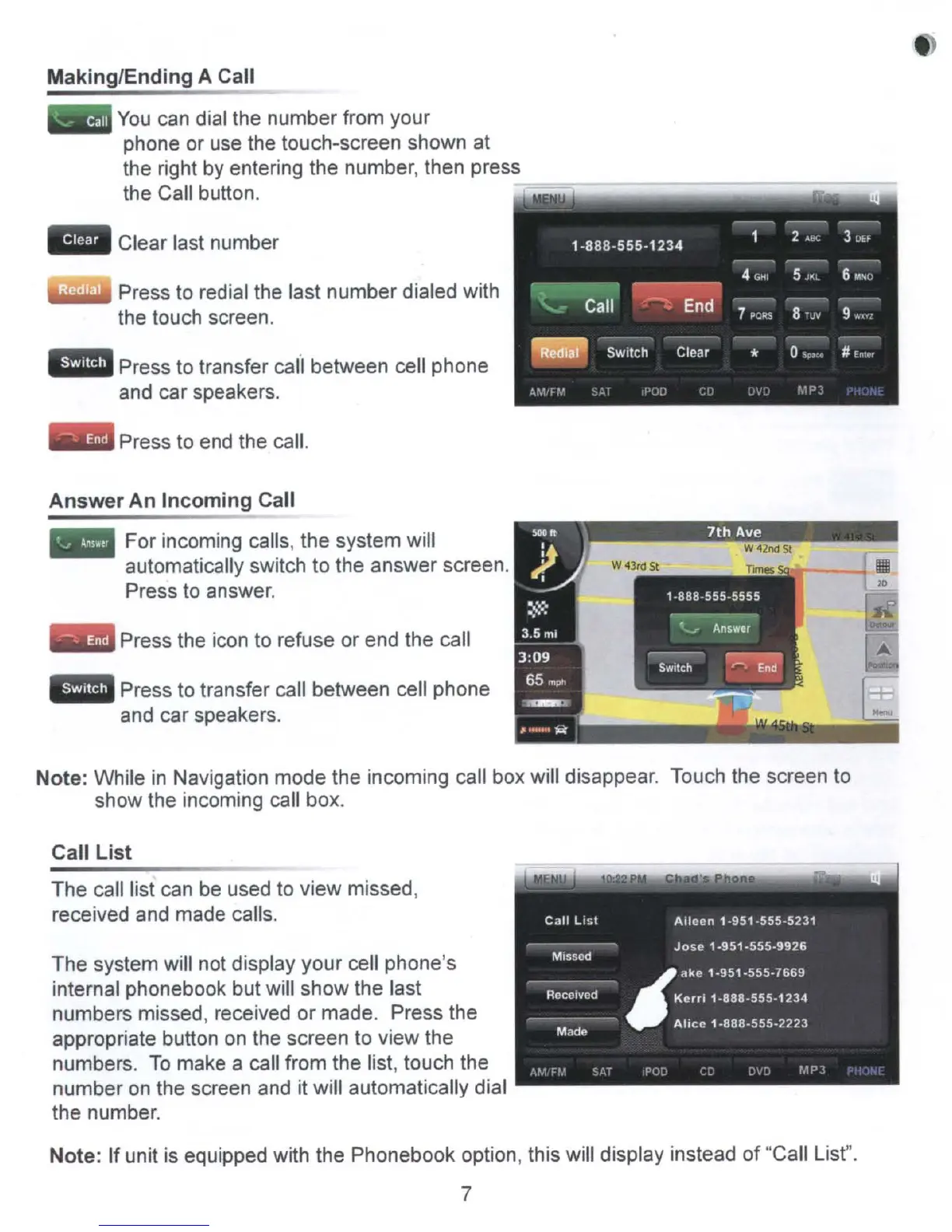
dial the number from your
phone or use the touch-screen shown at
the right by entering the number, then press
the Call button.
WiI.iIII Press to redial the last number dialed with
the touch screen.
Press to end the call.
Press the icon to refuse or end the call
Press to transfer call between cell phone
and car speakers.
Answer
An
Incoming
Call
For incoming calls, the system will
automatically switch to the answer screen.
Press to answer.
Note: While
in
Navigation mode the incoming call box will disappear. Touch the screen to
show the incoming call box.
Call
List
The call list can be used to view missed,
received and made calls.
The system will not display your cell phone's
internal phonebook but will show the last
numbers missed, received or made. Press the
appropriate button
on
the screen to view the
numbers.
To
make a call from the list, touch the
number
on
the screen
and
it will automatically dial
the number.
Note: If unit is equipped with the Phonebook option, this will display instead
of
"Call List".
7



 To Next Page