..
Settings
.;
System
Settings
•
~--
"""';;
'n
~(~
AUDIO
oDISPLAY
AUX
fr>?'
--
N
CAMERA
......l
REAR
V • EXTRAS
!-cONTROLS
/
mETTlNGS
/)
TOUCH
The time displayed
on
all screens
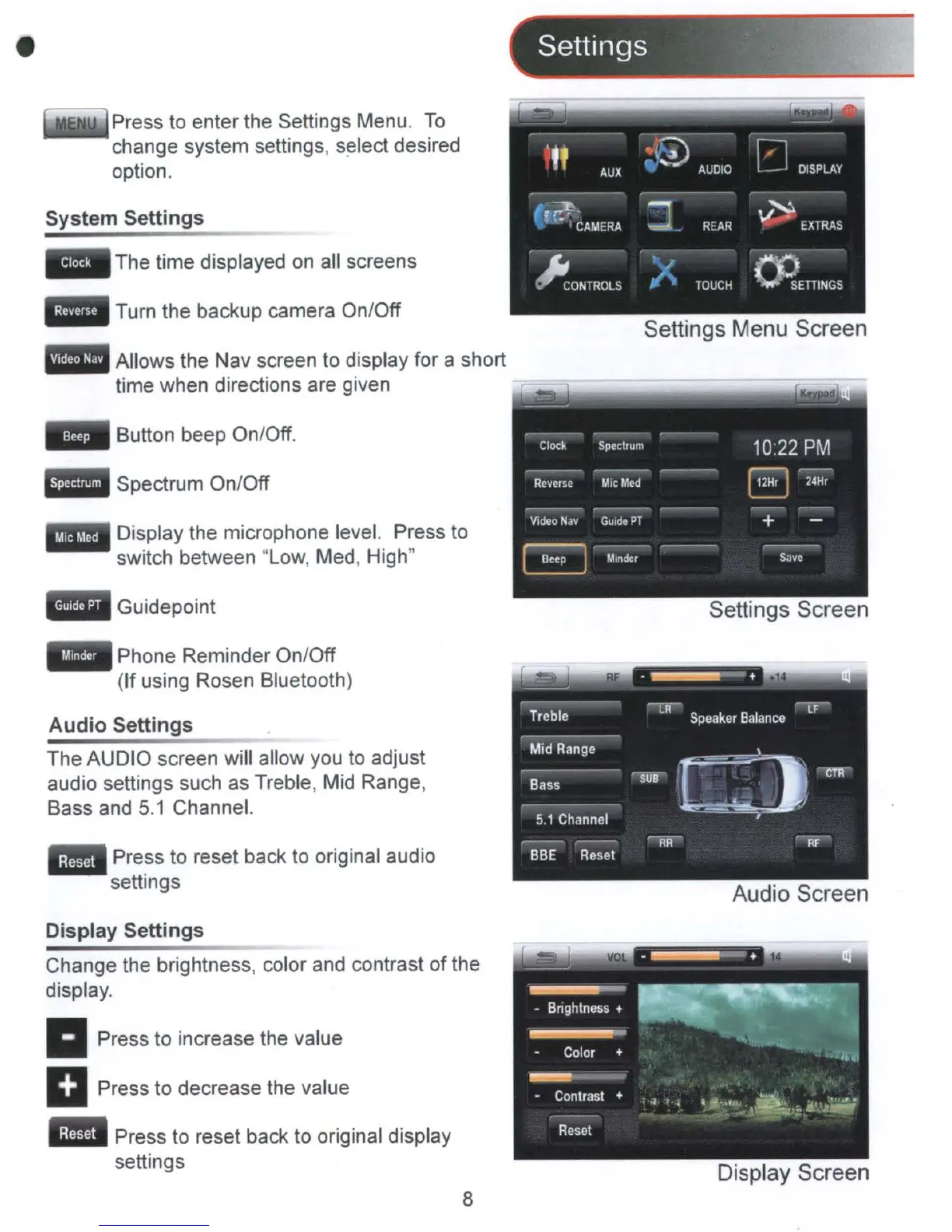
Press to enter the Settings Menu.
To
change system settings,
s~lect
desired
option.
Settings Menu Screen
-
..
Clock
Spectrum
10:22
PM
Reverse
MIC
M.d
EJ
24Hr
Video
Nav
GUide
PT
+
B
Minder
S.VC
Spectrum On/Off
Button beep On/Off.
Allows the Nav screen to display for a short
time when directions are given
Turn the backup camera On/Off
..
Display the microphone level. Press to
switch between "Low, Med, High"
Guidepoint
Settings Screen
Press to reset back
to
original audio
settings
Audio
Settings
The AUDIO screen will allow
you
to
adjust
audio settings such
as
Treble, Mid Range,
Bass and
5.1
Channel.
Audio Screen
Phone Reminder On/Off
(If using Rosen Bluetooth)
Display
Settings
Change the brightness, color and contrast of the
display.
..
Press to increase the value
Press to decrease the value
Press to reset back to original display
settings
8
Display Screen



 To Next Page