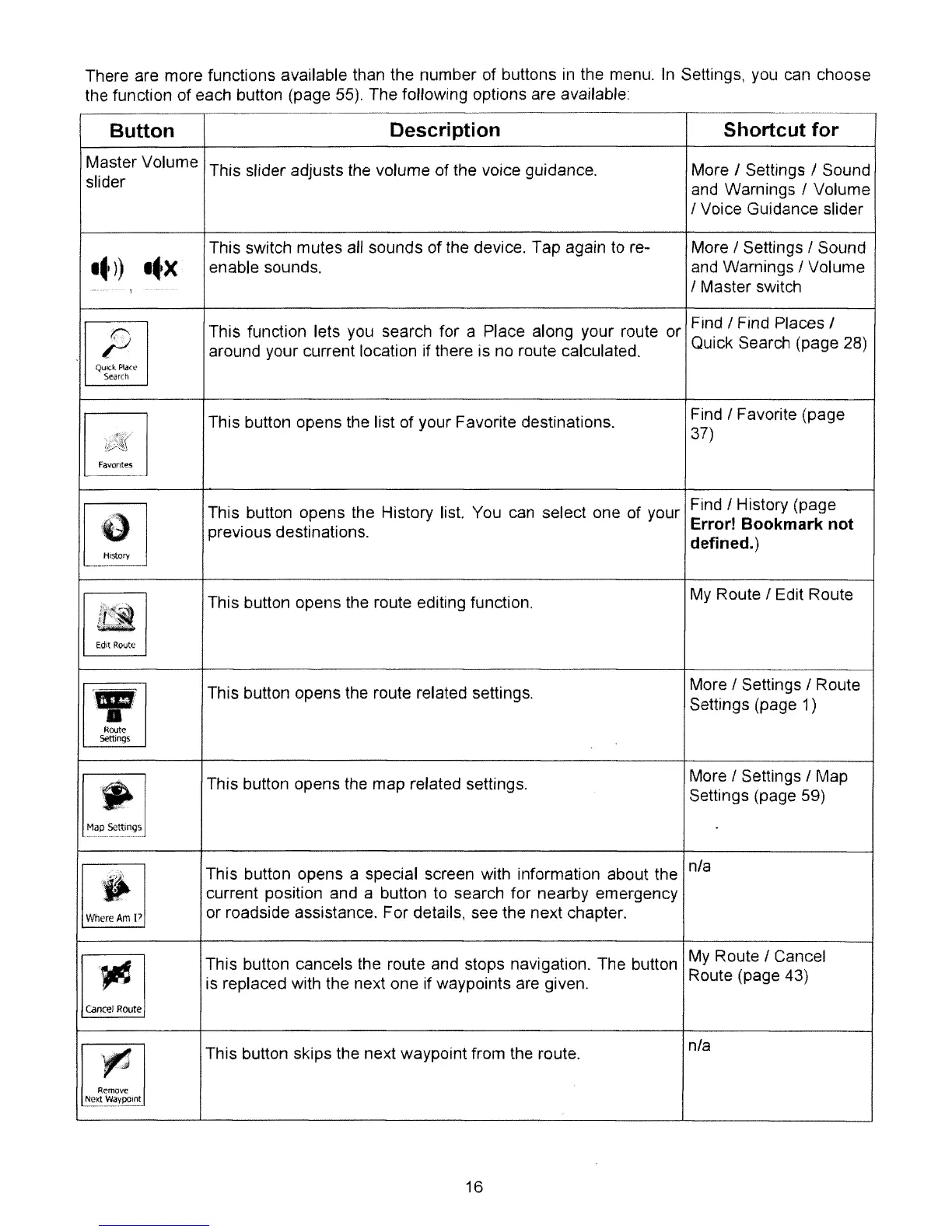
There are more functions available than the number of buttons in the menu.
In
Settings, you can choose
the function of each button (page
55).
The
follOWing
options are available
Button
Description
Shortcut for
Master Volume
This slider adjusts the volume of the voice guidance. More f Settings f Sound
slider
and
Warnings I Volume
I Voice Guidance slider
This switch mutes all sounds
of
the device. Tap again
to
re- More I Settings I Sound
It))
It
X
enable sounds.
and
Warnings I Volume
I Master switch
~
This function lets
you
search for a Place along your route or
Find
I Find Places I
~~~
around your current location if there is no route calculated.
Quick Search (page 28)
~ar(1\
This button opens the list of your Favorite destinations.
Find
I Favorite (page
~
37)
F"3\U1h!S
[!]
This button opens the History list. You can select one of your
Find
I History (page
previous destinations.
Error!
Bookmark
not
","'"
defined.)
I[!]
This button opens the route editing function.
My Route
I Edit Route
Edit
Rovtc
[fJ
This button opens the route related settings.
More
I Settings I Route
Settings (page 1)
,-
""""
Ie!]
This button opens the map related settings.
More
I Settings I Map
Settings (page 59)
This button opens a special screen with information about the
nfa
[!J
current position and a button
to
search for nearby emergency
Where~p
or roadside assistance, For details, see the next chapter.
~
This button cancels the route and stops navigation. The button
My
Route I Cancel
is replaced with the next one if waypoints are given.
Route (page 43)
~
This button skips the next waypoint from the route.
nla
'_0
Nt'ldVl'ayP0101
16



 To Next Page