SME VoIP Handset guide
Proprietary and Confidential Page | 19
6.2 Central Directory
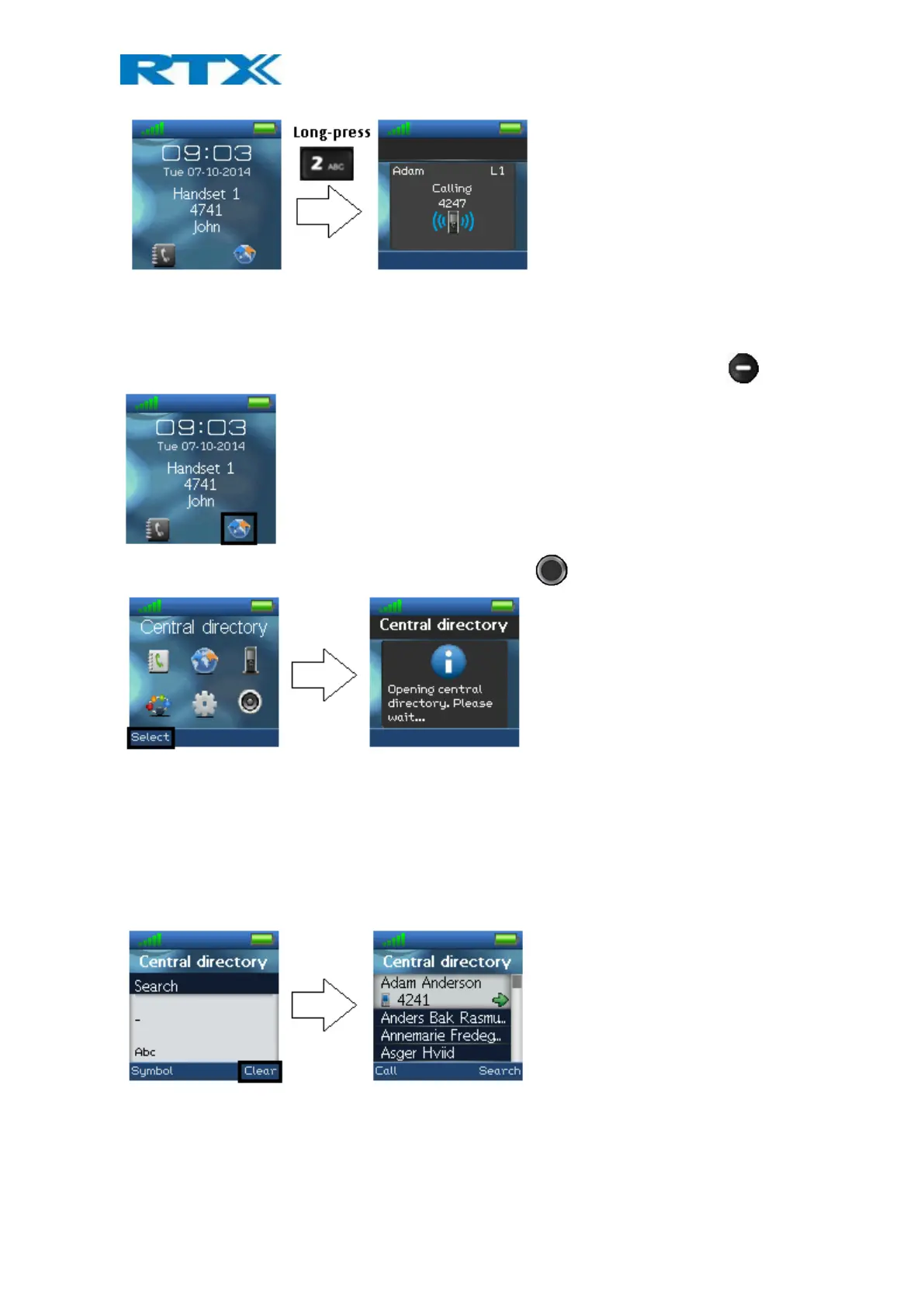
In the “Central directory” menu different contacts can be called according to which list the system administrator
has setup in the base system. This menu can be entered directly from idle with the right softkey
Otherwise the menu can be opened by pressing the selection key in idle and choosing “Central directory”.
6.2.1 LDAP Mode and Local Mode
The “Central directory” can be set to LDAP Mode or Local Mode via the web interface of the base station (see [2]
for additional information on this).
When set to LDAP mode, opening the central directory will show a search screen as displayed in the following. By
leaving the search field empty and pressing the middle softkey “Search” all the contacts in the central directory
will be displayed.
NOTE: When the central directory is in LDAP mode pressing right softkey “Search”, the handset will return to the
“Search” field and a new search for a contact can be made. Pressing the red “On-hook” button in the central
directory will send the user back to idle.
If the central directory instead of LDAP mode is set to Local mode, opening the central directory will get you
directly to browsing mode. To enter search mode press the right softkey as displayed below.



 To Next Page