SME VoIP Handset guide
Proprietary and Confidential Page | 9
3 Phone Overview
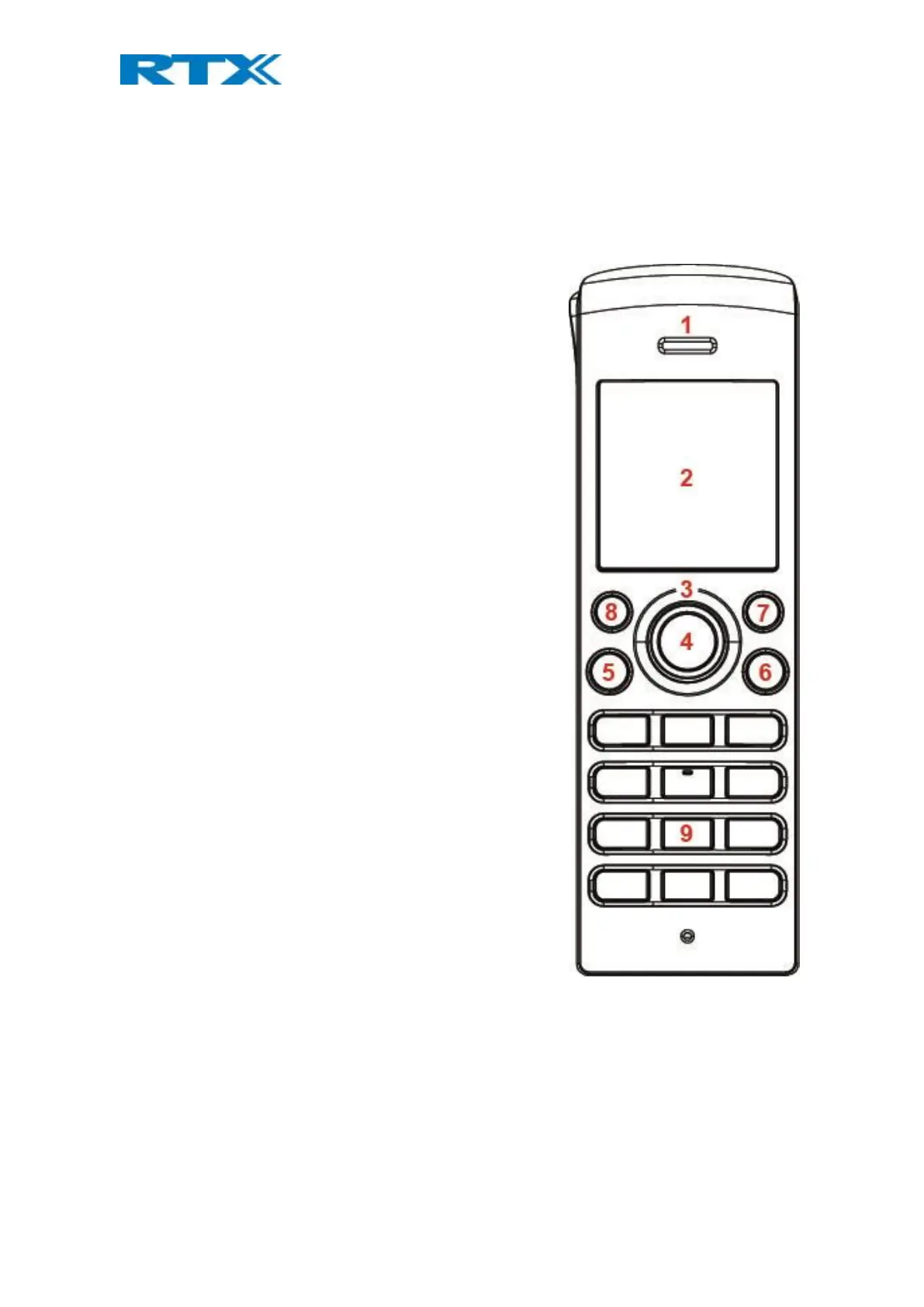
This section contains an overview of the handset from a front and a rear view.
3.1 Handset – Front View
1. Earpiece Speaker
2. Screen
3. Navigation Keys (Up/Down/Right/left)
4. Selection Key (Centre of Navigation Keys)
This functions as the activity menu key. Press this in idle to
enter all the menus available on the handset.
5. Call Key/ Accept Call Key (Off-hook key)
Press to answer a call, and it functions as a shortcut to the
call list.
6. End, ON/OFF Key, Back Key (On-hook key)
Press to end call, to return to a previous menu, and to
switch the handset on/off by long-press.
7. Right Softkey
Are used for different commands in the different menus on
the handset, and it changes according to what is displayed
on the screen.
8. Left Softkey
Are used for different commands in the different menus on
the handset, and it changes according to what is displayed
on the screen.
9. Numeric Keypad



 To Next Page