SME VoIP Handset guide
Proprietary and Confidential Page | 23
6.4 Connectivity
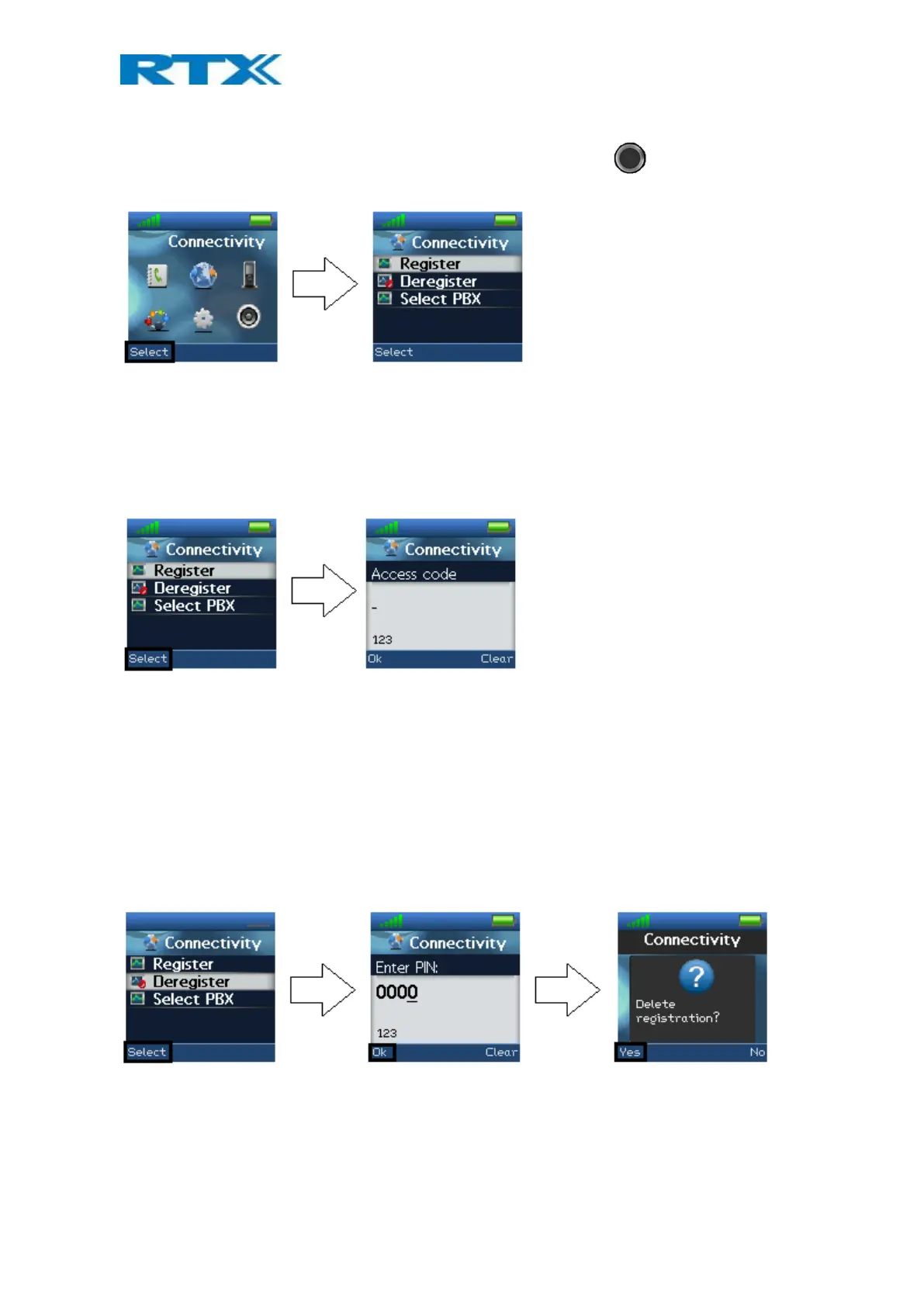
The “Connectivity” menu is entered in the menu by pressing the selection key in idle and choosing this
menu.
In this menu it is possible to register or deregister the handset to a certain base system.
6.4.1 Register
When a handset is to be registered on a base system, the user will be prompted for an access code (base
registration PIN) before the registration procedure is started.
The access PIN code is default “0000” and cannot be changed via the handset. The access PIN code can only be
changed via the web interface on the base (please check the additional document via [2] for more information
about handset registration on a base system).
6.4.2 Deregister
The handset can be deregistered from a base station system. When deregistering a handset, the user will in this
case be prompted for a PIN code (base deregistration PIN), the PIN code is default “0000” and cannot be
changed via the handset. This is displayed below.
When the registration that should be deregistered is selected, a warning message “Delete registration?” will be
displayed as seen above. The user must accept the deletion by pressing the left softkey “Yes”. The right softkey
“No” cancels the operation.
6.4.3 Select PBX
In the “Select PBX” menu it is possible to select another PBX for the handset to use.



 To Next Page