SME VoIP Handset guide
Proprietary and Confidential Page | 39
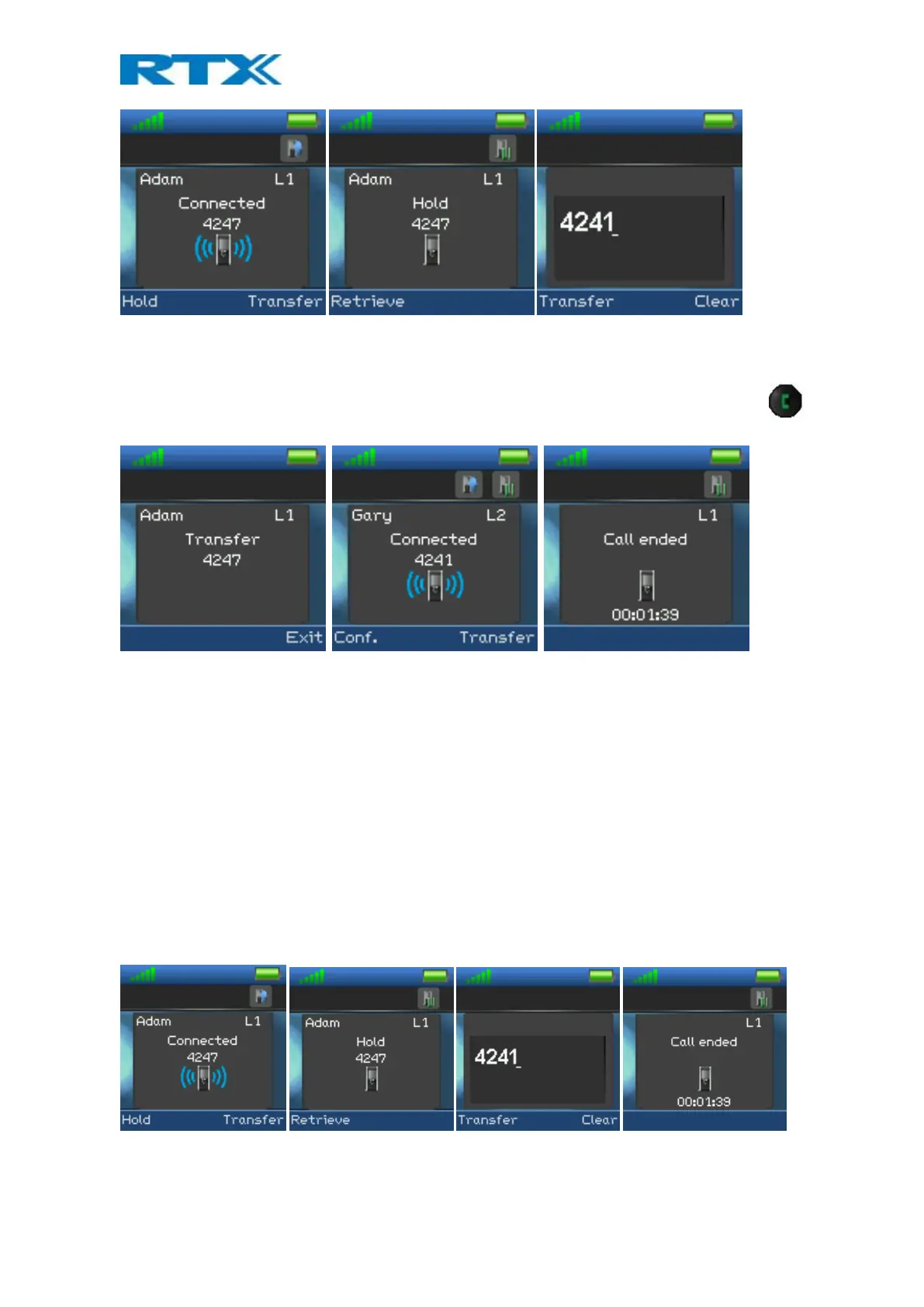
2. Press the right softkey “Transfer” on either of the handsets in call. The counterpart of the call is put on
hold.
3. Enter the number that the transfer should be made to and press the green “Off-hook” button
4.
5. A ring back tone is heard, and the third party is called.
6. As the third party answers the call, the handset initiating the transfer will show a connected screen as
seen above.
7. To make the transfer after the third party has answered the call, press the right softkey “Transfer”. The
call is transferred so that the second and third party are now in call and a “Call ended” screen is
displayed on the handset that initiated the transfer as seen above.
NOTE: It is also possible to make an attended transfer by pressing either the left softkey “Hold” instead of
pressing the right softkey “Transfer” in step 2.
7.4.2 Unattended Transfer
When making an unattended transfer, the call will be transferred directly to a third party without the party
initiating the transfer needing to call this third party before the transfer.
1. Initiate a call with a counterpart so that the handset displays “Connected” as shown above.
2. Press the right softkey “Transfer” on either of the handsets in call, and the counterpart of the call is put
on hold.



 To Next Page