SME VoIP Handset guide
Proprietary and Confidential Page | 33
6.6 Audio Settings
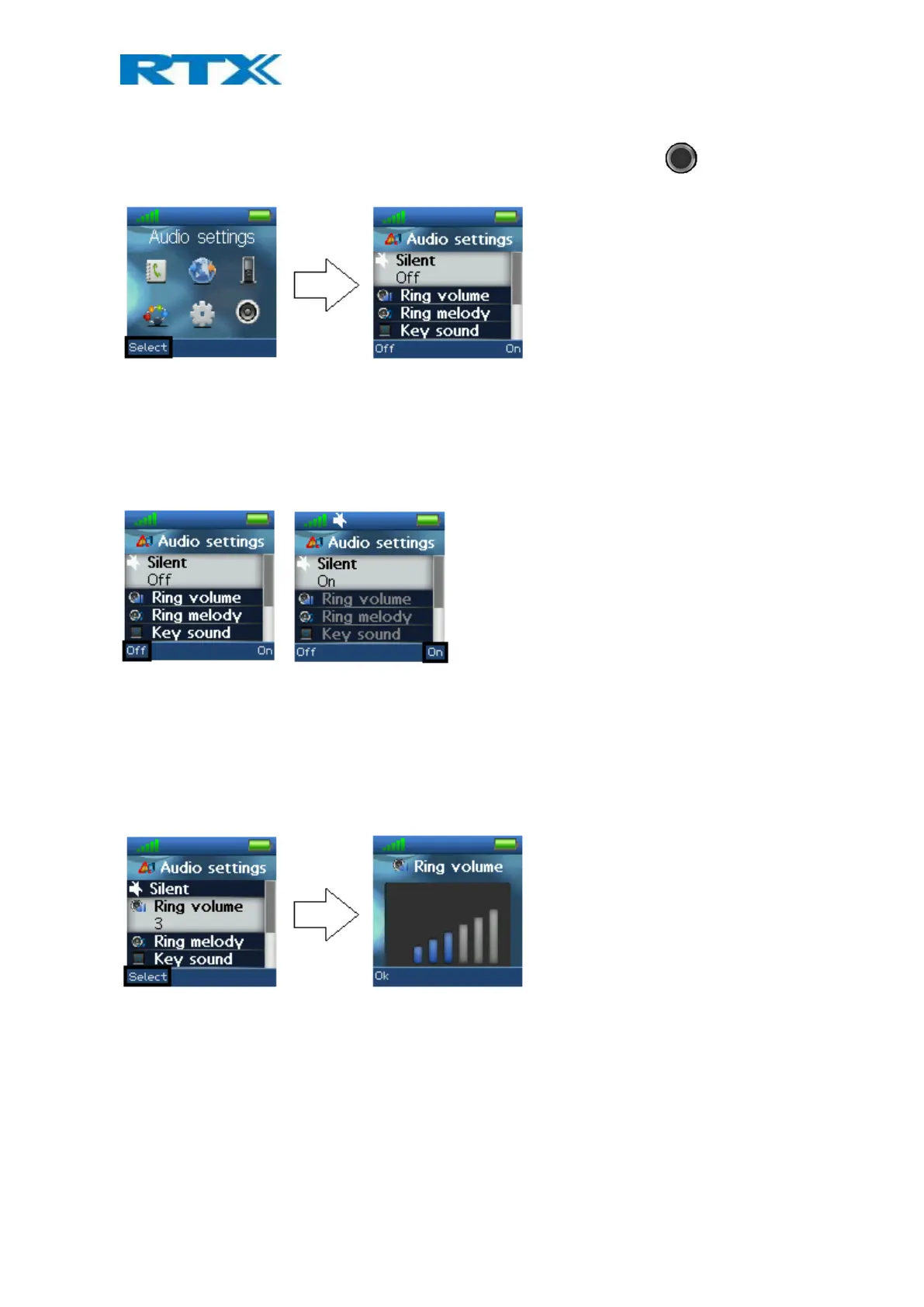
The “Audio Settings” menu is entered through the menu by pressing the selection key in idle. It contains
different settings for the sounds and ringing on the handset.
6.6.1 Silent Mode
The “Silent” profile can either be enabled with the right softkey “On” or disabled with the left softkey “Off”.
When the “Silent” profile is enabled, no sounds are played on the handset and the handset does not ring on
incoming calls or messages.
In the “Audio settings” menu no other settings can be entered when “Silent” is set to “On”.
6.6.2 Ring Volume and Ring Melody
When the handset receives an incoming call, different ring volumes and melodies can be selected.
Ring volume
The ring volume can be adjusted from mute to volume 6. The currently applied level is displayed when entering
the menu “Ring volume”.
To select the desired ring volume, the navigation keys up/down or right/left are used to respectively increase or
decrease the volume. Pressing “Ok” saves the current ring volume. The currently applied ring melody is played
when adjusting the ring volume so that the respective ring volume can be heard before selected.
Ringer mute
The ringer is switched off when the lowest level is selected in “Ring volume”, and a mute image is showed in the
display as seen below.



 To Next Page