© Safe Fleet | 2020 | All rights reserved | Part #: 700-1234 R1
DH4 Installation Guide
p. 27
DH4 Basic Conguration
Camera Settings
When a DVR is installed with less than the full number of cameras connected, disable the unused camera input settings to
settings for unused camera inputs as follows:
• Record FPS OFF
• Record Camera Audio OFF (to save disk space)
• Alarm/Signal Alarms FPS OFF
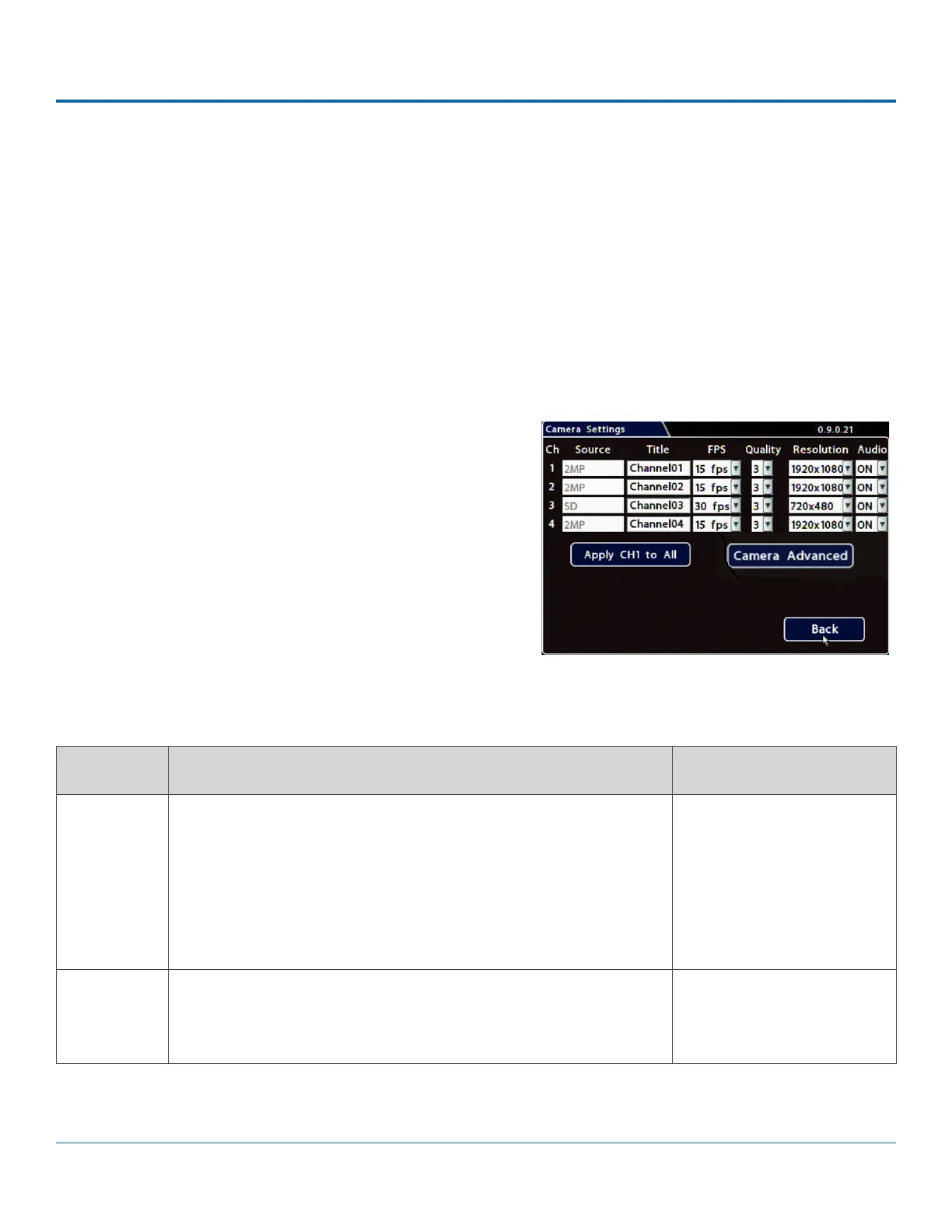
To set the cameras:
1. Select Record Camera to open the tab.
2. Set up the cameras. For details, see Menu Options, below.
3. Click Back to save Camera settings, then click Back again to
ITEM DESCRIPTION VALUE [DEFAULT]
Title For each camera, enter a name that describes the view it is
recording. For example: "Front", "Step", "Mid", "Rear", "Stop Arm".
For instructions on how to enter text with the mouse, see
DH4 Operation: Using On-screen Keyboards.
Camera titles display in live views and during playback. For more
information, see Metadata Details in DH4 Conguration: Title/Display
Menu.
[Channel01]...[Channel04]
FPS
(channel
speed)
Leave channel speed at the default setting unless you have special
requirements.
This sets the recorded frame rate, per second.
[15 fps.], OFF, 1 fps, 5 fps, 7
fps, 10 fps, 15 fps, 20 fps,
30 fps
Menu Options



 To Next Page