© Safe Fleet | 2020 | All rights reserved | Part #: 700-1234 R1
DH4 Installation Guide
p. 40
DH4 Advanced Conguration
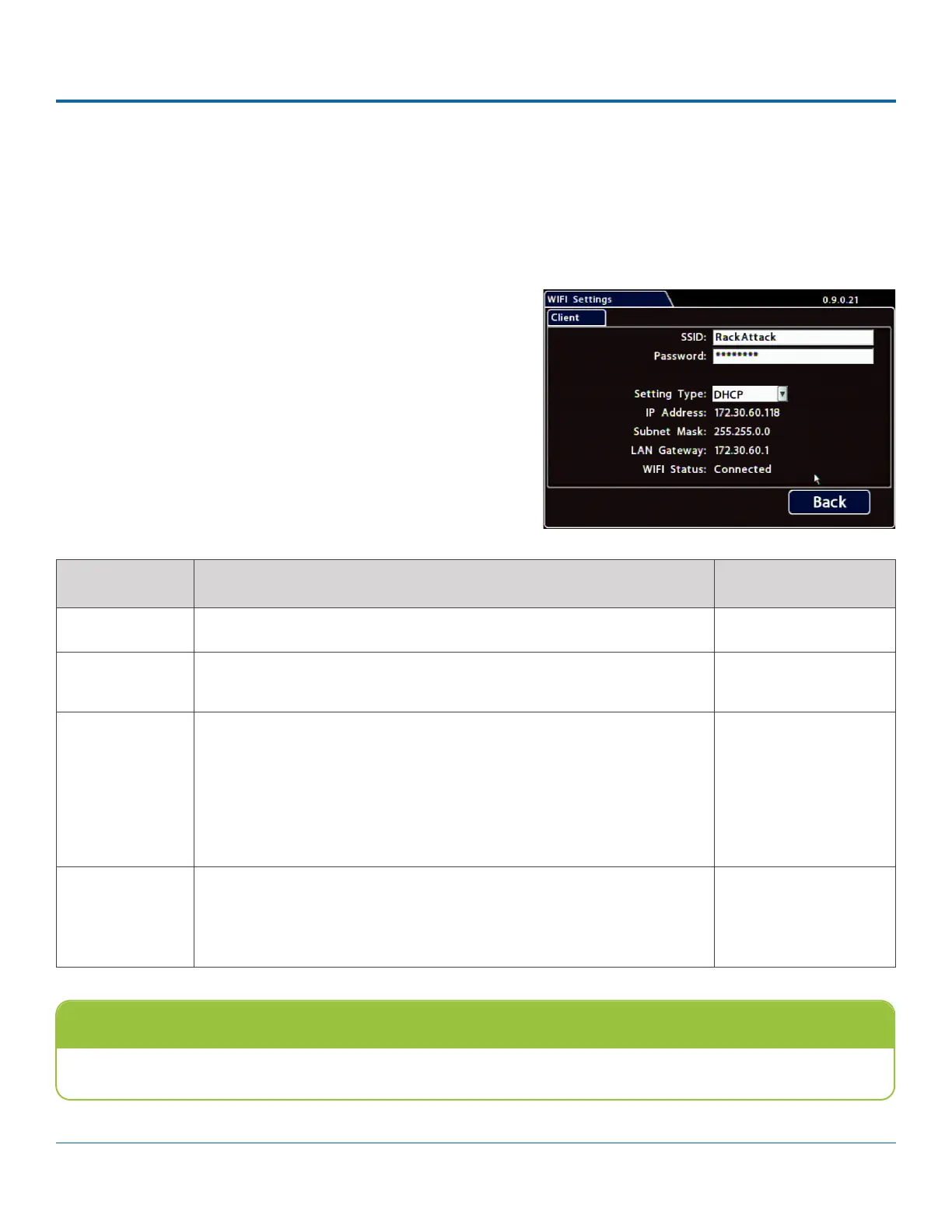
Built-in WIFI Settings
For information on supported applications, see the vMax Web, Depot Manager, and Commander documentation available
on the Safe Fleet Community.
:
1. Select Network Advanced WIFI to open the tab.
2.
For details, see Menu Options, below.
3. Click Back to save settings, then click Back again (twice) to
ITEM DESCRIPTION VALUE [DEFAULT]
SSID Enter the WIFI network name n/a
Password Enter the WIFI network password
administrator.
n/a
Setting Type Choose Static IP or DHCP to enable built-in WIFI.
Contact the network administrator for the required Setting Type.
Static IP uses a permanent address on the network, assigned by the
IP address assignment.
OFF disables built-in WIFI capability.
[OFF], Static IP, DHCP
IP Address,
Subnet Mask,
LAN Gateway,
WIFI Status
When the DVR is connected to an access point, the network details
appear automatically, and WIFI Status displays Connected (otherwise
Not Connected).
n/a
Menu Options
Note: Wireless network should not be enabled if WIFI is unused
Leave Setting Type OFF when built-in WIFI is not being used.



 To Next Page