© Safe Fleet | 2020 | All rights reserved | Part #: 700-1234 R1
DH4 Installation Guide
p. 7
DH4 Installation
Installing the DVR
The DVR typically ships with the locking front cover, mounting plate, and cable cover off, but in the shipping box. The hard
disk drive is in a separate box in the system shipping kit.
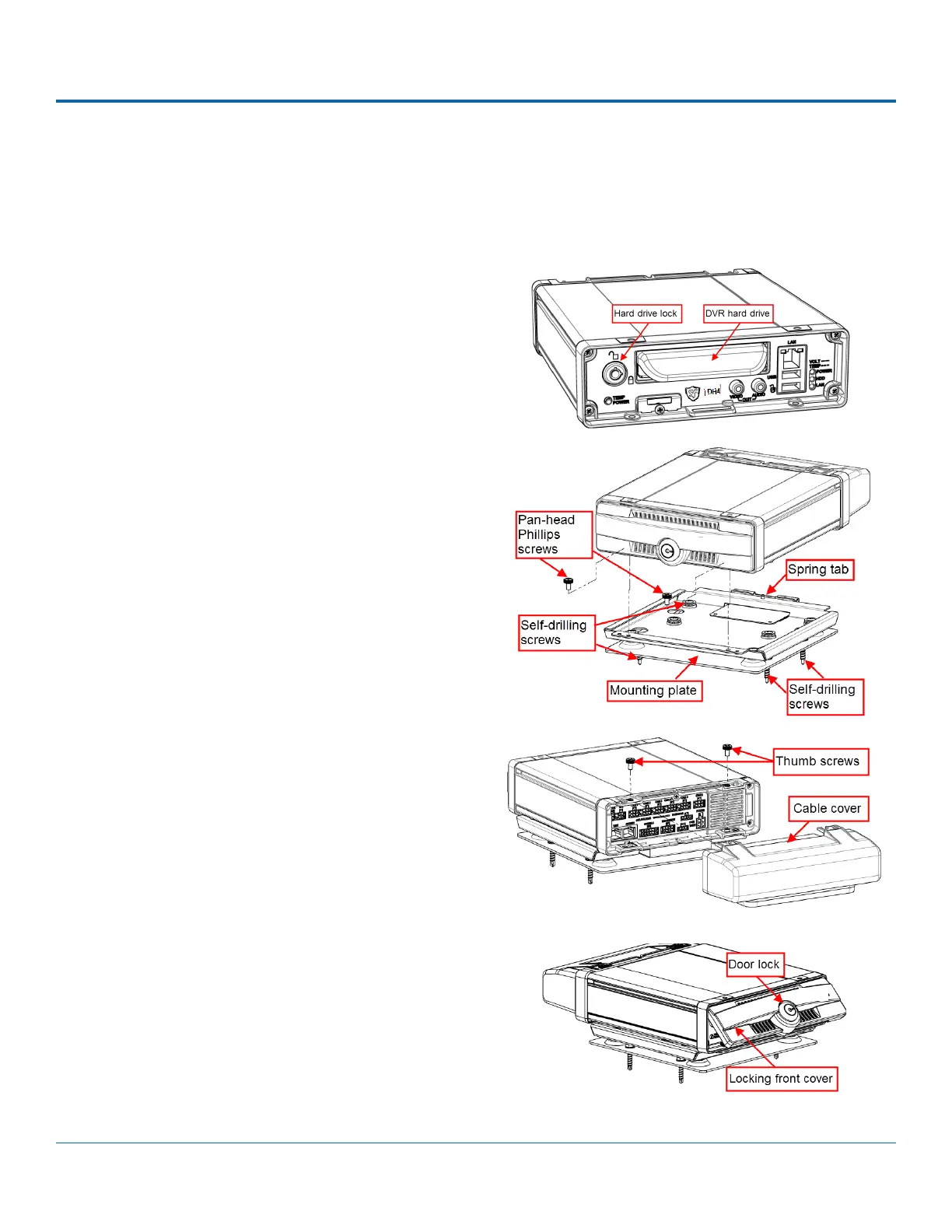
To install the DVR:
1. Select an appropriate mounting location and orientation:
horizontal or vertical.
2. Insert a hard drive in the DVR.
3. Insert the key into the hard drive lock and rotate a
quarter turn to lock the drive.
4. Use the mounting plate to mark the desired position of
the DVR and drill the four mounting holes.
5. Fasten the mounting plate to the mounting surface with
the four self-drilling screws.
6. Slide the rear bottom edge of the DVR into the spring tab
on the back edge of the mounting tray.
7. Attach the front bottom edge to the front of the DVR
using the two pan-head Phillips screws.
8. Connect the necessary cables and components.
9. Attach the cable cover to the DVR using the thumb
screws provided.
10. When DVR installation is complete, attach the front door
by hooking the door along the top edge and turning the
key to the locked position.



 To Next Page