© Safe Fleet | 2020 | All rights reserved | Part #: 700-1234 R1
DH4 Installation Guide
p. 41
DH4 Advanced Conguration
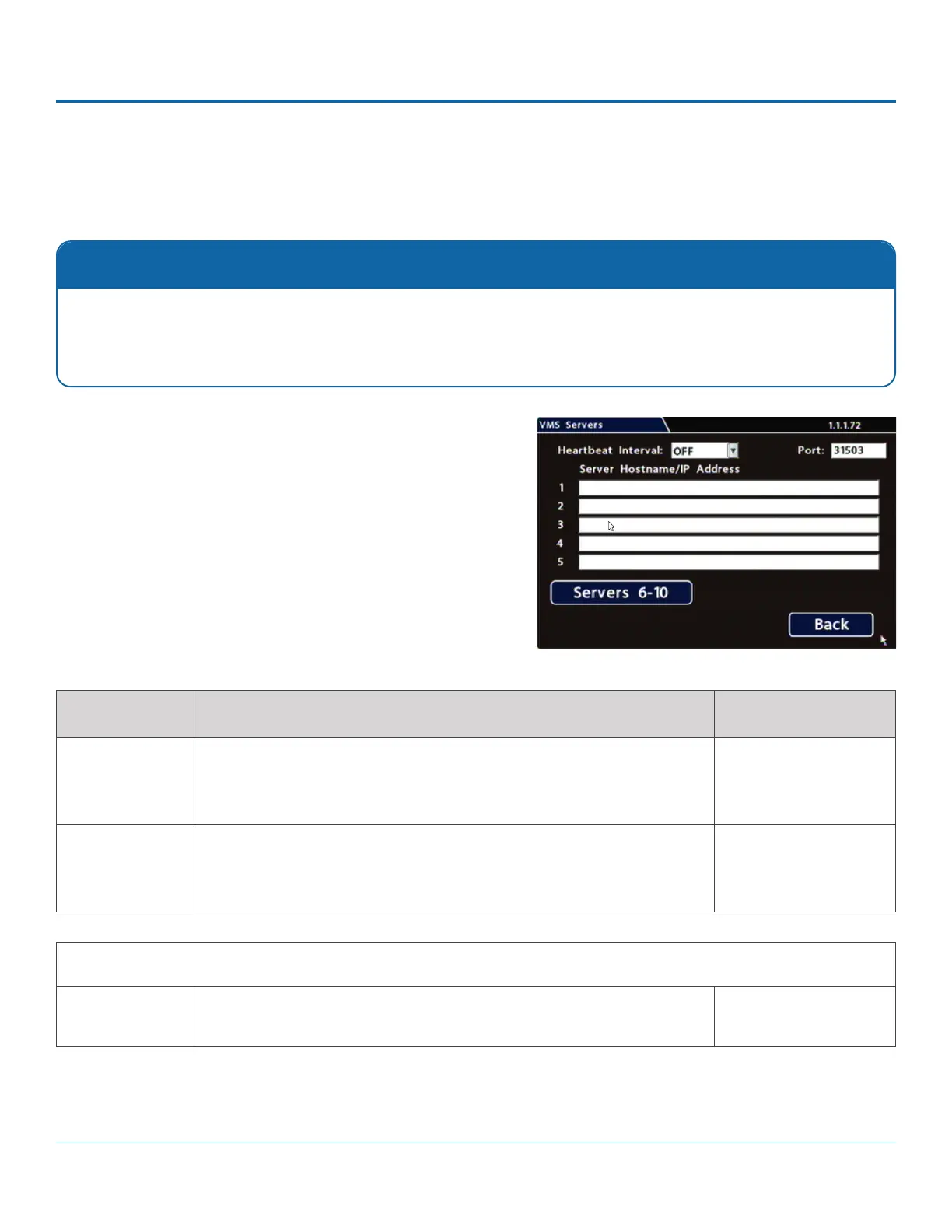
VMS Servers
Conguring VMS Servers (Commander Settings)
1. Select Network Advanced VMS Servers to open the
tab.
2. Menu
Options, below.
3. Click Back to save settings, then click Back on successive
Qualied IT Administrator Required
Contact Safe Fleet Engineering Services or Technical Support for more information.
ITEM DESCRIPTION VALUE [DEFAULT]
Heartbeat
Interval
DVR status messages to all available VMS Servers.
We recommend a Heartbeat Interval setting of one minute.
[OFF], 1 min, 2 min, 3
min, 4 min, 5 min
Port Enter a Port for VMS Heartbeat communication as determined by a
We recommend the default Port setting.
[31503]
Menu Options
Servers 1 to 10
Hostname/IP
Address
Up to 10 server hostnames or IP addresses that can receive VMS heartbeat
Maximum 64
characters.



 To Next Page