© Safe Fleet | 2020 | All rights reserved | Part #: 700-1234 R1
DH4 Installation Guide
p. 33
DH4 Basic Conguration
Applying DVR Settings
management application if the DVR is equipped with wireless capabilities. Video Management applications can also
perform batch updates on multiple DVRs (for more information, see the Commander and Depot Manager guides).
IMPORTANT
Do not edit or copy DVR conguration locally when making updates over a network.
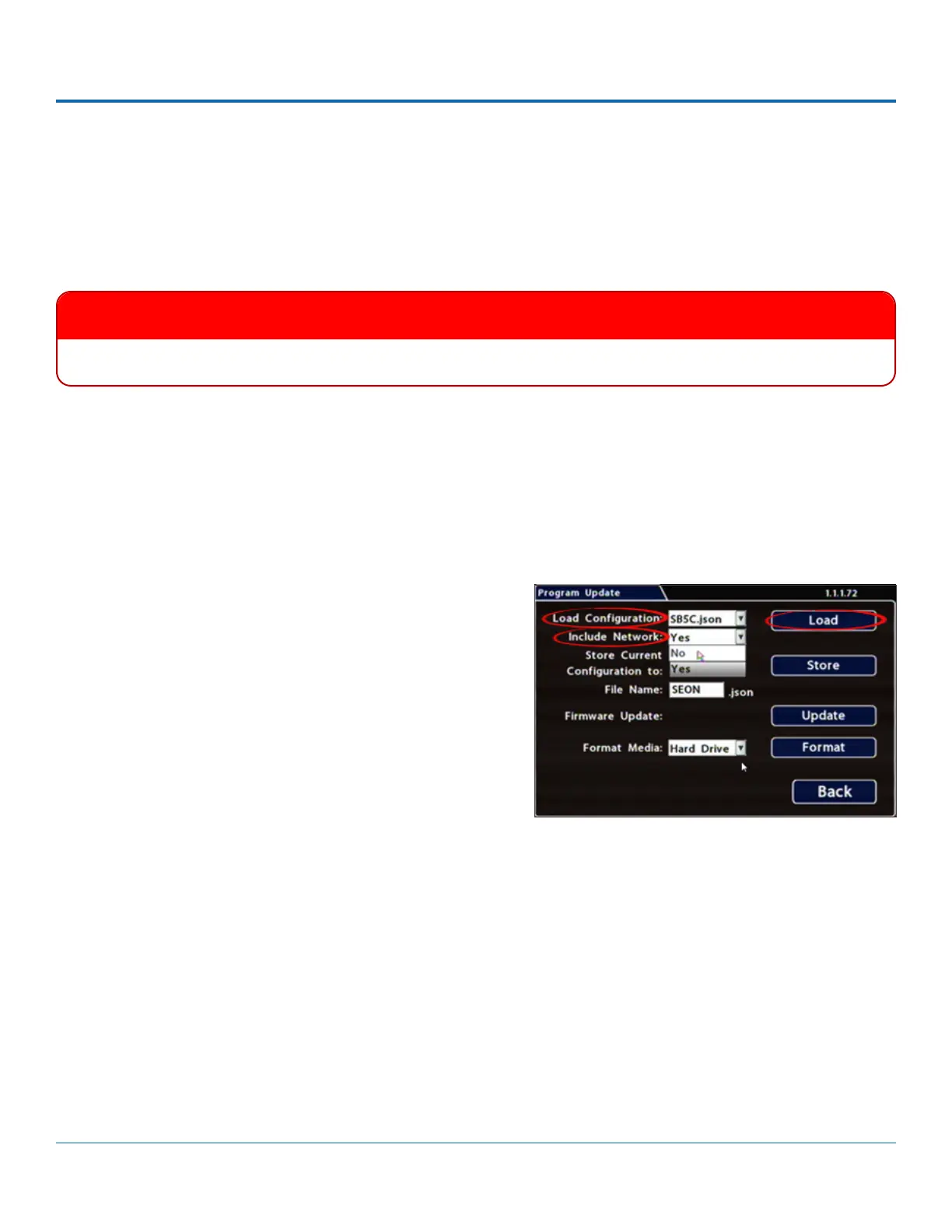
5. Select Conguration System Program Update.
6. Use the Load Conguration
folder of the USB drive are available from the drop-down
menu.
7. From the Include Network pull-down menu, select whether
or not to overwrite DVR network settings:
• No keeps existing DVR network settings.
• Yes
1. Power up the DVR using the vehicle ignition.
2. Connect the portable video monitor and USB mouse.
3.
4. From the On-Screen Display, right-click anywhere in Live view to display the Main Menu.
8. Click Load, then select Yes
9. Click Back in the Program Update and System Settings
10. Remove the USB memory device.
11.
including:
• Title/Display Main Title - generally contains the bus #/vehicle ID where the DVR is installed
•
• Alarm/Signal G Sensor calibration (if the external G-Sensor is installed)



 To Next Page