List of settings in Adjustment menu
TsDHW- Reservoir temperature preset.
Night cooling- YES enables / NO disables night
cooling in hours 0
00
÷5
00
.
Night cooling ON – DHW reservoir temperature
(T2 sensor), if exceeded at 0
00,
if night
cooling function is enabled, the controller will
decide on night cooling activation.
Night cooling OFF – DHW reservoir
temperature (T2 sensor), to which the
controller will cool the reservoir (if night
cooling is enabled and in hours 000÷5
00
Night cooling ON temperature is
exceeded).
Alarm TCOLcr – Switching on (YES) or off (NO)
the alarm on exceeding TCOLcr
temperature. This function does not affect
the controller’s operation. If the setting is set
as NO, the controller will not report any
alarm after TCOLcr temperature has been
exceeded on the collector’s sensor.
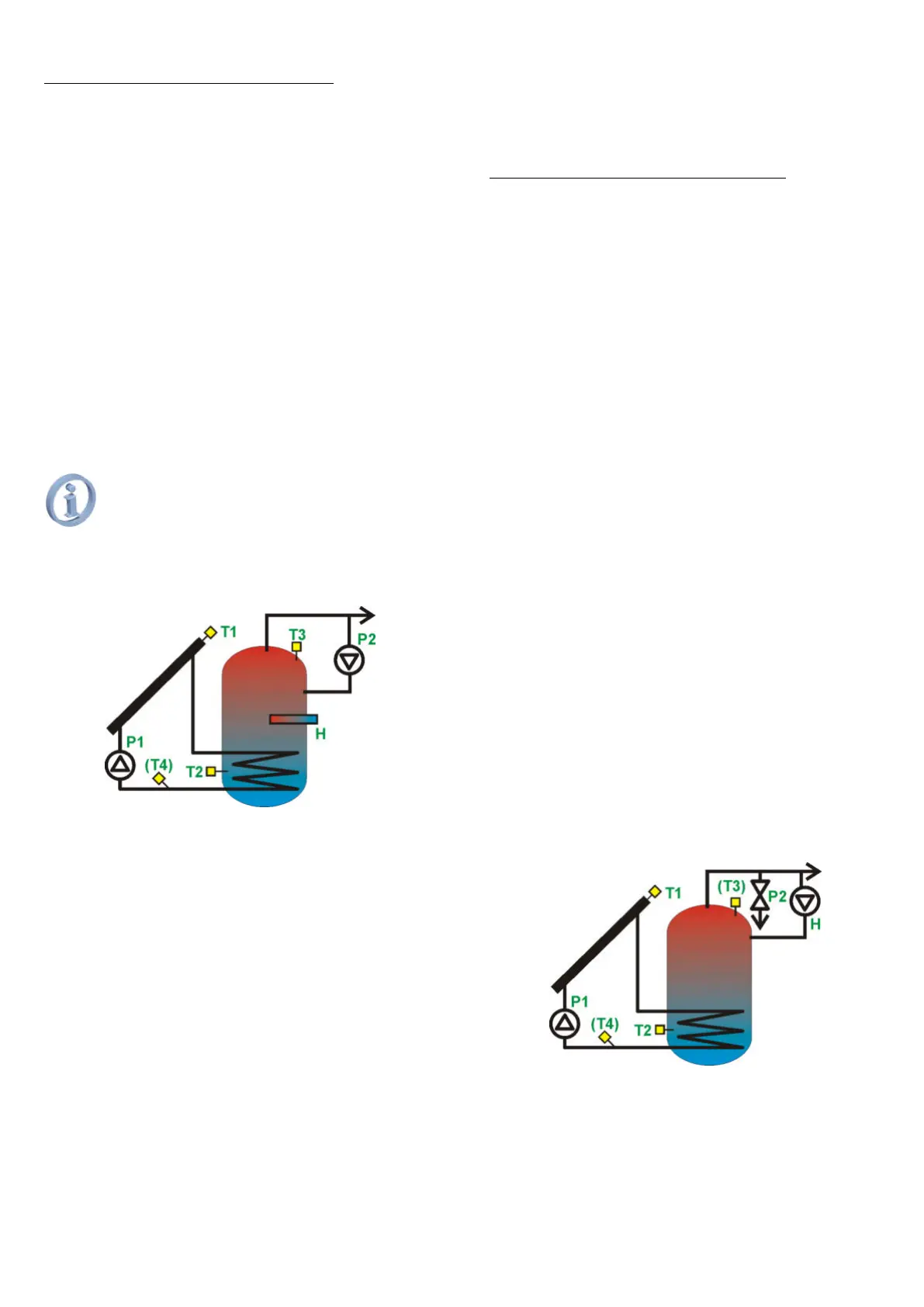
13.3. Solar thermal scheme B
Loading of DHW reservoir with a function of
extra heating by the use of a heater
Fig. 13.2 Solar thermal scheme B
The collector pump will be started with
100% capacity, if the difference between T1 and
T2 exceeds value of dTonDHW
setting and it will work for the time as specified
in tP. If after this time the difference between T1
and T2 is still above dTonDHW,
the pump speed will remain at 100%. If the said
difference T1 and T2 drops below dTonDHW,
the controller will start reducing the pump speed,
until the difference between T1
and T2 reaches the value specified as
dToffDHW. When the difference between T1 and
T2 is between the values dTonDHW ÷
dToffDHW, the controller will calculate and set
pump speed proportionally. If dToffDHW is
reached, the pump will work at minimal speed
(parameter Pmin), below it will be stopped.
The controller will heat up CWU reservoir
using a heater or other heat source (H output)
up to the temperature of TDHWmin. Functioning
of H output depends also on eco function set up,
as described in „Adjustment” menu.
TDHWmin temperature is set through
main menu item TDHWmin.
List of settings in Adjustment menu:
TsDHW- Reservoir temperature preset.
Eco mode- economic mode on or off (power
saving) YES Extra heating of DHW reservoir
with a heater or other source of heat (H
output) to the temperature of TDHWmin,
when the collector is not working (P1 pump
stops due to poor sunlight).
When the collector pumpis started, the
controller will turn the heater off (H output).
NO Extra heating of DHW reservoir with a
heater or other source of heat (H output) up
to the temperature of TDHWmin, regardless
if the collector supplies energy or not.
Night cooling- YES enables / NO disables night
cooling mode in hours 0
00
÷5
00
.
Night cooling ON – DHW reservoir temperature
(T2 sensor), which if exceeded at 0
00
(if night
cooling function is enabled), the controller
will decide on night cooling activation.
Night cooling OFF – DHW reservoir
temperature (T2 sensor), to which the
controller will be cooling down the reservoir
(if night cooling function is enabled and in
hours 0
00
÷5
00
the temperature of Night
cooling ON has been exceeded).
Alarm TCOLcr – Switches on (YES) or off (NO)
the alarm on exceeding TCOLcr
temperature. This function will not affect the
controller operation. If the parameter is set
as NO, the controller will not alarm when the
temperature of TCOLcr is exceeded at the
collector’s sensor.
13.4. Solar thermal scheme C
Loading of DHW reservoir with excess heat
discharge function.
Fig. 13.3 Solar thermal scheme C
The collector pump will be started with
100% capacity, if the difference between T1 and
T2 exceeds value of dTonDHW
setting and it will be working for the time
specified in tP parameter. If after this time the
difference between T1 and T2 is still above
dTonDHW, the pump speed will remain at
Due to heat discharge function, this
scheme has no night cooling function.



 To Next Page