18. CASING CLOSING
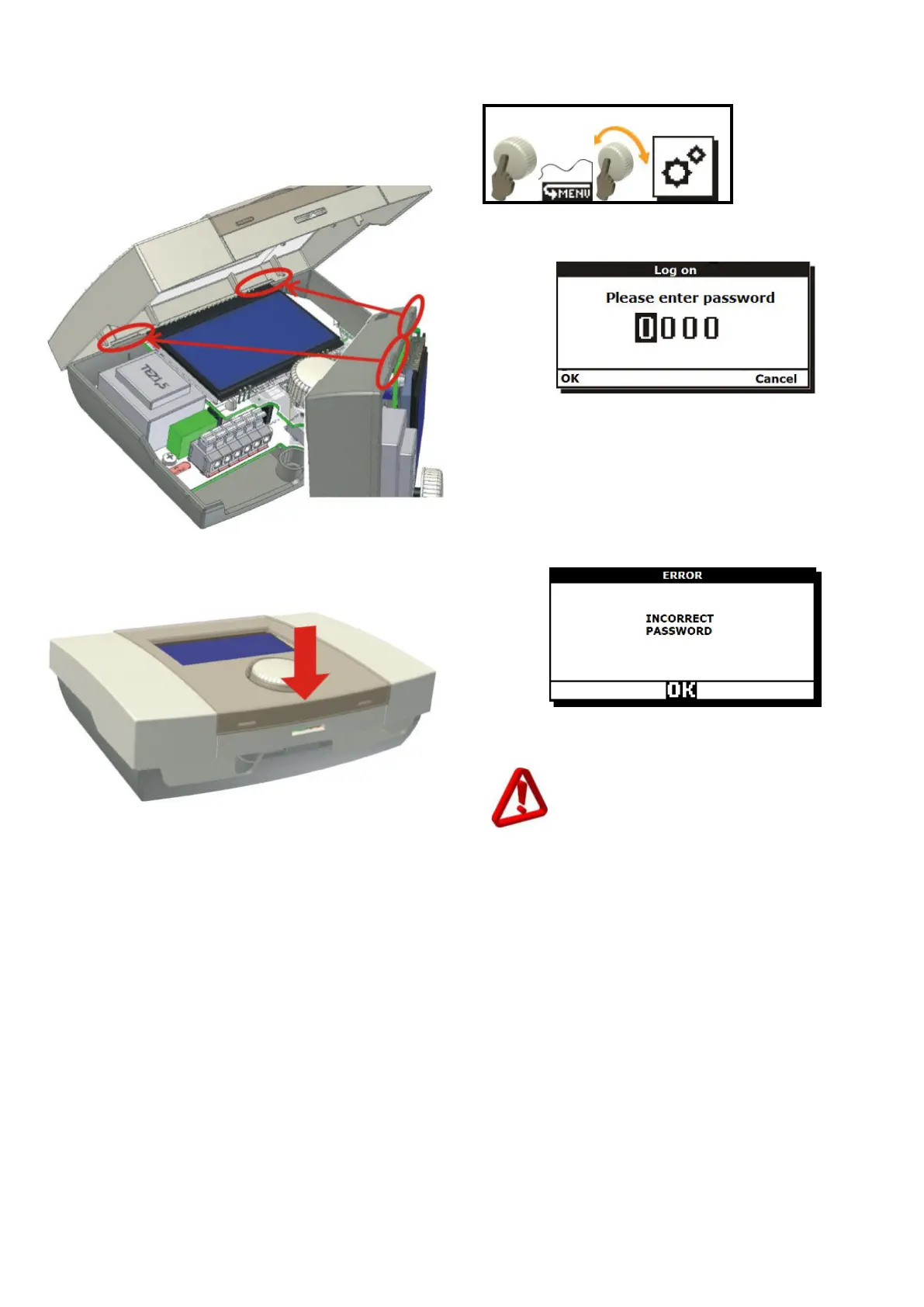
To close the unit casing hook the casing cover
with recesses against the base insets (shown in
Fig. 18.1)
Fig. 18.1 Casing closing first step
Then, press the cover in place indicated by red
arrow (Fig. 18.2), until you clearly hear the latch
click.
Fig. 18.2 Casing closing second step
19. CONTROLLER OPTIONS
Access to the controller options is protected
with password and to make any changes you
must log-in with a service password.
Fig. 19.1 User login screen
To login place cursor in selected digit by its
rotating, then press the button. When the digit is
blinking, rotate the encoder to change its value.
Confirm the digit by pressing again. Edition will
move the cursor to next position. Confirm login
by using “OK" or abandon login by using
“CANCEL” option. If the password is wrong, the
unit will display a message Fig. 19.2.
Fig. 19.2 Information on incorrect password
Repeat login procedure.
Settings should be modified only by
trained persons with adequate technical
skills. Wrong parameters may cause
irregular performance or damage to the
equipment.



 To Next Page