1 - 14 WS80A Service Manual
▐ Touch Screen
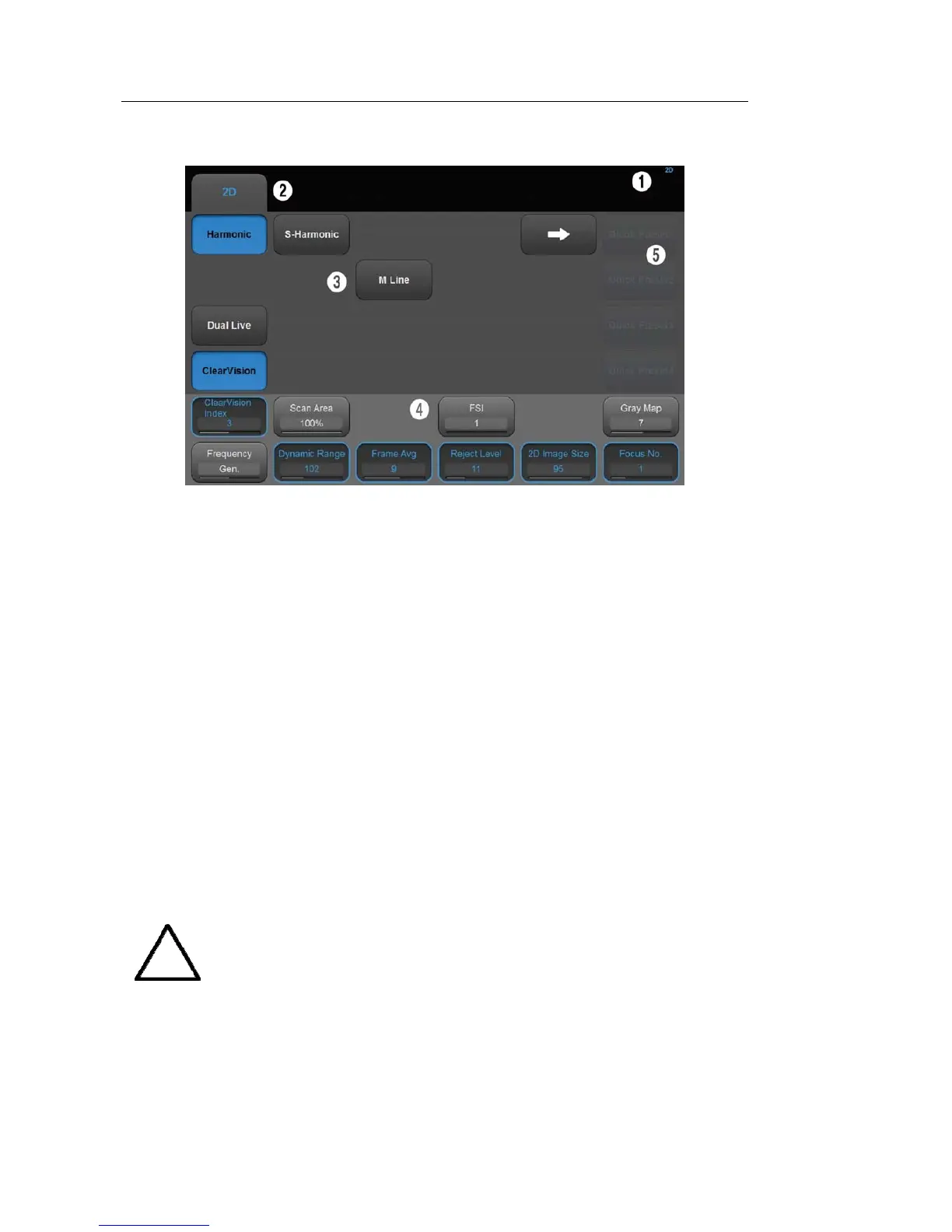
[Figure 1.7 Touch Screen]
The touch screen is an operating tool that can be touched by the user to input data. The
functions that are available in the current mode are shown in the form of buttons or a
dial-button.
■ Touch screen display
① Information Area: Shows the title of the touch screen currently displayed.
② Tab Area: Shows diagnostic modes and utilities under different tabs. The touch screen
can be changed by pressing one of the tabs.
③ Menu Area: The menu items that are available in the current input mode are shown in
the form of buttons. The user can access the desired menu item by pressing the
corresponding button. The menu currently in use is shown in blue.
④ Soft Menu Area: The soft menu items that are available in the current input mode are
shown.The menus in use are shown with blue borders. Press or rotate the dial-buttons
right below each menu.
⑤ Quick Preset: With predefined diagnosis mode and presets of probes frequently used by
the user, this function provides quick and easy access to frequently used probe in each
diagnosis mode
NOTE
For further details about setting up Quick Preset, please refer to ‘Setup >
General > Quick Preset > Quick Preset Setup’ in ‘Chapter 3 Utilities’.



 To Next Page