-16-
Mechanical Disassembly
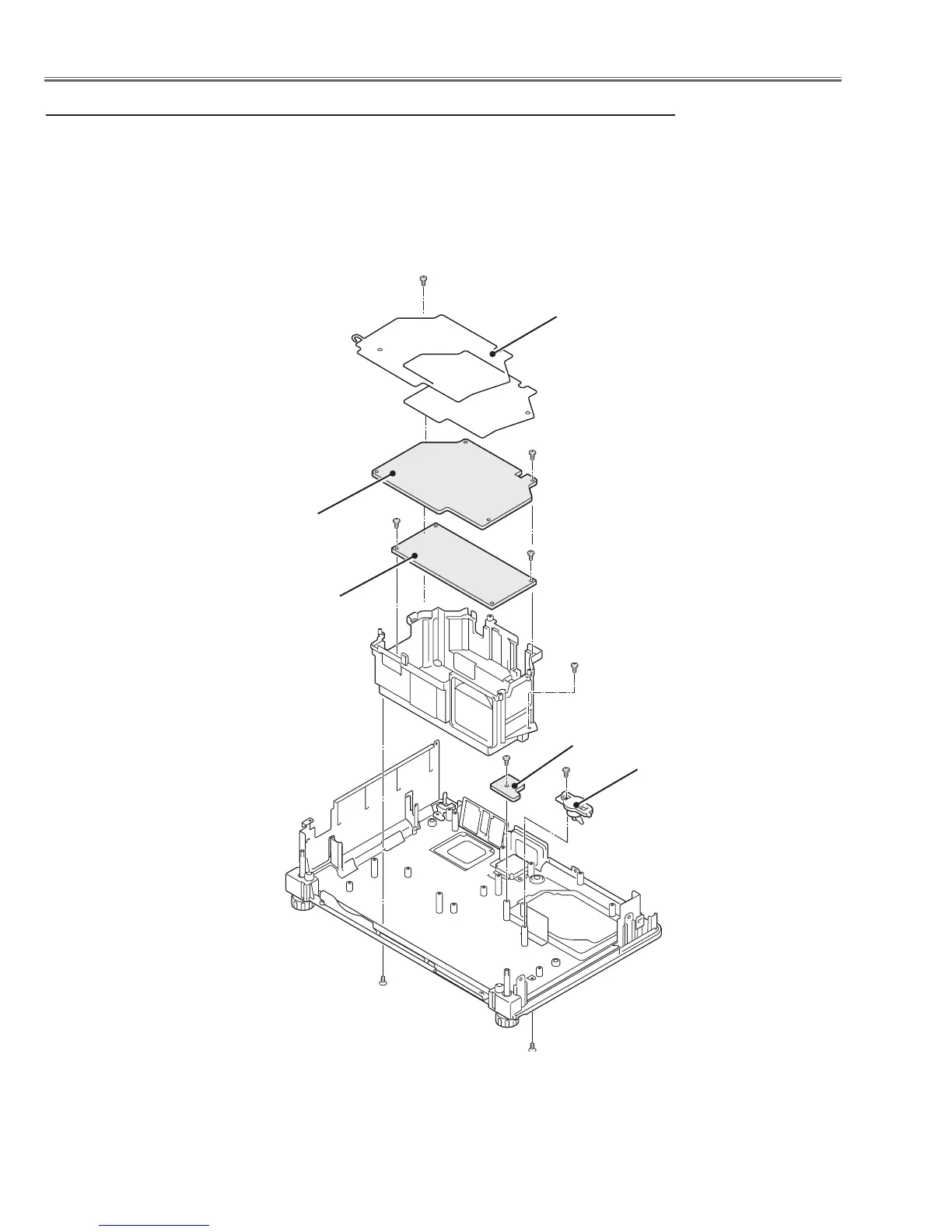
Fig.5
b Power, Ballast, LA Board, Thermal SW(SW902) removal
Isolation sheet (2 sheets)
LA board
Thermal switch
(SW902)
Power board
D(T3x6)x2
E (T3x6)
C(T3x6)
F (T3x6)
Ballast board
1. Remove the 2 screws A( T3x8) (top side), remove the 2 screws B (T3x8)
(bottom side) .
2. Remove the Isolation sheet and remove screw C(T3x6) to remove the
Power board assy.
3. Remove 2 screws D(T3x6) to remove the Ballast board.
4. Remove the screw E (T3x6) and remove the LA board.
remove the screw F (T3x6) and remove the thermal switch (SW902).
B (T3x8)x2
D
B
A
A(T3x8)x2


 To Next Page
 Loading...