18
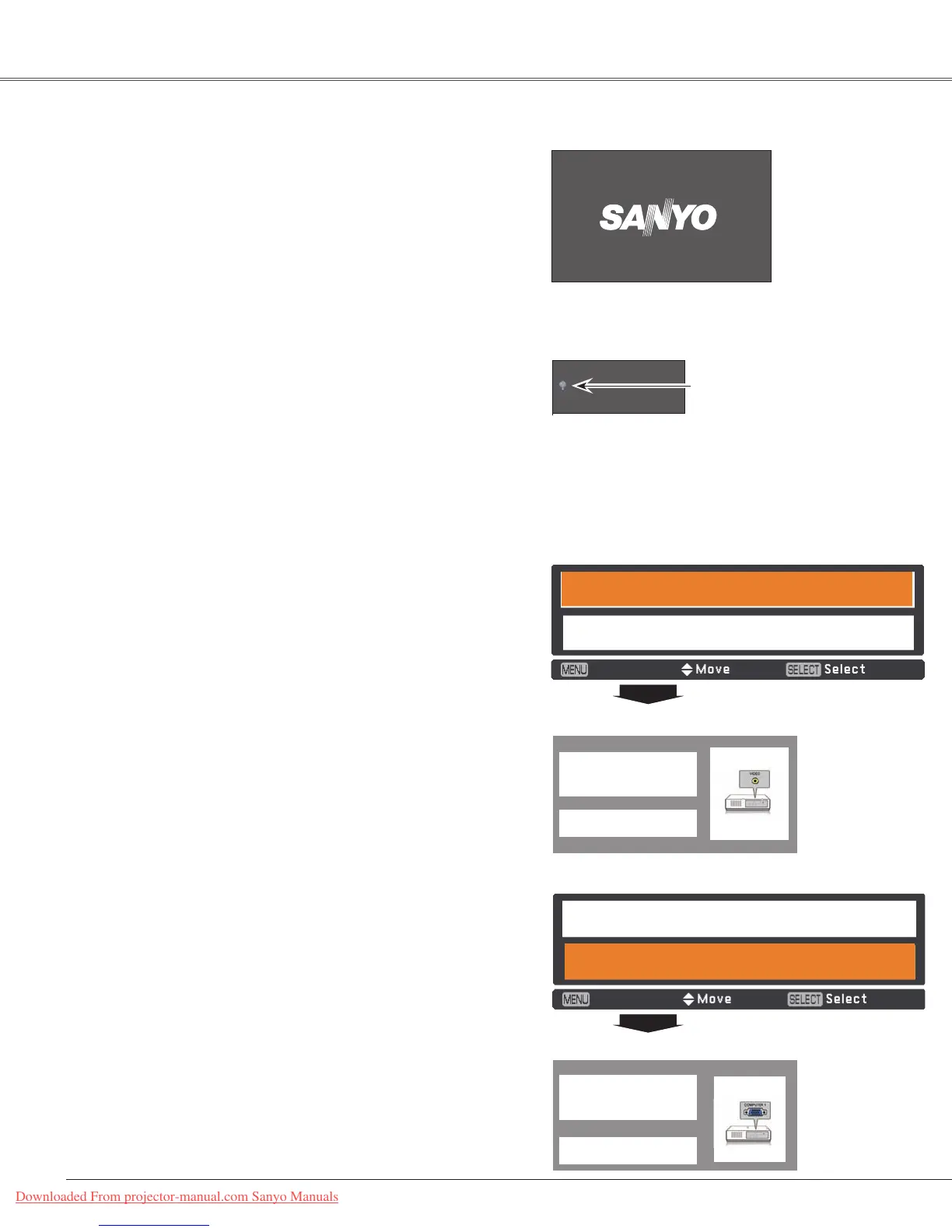
Thepreparationdisplaywilldisappear
after30seconds.
(Seepage52forLampcontrolstatus.)
Turning On the Projector
Connecttheprojector’sACpowercordintoanAC
outlet.ThePOWERindicatorlightsred.Openthelens
cap(seepages8,60).
PresstheON/SYAND-BYbuttononthetopcontrolor
ontheremotecontrol.ThePOWERindicatorlights
greenandthecoolingfansstarttooperate.The
preparationdisplayappearsonthescreenandthe
countdownstarts.
2
3
1
Completeperipheralconnections(withacomputer,
VCR,etc.)beforeturningontheprojector.
Selected Input Source and Lamp Control
Note:
TheFilterwarningandLampreplacement
iconsmayappearonthescreen
dependingontheusagestateofthe
projector.
Basic Operation
16
Lampcontrolstatus
Video
4
Afterthecountdown,theinputsourcethatwasselected
thelasttimeandthelampcontrolstatusicon(seepage
52)appearonthescreen.
Note:
•WhentheLogoselectfunctionissettoOff,thelogowill
notbeshownonthescreen(p.46).
•WhenCountdown offorOffisselectedintheDisplay
function, the preparation display will not be shown on
thescreen(p.45).
•WhentheInputSearchfunctionissettoOn2,theinput
signalwillbesearchedautomatically(p.44).
• WhenOffisselectedintheDisplayfunction,theVideo/
PC selection window and the input signal guidance
windowarenotshownonthescreen.(p.45)
5
Ifthereisnosignalinputwhenstartontheprojector,
orthecurrentsignalismissedwhileoperatingthe
projector,theVideo/PCselectionwindowwillbe
displayedonthescreen,pleasemovethepointerto
inputsourcedesiredbypressingthePoint▲▼buttons
andpresstheSELECTbutton.Andthenfollowthe
inputsignalguidancewindowtocorrectthesignaland
connection.
IftheprojectorislockedwithaPINcode,PINcodeinput
dialogboxwillappear.EnterthePINcodeasinstructed
onthenextpage.
Video / PC selection window
Input signal guidance window
Video / PC selection window
Input signal guidance window
Project Video
Project Computer
Cancel
Project Video
Project Computer
Cancel
Project Computer
Nosignal
CurrentInputsetting:Video
Is signal processed correctly?
Is cable connected properly?
Nosignal
CurrentInputsetting:RGB
Is signal processed correctly?
Is cable connected properly?
Downloaded From projector-manual.com Sanyo Manuals



 To Next Page