43
Setting
Setting
Language
ThelanguageusedintheOn-ScreenMenuisavailablein
English,German,French,Italian,Spanish,Portuguese,
Dutch,Swedish,Finnish,Polish,Hungarian,Romanian,
Russian,Chinese,Korean,Japanese,ThaiandTurkish.
Setting Menu
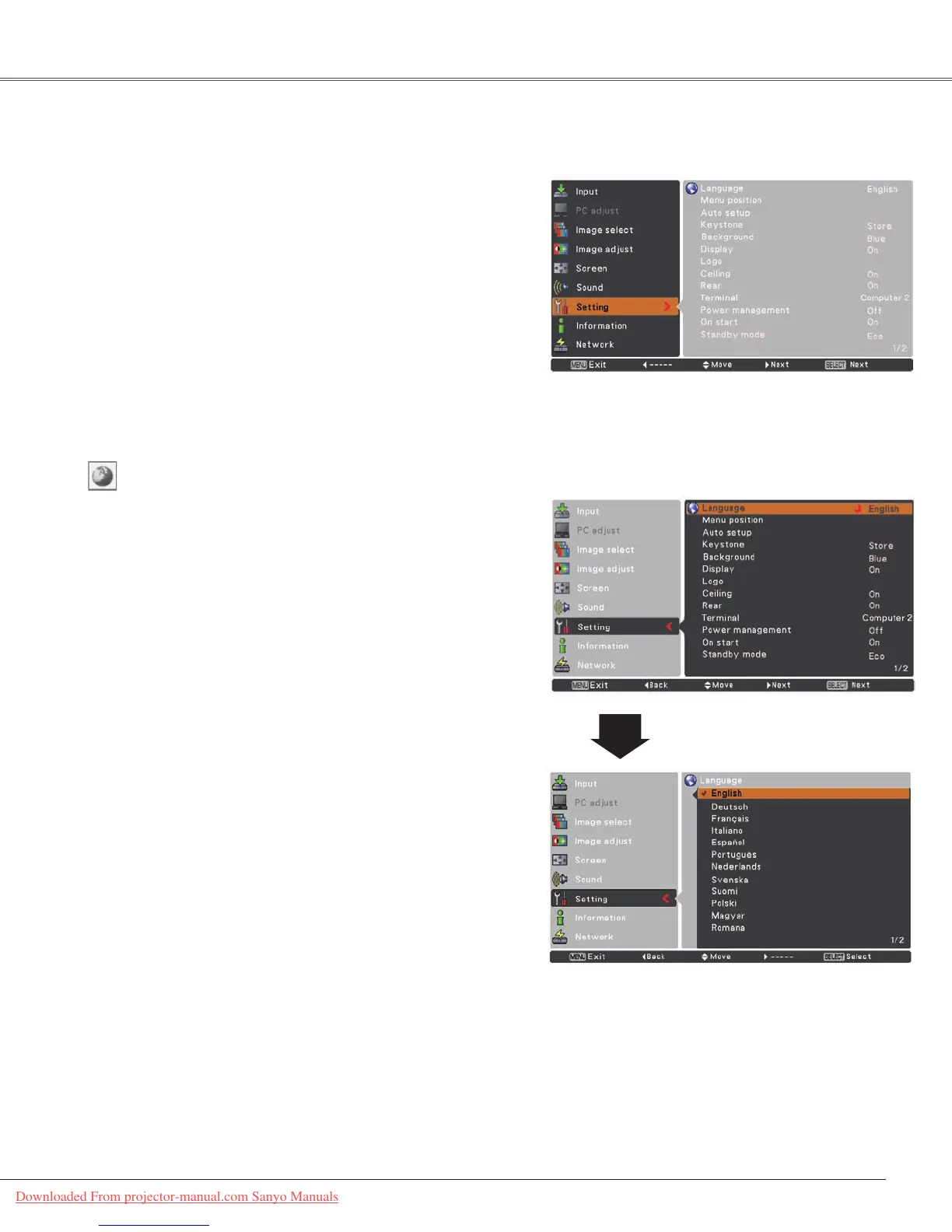
PresstheMENUbuttontodisplaytheOn-Screen
Menu.PressthePoint▲▼buttonstoselectSetting
andpressthePoint►ortheSELECTbuttontoaccess
thesubmenuitems.
1
2
UsethePoint▲▼buttonstoselectthedesireditem
andthenpressthePoint►ortheSELECTbuttonto
accesstheselecteditem.
ThisprojectorhasaSettingmenuthatallowsyoutosetup
theothervariousfunctionsdescribedbelow.
Language
Menu position
Thisfunctionisusedtochangethepositionofthe
On-ScreenMenu.SelectMenu positionandpressthe
SELECTbutton.
TheMenupositionchangeseachtimeyoupressSELECT
buttonasfollows.
thetopleft→thetopright→thecenter→thebottomleft
→thebottomright→thetopleft→.....
3
UsethePoint▲▼buttonsselectthedesireditemand
thenpresstheSELECTbutton.
Downloaded From projector-manual.com Sanyo Manuals



 To Next Page