27
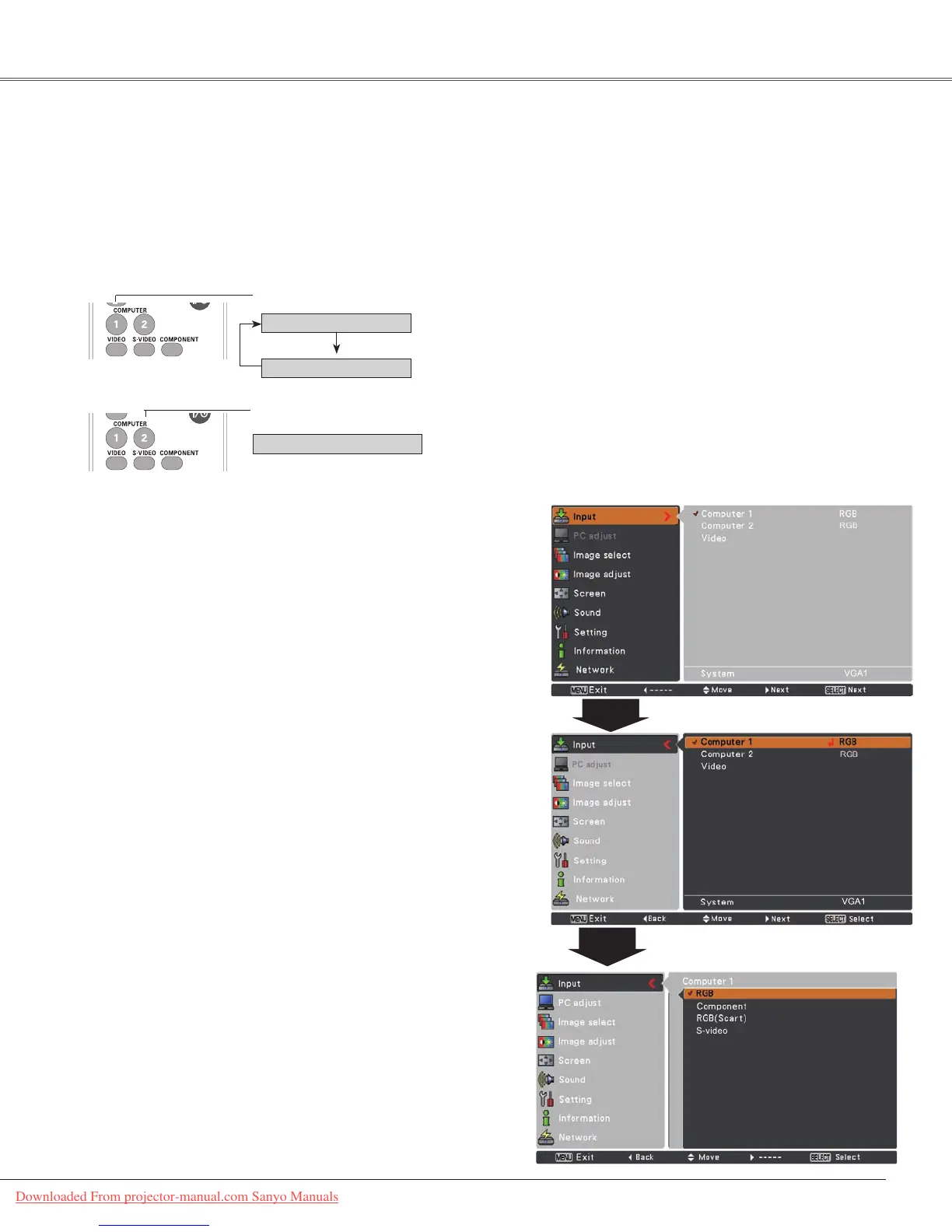
ChooseeitherComputer 1(RGB) orComputer 2(RGB)bypressingtheCOMPUTER1orComputer2button
ontheremotecontrol.
Before using these buttons, correct input source should be selected through Menu operation as described
below.
1
Input Menu
2
3
Computer Input
COMPUTER 1 button
Note:
WhentheInputSearchfunctionissettoOn1orOn2in
theAutosetupfunction,theinputsignalwillbesearched
automatically(p.44).
Computer
1
Remote Control
Direct Operation
Menu Operation
PresstheMENUbuttontodisplaytheOn-Screen
Menu.UsethePoint▲▼buttonstoselectInputand
thenpressthePoint►ortheSELECTbutton.
UsethePoint▲▼buttonstoselectComputer 1.
WhenComputer 1isselected,
pressthePoint
►
button
toaccessthesubmenuitems
.UsethePoint▲
▼
buttonstoselecttheRGBinputsourceandthen
presstheSELECTbutton.
Computer 1(RGB)
Computer 1(Scart)
Input Source Selection (RGB: Computer 1/Computer 2)
Computer 2 (RGB)
COMPUTER 2 button
Downloaded From projector-manual.com Sanyo Manuals



 To Next Page