50
7. Repeat the setup for other subscriptions you wish to configure, and then send your setup
to the device and save to the device database. Notice that dataset member names are
not stored in the device and will not be displayed when reading the setup from the
device unless you saved the setup in the device database on your PC.
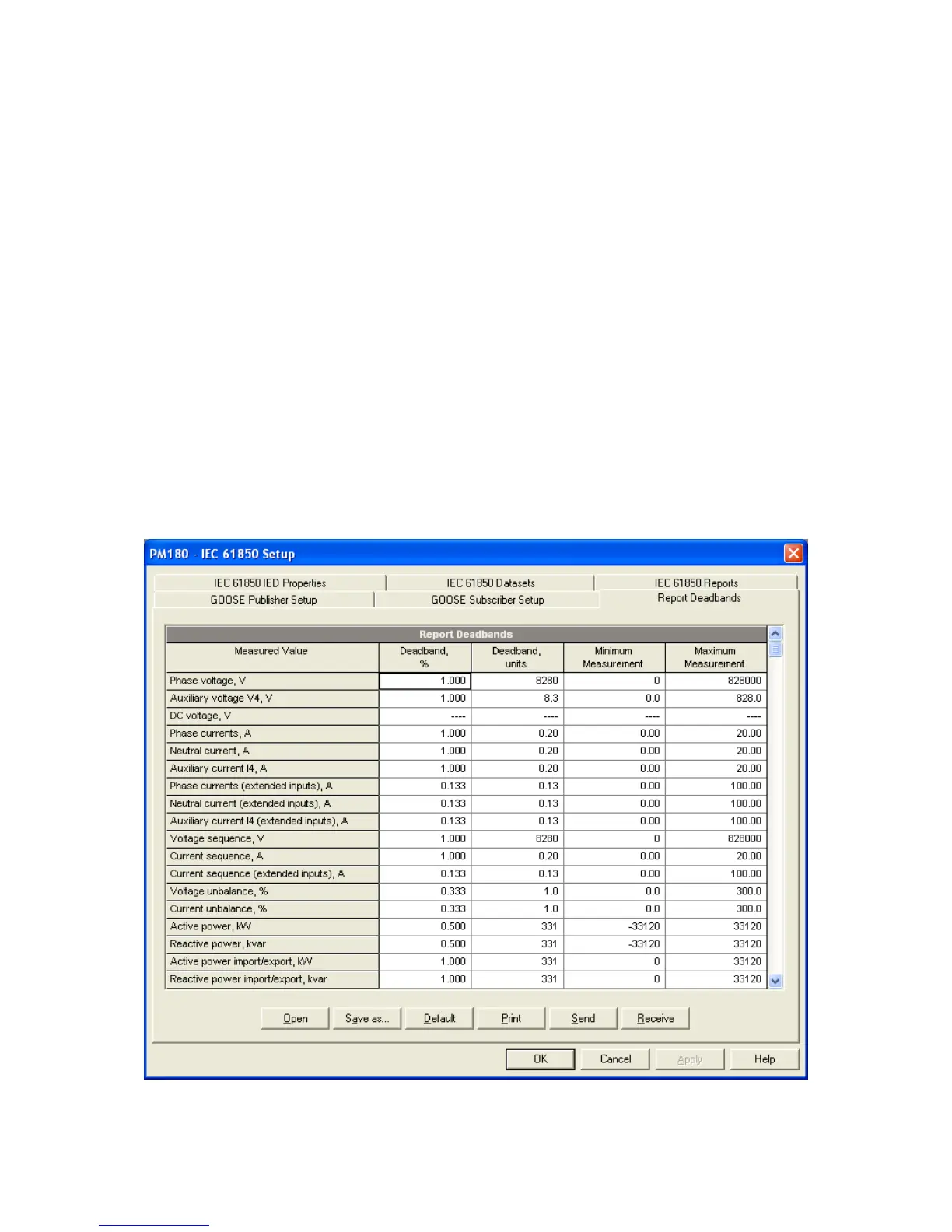
6.7 Configuring Report Deadbands
Deadbands for reporting measured analog values can be configured at once via PAS without
the need to setup individual deadbands for every data element. If required, you can then
change deadbands for individual variables via your IEC 61850 application.
Downloading new report deadbands to the device changes deadbands for all analog data of
the same type in all logical nodes, so it is recommended to do that before you make your
individual deadband adjustments.
NOTE
The process measurement scales for most analog values depend on your external PT and
CT settings and on the voltage and current scales defined in the device. Configure them in
your device and save to the device site database before changing report deadbands. See
Basic Setup and Device Options Setup in the PM180 Operation Manual on how to
configure these parameters in the device. See Programming Analog Inputs in the PM180
Operation Manual on how to setup the measurement scales for analog inputs.
To configure the deadbands for measured analog values:
1. Select IEC 61850 Setup from the Meter Setup menu, and then click on the Report
Deadbands tab.



 To Next Page