16 User Manual SATEL
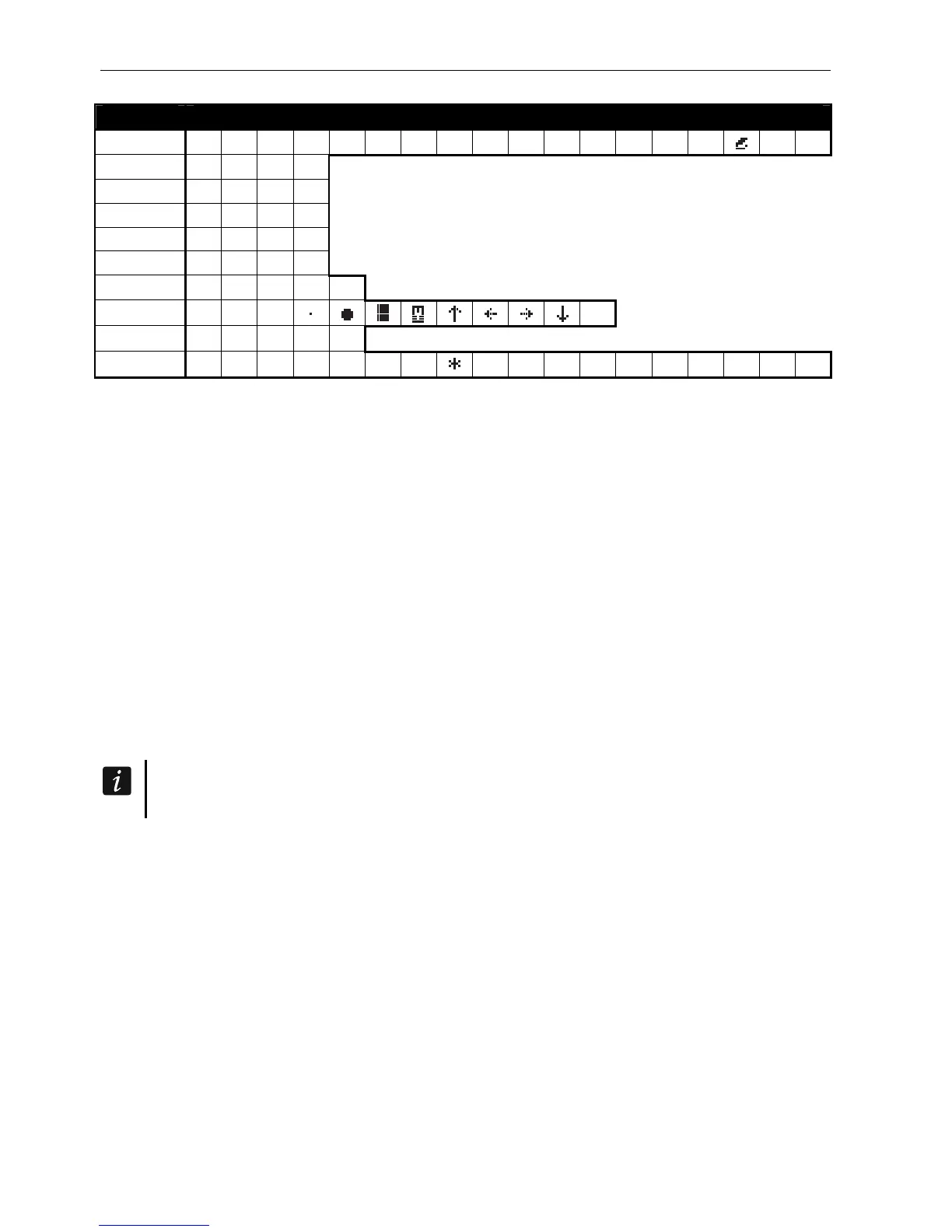
Key Characters available after next keystroke
1 ! ? ' ` " { } $ % & @ \ ^ |
# 1
2 a b c 2
3 d e f 3
4 g h i 4
5 j k l 5
6 m n o 6
7 p q r s 7
8 t u v
8
9 w x y z 9
0 . , : ; + -
/ = _ < > ( ) [ ] 0
Table 3. Characters available when entering names. The upper case letters are available
under the same keys (to change the letter case, press key.
5.3.5 Description of user functions
View cleared alarms – available, if the user did not view the violated zones after alarm
clearing. It allows to check which zones triggered the alarm. After completion of the
viewing, the function is no longer available.
System reset – available to the installer, if the option REQUIRED SYSTEM RESET AFTER VERIFIED
ALARM
is enabled, and a verified alarm took place. After occurrence of the verified alarm, it
is necessary to reset the system by means of this function, in order to make re-arming
possible.
Disarm – allows to disarm the partitions accessible to the user from the given keypad.
Clear alarm – allows to silence the alarm.
Clear other alarms – allows to silence the alarms from other objects, to which the user has
normally no access.
Abort voice messaging – terminates the telephone messaging.
The messaging can be cancelled automatically together with alarm clearing. The
messaging cancellation rules are defined by the installer.
Arm – allows to arm the partitions accessible to the user from the given keypad.
Arm (2 codes) – allows to initiate arming of the partitions which require entering 2 codes.
Disarm (2codes) – allows to initiate disarming of the partitions which require entering 2
codes.
Defer auto-arming – available when auto-arming delay countdown is running. It allows to
postpone by a programmed time period the auto-arming of the partition in which the auto-
arming delay countdown is running. Entering just zeros will block the auto-arming function
(until the next auto-arming time).
Set auto-arming delay – available when the auto-arming delay is programmed for at least
one partition and the auto-arming delay countdown is not currently running in that partition.
It allows to postpone by a programmed time period the auto-arming of the partition.
Arming mode – allows to select the arming mode which is to be used (the shortcut key is
shown in square brackets):
[0] full arming (to be used after everybody has left the protected area),












 To Next Page