SECTION 4
:
FREE MODE
Page 4-26 SATO HT200e
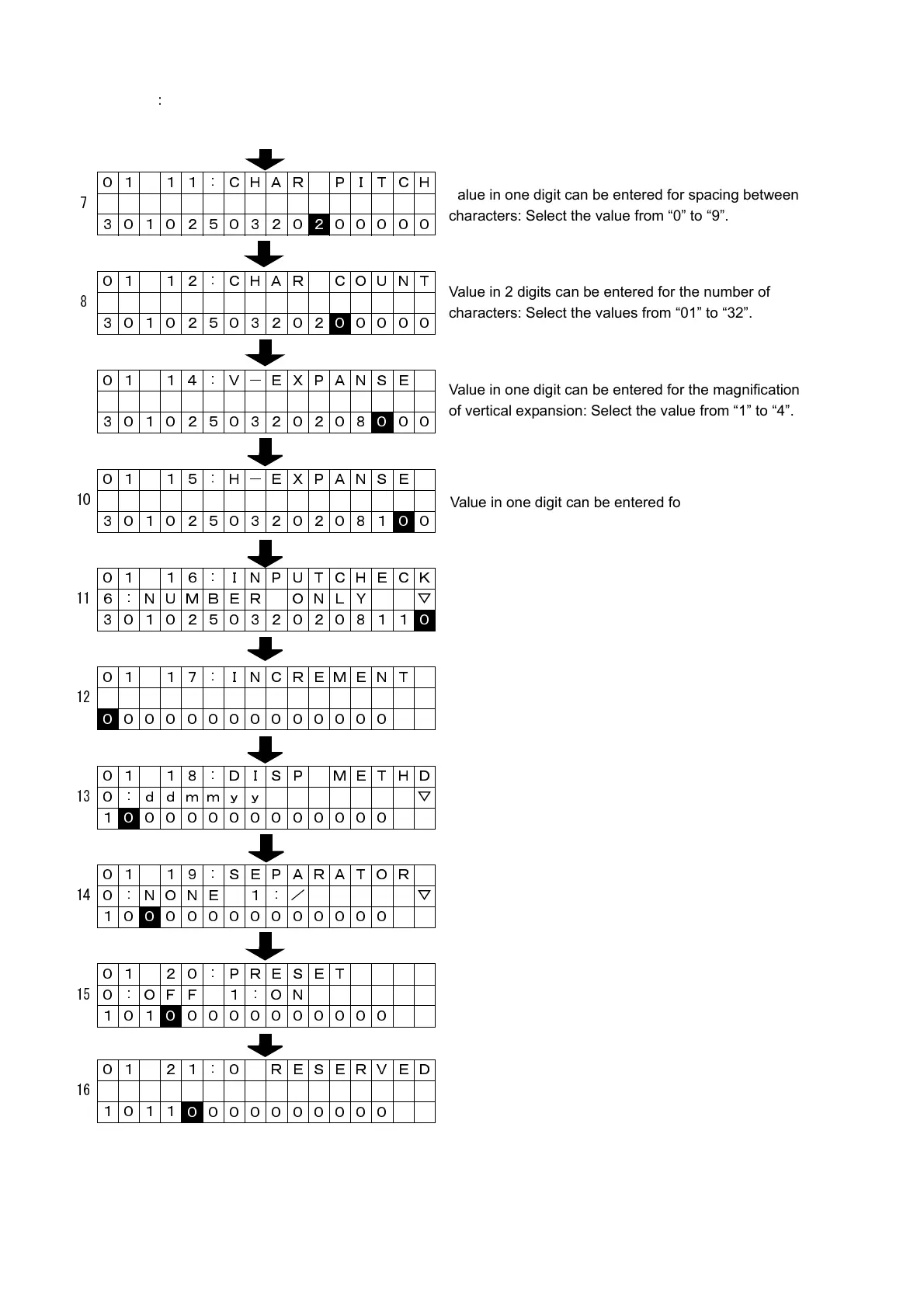
01 11 : CHAR PITCH
7
3010250320
2 00000
01 12 : CHAR COUNT
8
30102503202
0 0000
01 14 : V-EXPANSE
3010250320208
0 00
01 15 : H-EXPANSE
10
30102503202081
0 0
01 16 : INPUTCHECK
11 6 : NUMBER ONLY ▽
301025032020811
0
01 17 : INCREMENT
12
0 0000000000000
01 18 : DISP METHD
13 0 : ddmmyy ▽
1
0 000000000000
01 19 : SEPARATOR
14 0 : NONE 1 : / ▽
10
0 00000000000
01 20 : PRESET
15 0 : OFF 1 : ON
101
0 0000000000
01 21 : 0 RESERVED
16
10110 000000000
Value in one digit can be entered for spacing between
characters: Select the value from “0” to “9”.
Value in 2 digits can be entered for the number of
characters: Select the values from “01” to “32”.
Value in one digit can be entered for the magnification
of vertical expansion: Select the value from “1” to “4”.
Value in one digit can be entered for the magnification
of horizontal expansion: Select the value from “1” to “4”.
Value in one digit can be entered for the input check:
Select “6” or “7”.
Value in one digit can be entered for the addition:
Select “0” or “1”.
Valid in one digit can be entered for the presentation
method: Follow the spec. for setting.
Value in one digit can be entered for the separator:
Select the value from “1” to “4”.
Value in one digit can be entered for preset:
Select “0” or “1”.
“0” is fixed.



 To Next Page