5.4 Setting up the machine (height and width settings) 23
5.4 Setting up the machine (height and width settings)
Switch on the machine.
The system fully-automatically adjusts in weight and height to the frame formwork to be
cleaned.
Setting the pressure pre-tension of the width setting (see page 25)
The height setting does not need to be adjusted, since fine setting of the cover cleaning
is performed from the outside. See below section cover cleaning.
Adjustment of all brushes is possible in operation.
Side cleaning
Moving and regulating of the side brushes is possible via the corresponding buttons at
the control cabinet.
Side brushes can be switched ON or OFF in pairs via the operating panel for automatic
mode (see Figure 5.13).
Cover cleaning
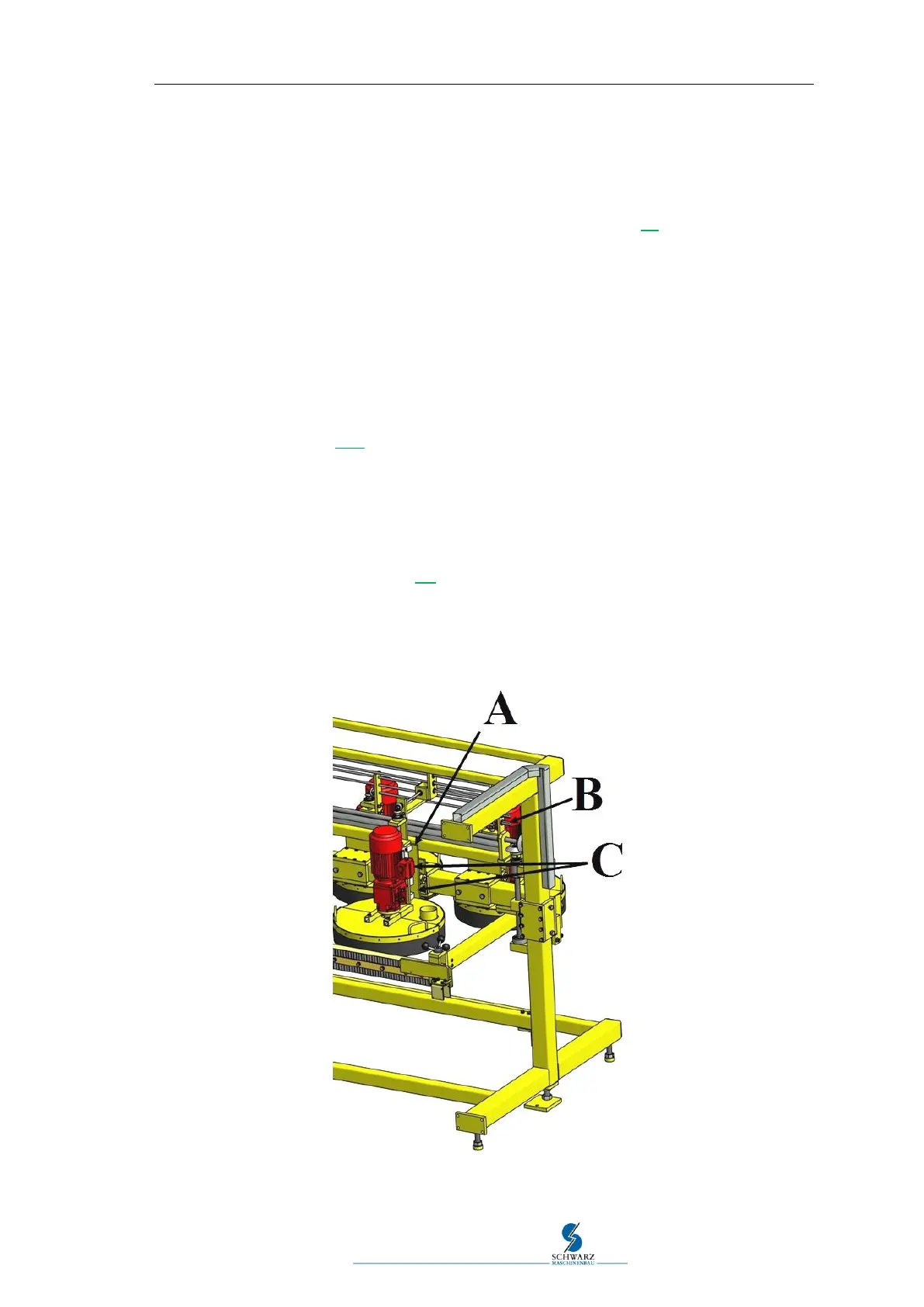
If required or if the disc brushes are worn, the respective disc brush may be adjusted
individually in height via the carriage "A" from the outside using the nut wrench (acces-
sories SW19) "B" (see Figure 5.3 Setting cover cleaning).
The disc brushes should have an incline of 3 to no more than 5 degrees. “C”. Thus, the
front edge of the brushes is higher than the rear edge and the formwork elements can
be transported more easily under the disc brushes.
Figure 5.3 Setting cover cleaning



 To Next Page