Configuring the conference system via the central unit
52 | ADN Digital Conference System
The “Microphone Limit” menu item allows you to set the max. number of speakers
who can take the floor simultaneously for all conference modes. Please note that
any connected ADN C1 chairperson unit is counted against the microphone limit
(the number of chairperson units is limited to 10 max.). If you set a higher value
(adjustment range “1” ... “10”) than the one determined by the number of con-
nected chairperson units, the system will reduce the microphone limit to the
maximum possible value (see examples in the table).
For information on how this setting affects your conference, refer to the section
“Adjusting the conference mode – “Conference Mode”” on page 50.
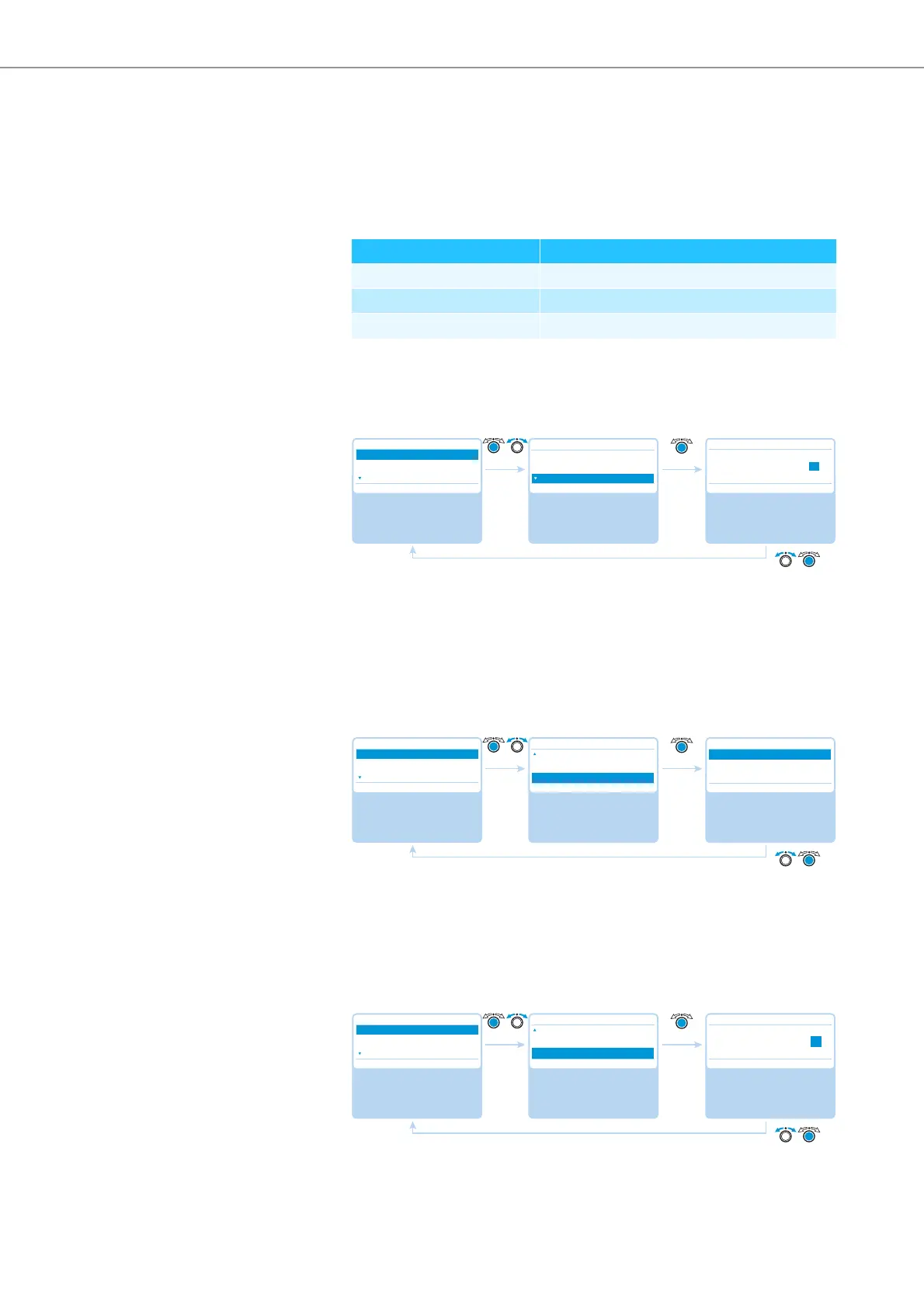
Setting the maximum number of requests to speak – “Request Limit”
Adjustment range: “0” ... “10”
The setting adjusted in the “Request Limit” menu item becomes effective only if
you are using a chairperson unit (“Request” mode) or if you have selected “Direct
Access” mode.
For information on how this setting affects your conference, refer to the section
“Adjusting the conference mode – “Conference Mode”” on page 50.
Activating/deactivating the speaking time limit – “Talk Time Status”
Possible settings: “On” and “Off”
This menu item allows you to activate/deactivate the speaking time limit. The
duration of the speaking time limit, the advance warning time, and the behavior
after expiration of the speaking time limit can be set in the following 3 menu items
(“Talk Time Limit”, “Premonition Time Limit” and “Reaction on Talktime Exceed”).
Setting the speaking time limit– “Talk Time Limit”
Adjustment range: “01” ... “60”, adjustable in steps of 1 minute
Chairperson units Possible “Microphone Limit” values
0 “1” – “10”
4 “1” – “6”
10 “0”
Select and call up the
“Conference” submenu
Select and call up the
“Request Limit” menu
item
Select the desired
setting; store the
setting
Main Menu
Conference
Audio
System
Conference
Conference Mode
Microphone Limit
Request Limit
Request Limit
Conf. Mode
Requests 05
No. Request
05 05
Select and call up the
“Conference” submenu
Select and call up the
“Talk Time Status”
menu item
Select the desired
setting; store the
setting
Main Menu
Conference
Audio
System
Conference
Microphone Limit
Request Limit
Talk Time Status
Talk Time Status
On
Off
On On
Select and call up the
“Conference” submenu
Select and call up the
“Talk Time Limit” menu
item
Select the desired
setting; store the
setting
Main Menu
Conference
Audio
System
Conference
Request Limit
Talk Time Status
Talk Time Limit
Talk Time Limit
Conf. Mode
Minutes 05
05 Min 05 Min



 To Next Page