Upgrading the software license
91
Upgrading the software license
To upgrade the software license:
왘 Make sure that the dongle is inserted into the correct port of your PC.
왘 Click and select and one after the other. Then
click .
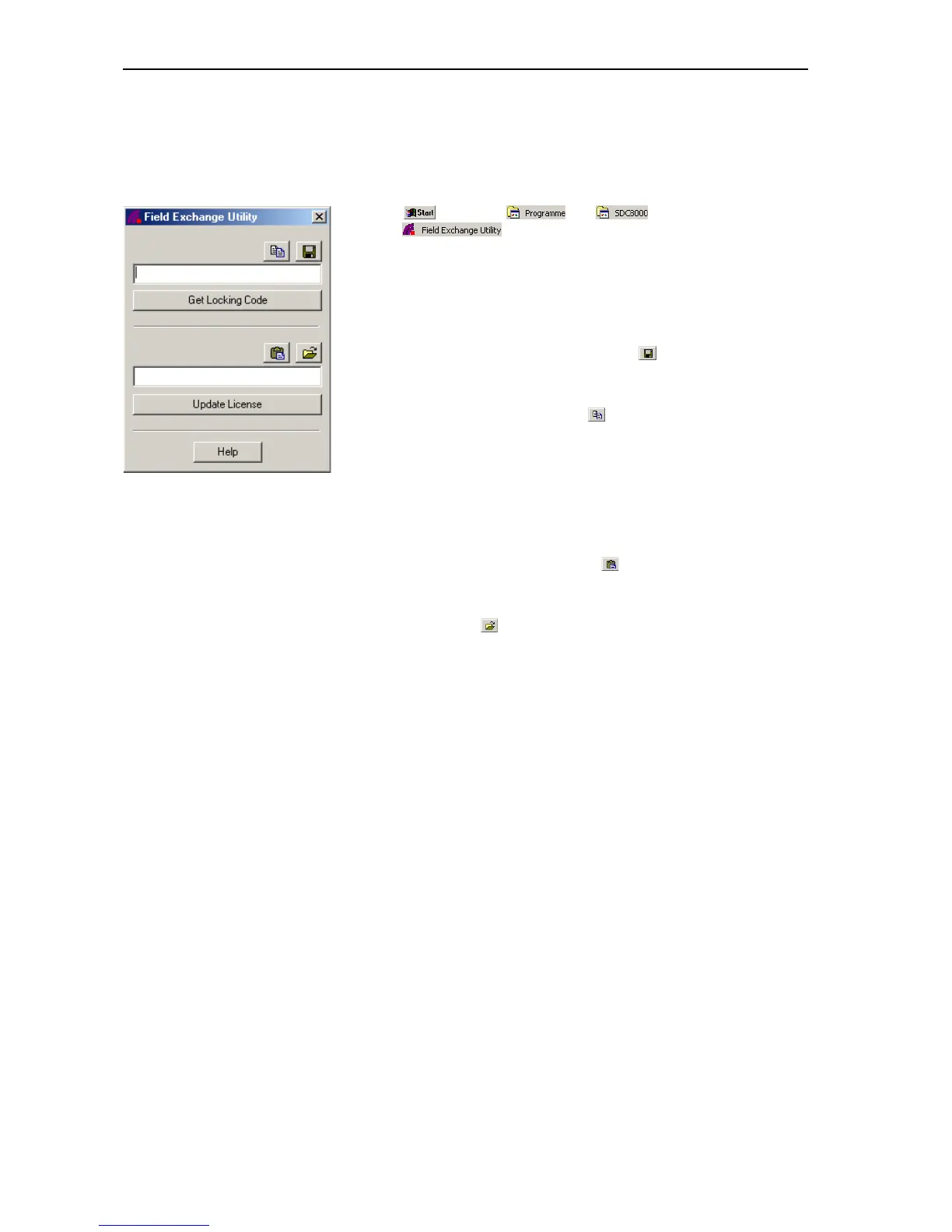
The “Field exchange utility” window opens.
왘 Click the “Get Locking Code” button.
The code is displayed in the box above the button.
To save this code in a file:
왘 Click the “Save locking code to a file” icon ( ).
To copy the code to the clipboard:
왘 Click the “Copy to Clipboard” icon ( ).
왘 Send this code (by email or by fax) to your Sennheiser distributor.
Within five days, you will receive the new license in the form of a license
code.
왘 Enter this license code in the box above the “Update License” button.
To avoid typing errors:
왘 Use the “Paste from Clipboard” icon ( ) to paste the code received by
email and copied to the clipboard in the box.
왘 If the new license code is saved in a file, click the “Load license code
from a file” icon ( ).
To enable the license:
왘 Make sure that the dongle is inserted into the correct port of your PC.
왘 Click the “Update License” button.
왘 Close the “Field exchange utility” window and start the software.
Note:
For further information, click the “Help” button.



 To Next Page