Intervening in the interpretation system
89
Monitoring the status of all interpreter consoles
To monitor the status of all interpreter consoles:
왘 Choose “Run” from the menu bar.
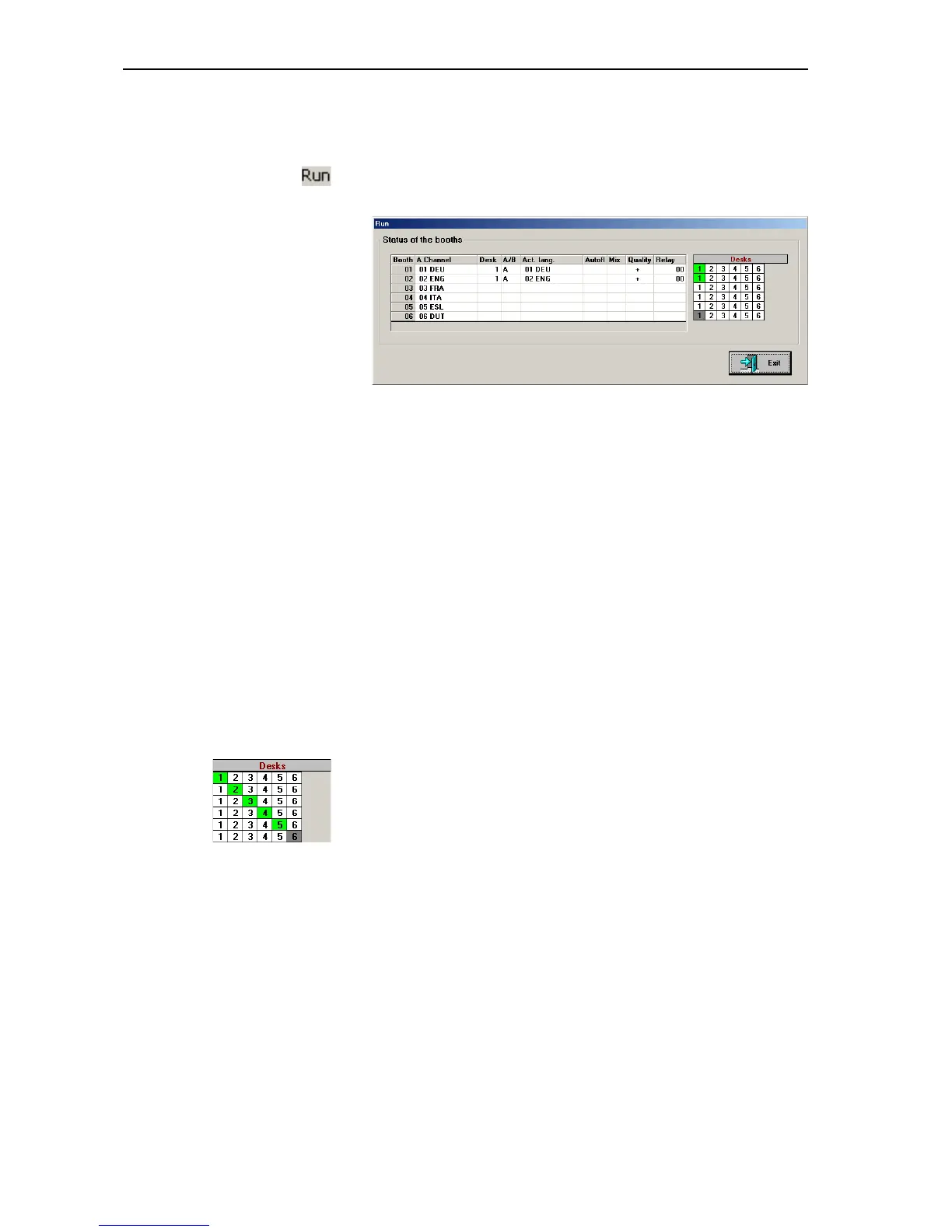
The “Run” window opens.
The channel table displays for each channel:
y in the “A Channel” column: the main target language
y in the “Desk” column: the currently active console in this booth
y in the “A/B” column: the channel (A or B) used by the interpreter
y in the “Act. lang.” column: the current target language
y in the “Autofloor” column: whether the “Auto-floor” function is enabled
y in the “Mix” column: whether the “Mixed” mode is active
y in the “Quality” column: the quality of the interpretation
“+” is displayed if the interpreter works directly from the source
language into the target language
“-” is displayed if the interpreter works from a colleague's interpretation
(e.g. “Auto-floor”)
y in the “Relay” column: whether one of the RELAY keys is pressed on the
corresponding console
The “Desk” overview displays:
y in green:
the active interpreter consoles in the corresponding booth
y in gray:
interpreter consoles which are not detected by the system or which are
not initialized correctly



 To Next Page