Doc. 177/5250x
Rev A
6-12
Sub 10 Data 5. Graph thickness. 16
Sub 11 Data 6. Maximum value displayed U32
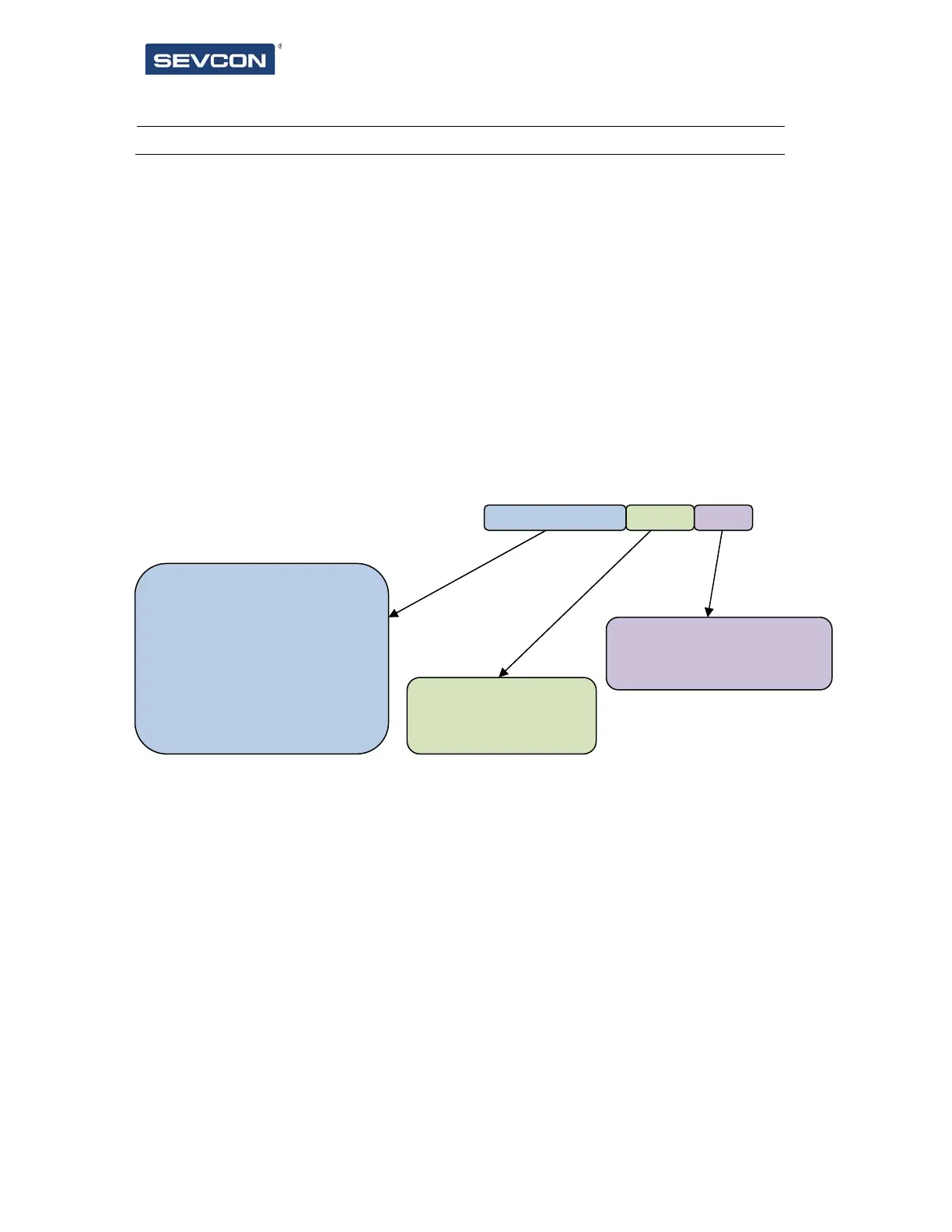
Sub 5 – Style flags
The style flags are contained within an U16 item. The flags help to define the operation of
the item. The following attributes can be configured:
Direction of the graph fill.
Whether the graph will display negative numbers, or absolute values.
How the value of the data object is shown on the graph. Standard filled bar graph,
or position marker.
Represented as binary, msb at the left, the object is constructed as shown below. ‘u’ indicates
that the bit is unused.
Sub 6 & 7 – (x,y) Size
These items define the x and y size of the outer ellipse shape used to create the arc.
Sub 8 & 9 – Start and End Angles
These items define the start and end points of the graph, in degrees. These will define the
arc shape that will be shown on screen, and the range over which the graph will be filled.
Sub 10 – Graph thickness
This defines the thickness of the graph, i.e. the space between the outer and inner ellipse
shapes. This is in pixels.
0000 = filled graph
0001 = 1 pixel wide marker
001x = 3 pixel wide marker
010x = 5 pixel wide marker
011x = 7 pixel wide marker
100x = 9 pixel wide marker
00 = signed value graph
01 = absolute value graph
00 = clockwise fill
01 = anticlockwise fill
u u u u u u u u m m m m d d a a



 To Next Page