③ Cancel Button
Cancels the link procedure.
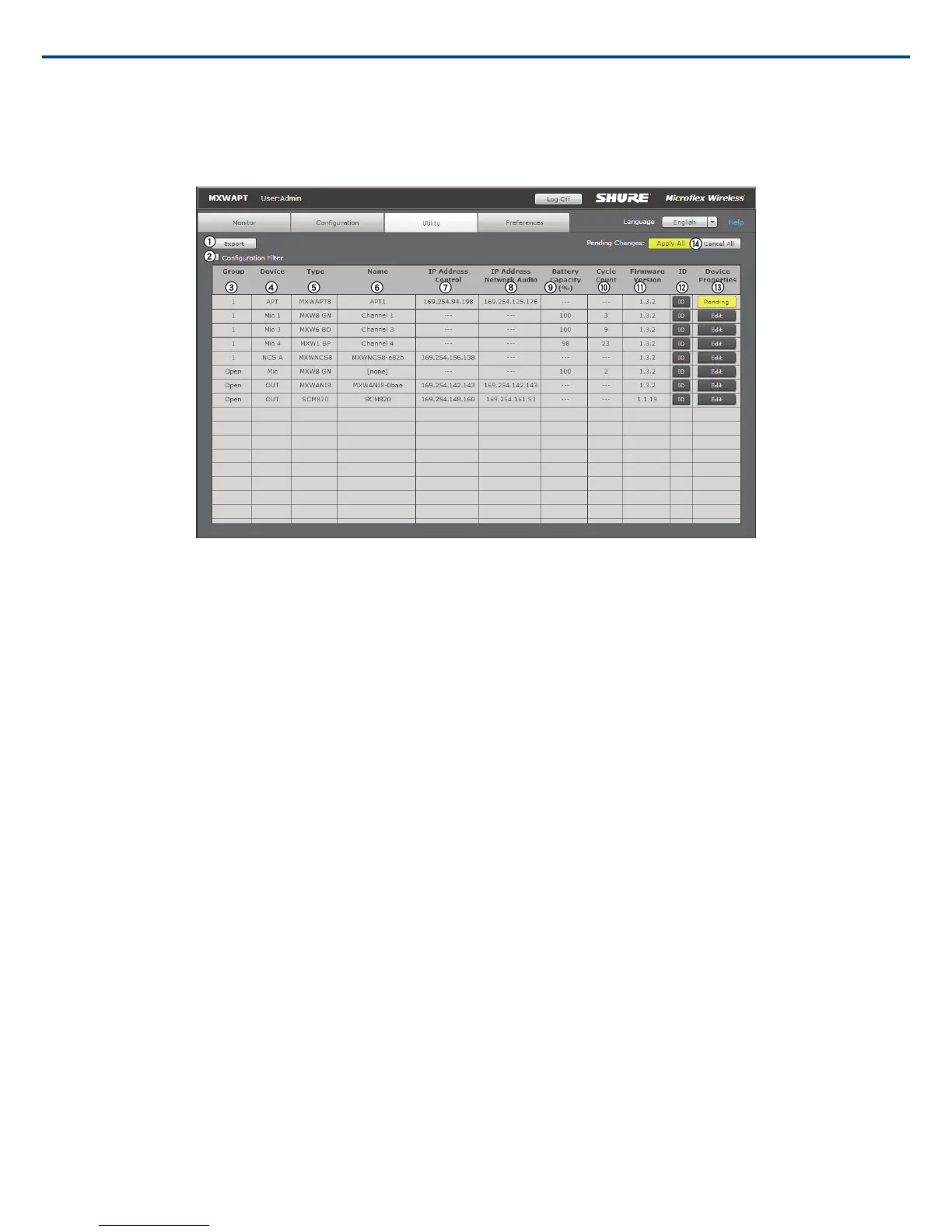
Utility Tab
① Export Button
Exports MXW device data to a text file (.csv).
② Configuration Filter
When checked, the table displays data for only the devices that belong to the Configuration or are open for association. Un-check the filter to view all MXW devices
on the subnet.
Note: The filter is checked when the configuration is locked from the Configuration tab.
③ Group
Indicates the device's status in a Group:
• 1 - 10: Device is associated to that Group in the Configuration
• Open: Device is not associated to any group
• None: Microphone is linked to an Access Point that has been removed from a group (deselected from the Group row in the Configuration tab)
• Standalone: Audio Network Interface is set to Standalone mode, which restricts association to an APT group
• Unknown: Microphone is linked to an APT that is powered off or connected to a different network
• Other: Device is associated to a Group in a different Configuration
④ Device
The device type or microphone channel.
• APT: Access point transceiver; also displays the selected channel density mode (SD = standard, HD = high)
• NCS: Network charging station, up to two per group (A or B)
• Mic 1 - 8: Microphone for channels 1-8, up to two microphones per channel (primary or secondary)
• Out: Device is not associated or linked to a group
⑤ Type
The device model number.
⑥ Name
Displays device name as defined in the Configuration tab or channel name as defined in the Monitor tab.
⑦ IP Address Control
Displays the IP Address of the control network interface (Shure control data).
⑧ IP Address Network Audio
Displays the IP Address of the Network Audio network interface (Dante digital audio data).
⑨ Battery Capacity
The microphone battery's percentage of charge capacity as compared to a new battery.
Shure IncorporatedMXW
2017/05/1750/72














 To Next Page