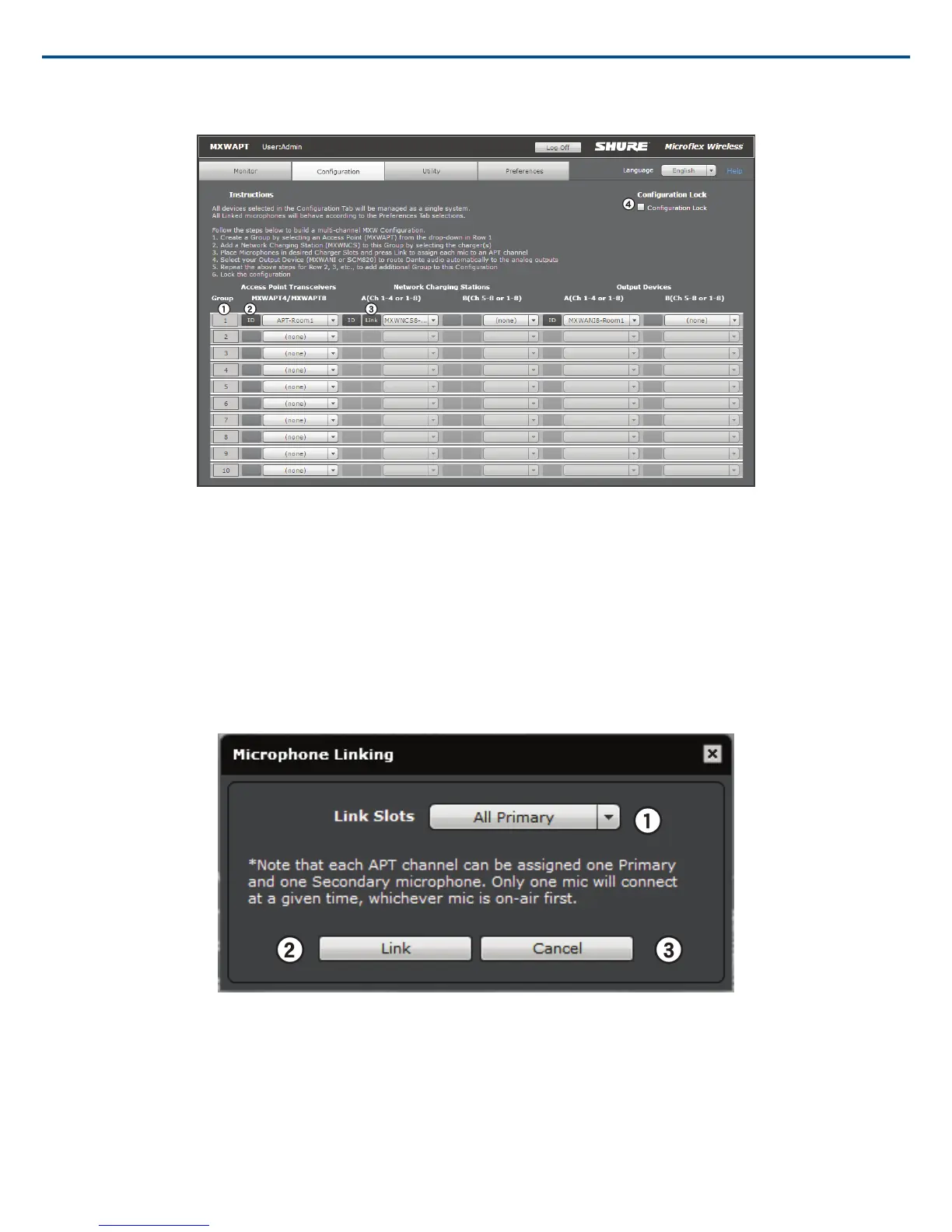
Configuration Tab
① Group Row
Each row represents a Group in the Configuration. Select an APT and associate chargers and audio output devices to form each Group.
② ID Button
Commands the selected device's LEDs to flash for easy identification.
③ Link Button
Links all microphones in the charger to channels in the associated Group.
④ Configuration Lock
Increases the number of MXW components that can operate on the same network. It is best practice to lock the configuration after setup to greatly reduce network
traffic from MXW equipment. When systems exceed 15 APTs on the same network, configuration locking is required for stable performance.
Note: When selected, Groups are not editable on the Configuration page and the Utility page only displays information for devices belonging to this Configuration.
Link Microphones
Link all microphones in the charger to the access point audio channels.
Up to two microphones can link to each audio channel, though only one is on air at-a-time. Use the secondary link slot to add a microphone for battery redun-
dancy or flexibility during events.
① Link Slot Selection
Up to two microphones link to each audio channel using the primary and secondary link slots. The secondary link slot is useful for an additional or alternate mi-
crophone that can be prepared before the event.
② Link Button
Links microphones in the charger to audio channels.
Shure IncorporatedMXW
49/722017/05/17














 To Next Page