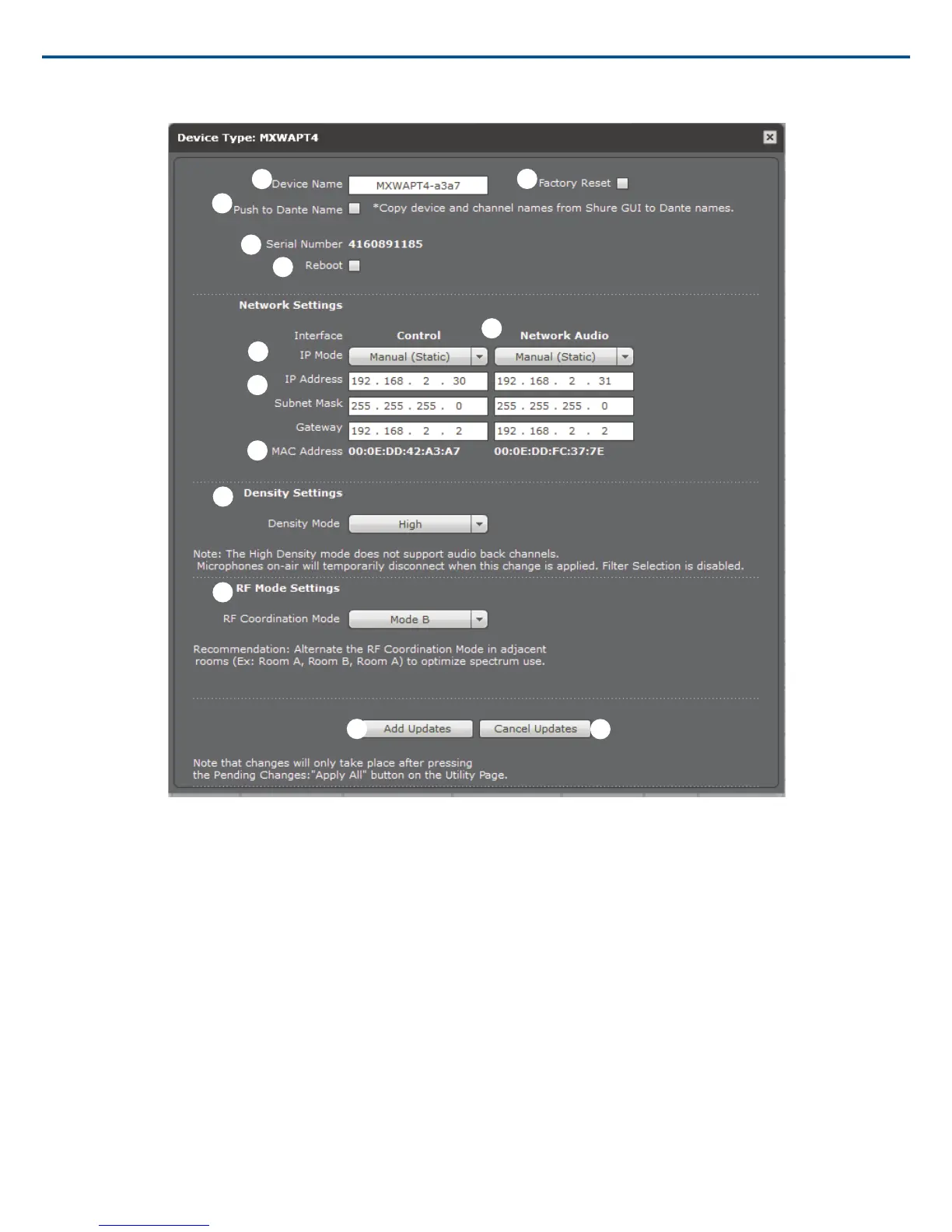
APT4 Properties Window
① Device Name
Device names can be customized with up to 31 characters.
② Push to Dante Name
Uses the device and channel name from the MXW web interface to overwrite the names in the Dante Controller (DC) software by Audinate.
Note: Use with caution, as this could break the routing configuration previously made in DC, causing audio interruptions.
③ Serial Number
The unique identifier used to register the device at the Shure website, guarantee the warranty, and troubleshooting with customer support.
④ Reboot
The unit performs a power cycle.
⑤ Factory Reset
Resets the device to default settings, clearing any MXW Group and Link associations. The password to access the control software will reset to admin.
⑥ Network Interface(s)
View and adjust IP settings for the device's network interface(s). Network settings are different for each device. See the Networking section for configuring each
MXW device.
• Control: Shure control (software interface operation, firmware updates, Shure Device Discovery application).
• Network Audio: Dante network audio (digital audio networking and Dante software).
Shure IncorporatedMXW
2017/05/1752/72














 To Next Page