Detailed descriptions
16.4 BIOS Setup
SIMATIC Box PC 627
16-36 Operating Instructions, Release 05/2006, A5E00362052-03
"Hardware Options" field
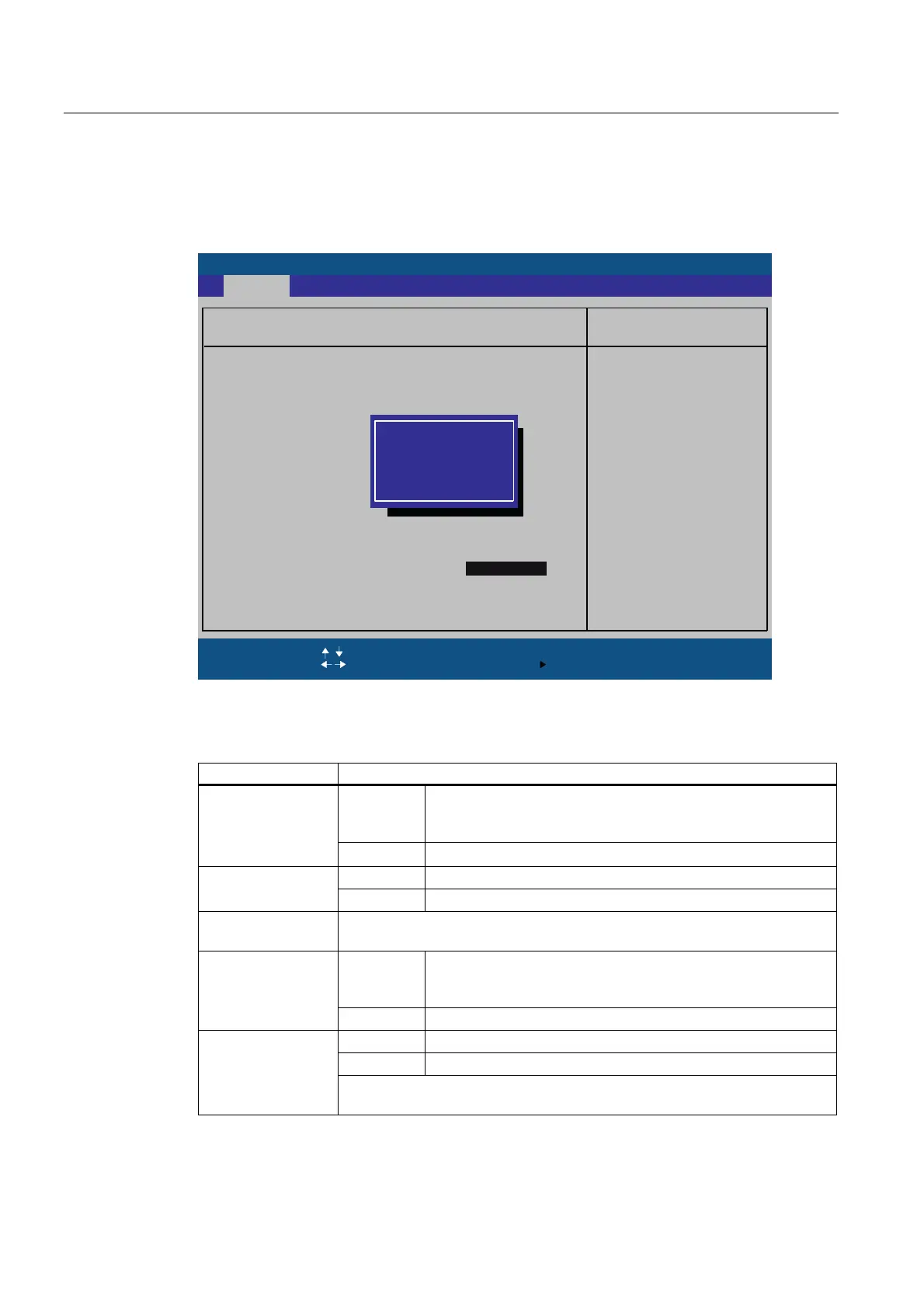
The following submenu, for example, appears when you select “Hardware Options” in the
main menu:
3KRHQL[%,266HWXS8WLOLW\
,WHP6SHFLILF+HOS
(6& ([LW
6HOHFW,WHP
6HOHFW0HQX
6HOHFW
&KDQJH9DOXHV
6XE0HQX
)
)
6HWXS'HIDXOWV
6DYHDQG([LW
(QWHU
+HOS
)
0DLQ
+DUGZDUH2SWLRQV
3&,03,'3
2QERDUG(WKHUQHW
>(QDEOHG@
2QERDUG(WKHUQHW$GGUHVV
2QERDUG(WKHUQHW
6DIH&DUGIXQFWLRQV
>(QDEOHG@
)DQ&RQWURO
2QERDUG(WKHUQHW$GGUHVV
>(QDEOHG@
2QERDUG(WKHUQHW5HPRWH%RRW
&57/&'VHOHFWLRQ
>(QDEOHG@
>&57'9,RQO\@,IVH
OHFWHGEXWQRWFRQQHF
WHG/&'ZLOOEHDFWLYH
>/&'RQO\@,QWHUQDO/&'
ZLOOEHHQDEOHGLI
FRQQHFWHG
>6LPXOWDQ$XWR@
,ID&57DQGDQLQWHUQDO
/&'DUHFRQQHFWHGWKH\
ZLOOEHHQDEOHGERWK
>6LPXOWDQ$XWR@
&57'9,RQO\
/&'RQO\
6LPXOWDQ$XWR
2QERDUG(WKHUQHW5HP
Figure 16-9 "Hardware Options" submenu (example)
The parameters of the interfaces present on the motherboard are set here.
Entry Meaning
[Enabled] Enables the CP5611-compatible MPI/DP interface. The
resources are managed by the BIOS PCI Plug and Play
mechanism.
PCI-MPI/DP
1)
[Disabled] The CP5611 compatible MPI/DP interface is disabled.
[Enabled] The Ethernet port on the motherboard is enabled. On-board Ethernet
[Disabled] The Ethernet port on the motherboard is disabled.
On-board Ethernet
Address
Shows the individual Ethernet address.
[Enabled] Booting via a connected LAN is possible. The respective boot
source is displayed as Intel® Boot-Agent in the boot sequence
menu.
On-board Ethernet
Remote Boot
1)
[Disabled] Booting via LAN is not possible.
[Enabled] On-board monitoring functions are enabled.
[Disabled] No monitoring functions.
SafeCard functions
The relevant driver and the application must be started for operation of the
monitoring functions.













 To Next Page