Installation and Startup
Rev 4 March 2019 27 41110030
High Side Pull-up / Dry Contact Switch Input
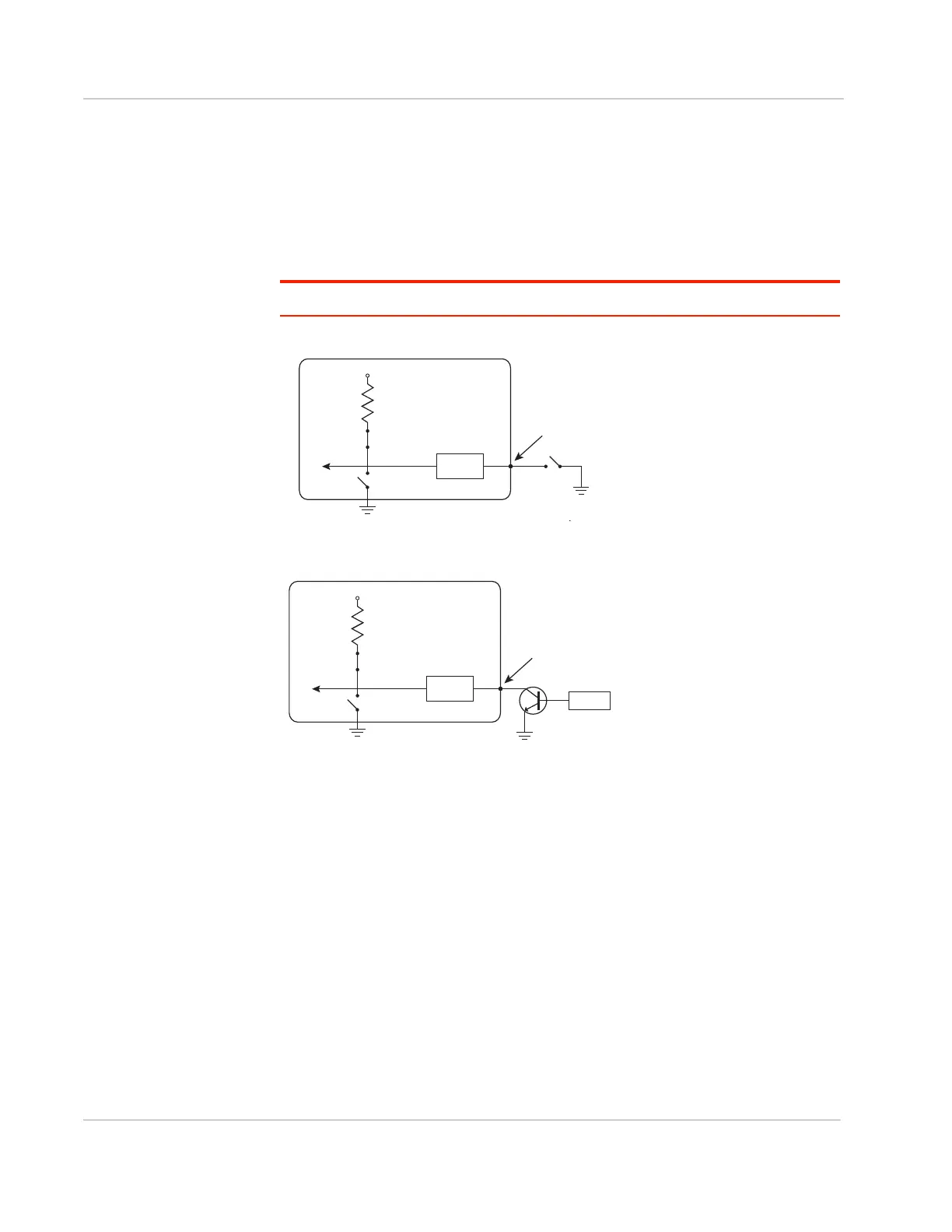
The three external I/O pins on the FX30 power connector have a high side pull-up
available. This high side pull-up can be driven low using a dry contact switch or
NPN/PNP transistor.
To use I/O 3 as a high side pull-up/switch input, GPIO56 (that drives I/O 3 when
used as a digital output) must be low.
Note: For this use case, the pull-up must be enabled.
Figure 2-20: High Side Pull-up / Dry Contact Switch Input
Figure 2-21: High Side Pull-up / Sensor and Transistor Input
Analog Input
Two analog inputs are available on the FX30. External I/O 2 on the power
connector maps to ADC1 on the WP module.
For more information, see
Table D-1, FX30 Hardware Feature to Linux Interface Mapping
on page 74
.
The IoT interface analog pin maps to ADC0 on the WP module. For more
information, see Table 3-19, IoT Connector Interface on page 54.
You can connect either of these pins to an analog gauge. As an analog input
(voltage sensing pin), the gateway monitors voltage changes in small increments.
This allows you to monitor equipment that reports status as an analog voltage.
The pin detects inputs of 0 V–10 V. When used with a sensor to transform values
into voltages, the pin can monitor measurements like temperatures, pressures or
the volume of liquid in a container.
Gateway
On
V
in
or 3.3 V*
Internal Pull-up
10 k Resistor
FX30
Internal pull-up
NſUHVLVWRU
On
I/O 1, I/O 2, I/O 3
RQWKHSRZHUFRQQHFWRU
3URWHFWLRQ
FLUFXLWU\
VLQRU V
2XWSXWRII
FX30
Internal pull-up
NſUHVLVWRU
On
I/O 1, I/O 2, I/O 3
RQWKHSRZHUFRQQHFWRU
6HQVRU
3URWHFWLRQ
FLUFXLWU\
VLQRU V
2XWSXWRII















 To Next Page