Simrad GC80/85 Compact MK2 Gyro Compass
988-12718-003 22
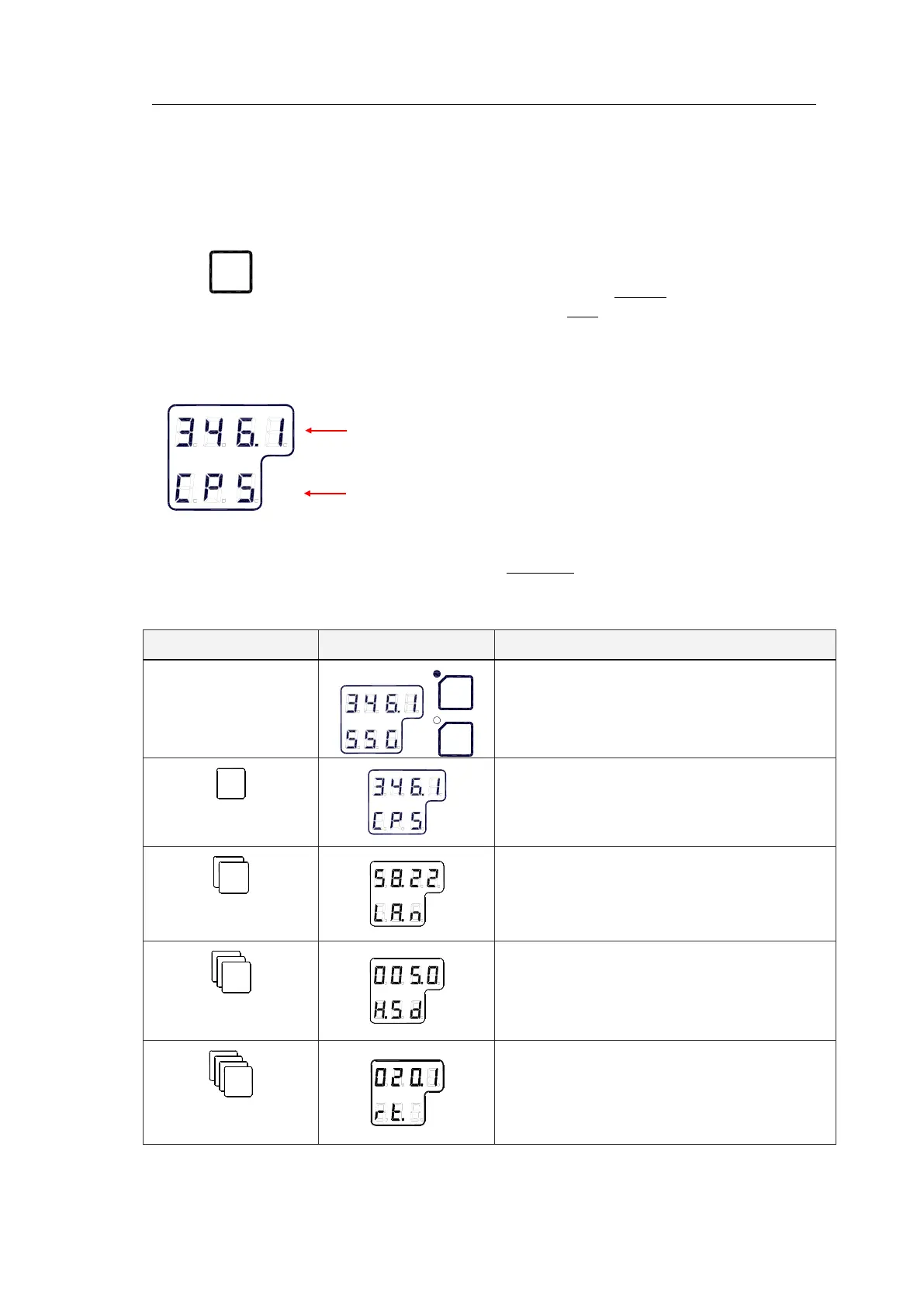
4.4 Displaying present settings
When pressing the DISP button on the GC80 Control unit, the system will
loop through a display sequence showing present settings for the system.
The sequence will depend on whether an external compass is connected or
not. When an external compass is connected, the readout will depend on
active compass.
The following sections;
Displaying settings with no external sensor
connected
and
Displaying settings with external sensor connected
,
show examples of how the present settings are presented by pressing the
DISP button.
The display will be used as follows:
- The first row in the display will show the value
- The second row displays code used for identification
Displaying settings with no external sensor
connected
Display state Display Description
Normal operation
- True output bearing
- Active compass
1
st
press on
- Gyro compass bearing without correction
- Active speed input source indication (GPS,
Manual, Log or Serial Log)
2
nd
press on
- Latitude
- Latitude indication: north (LA.n) or south
(LA.s)
3
rd
press on
- Vessel speed
- Speed input indication
(GPS, Manual, Log or Serial Log)
4
th
press on
- Rate of turn in °/min
- Rate of turn indication



 To Next Page